

REST API Explained with Real-World Examples
Introduction
In today’s modern web and mobile applications, REST APIs are the backbone that connects frontend interfaces to backend systems. From food delivery apps like Zomato, payment gateways like PhonePe, to train booking on IRCTC, REST APIs handle communication behind the scenes.
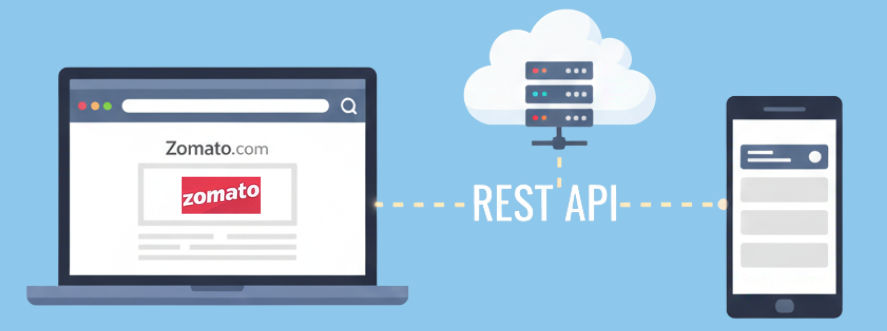
If you’re new to backend development or just starting with APIs, this guide will explain REST APIs in simple language, with real-world examples, analogies, and code snippets.
For visual learners, check out these related YouTube tutorials:
? REST API Introduction + Basics | Spring Boot
? Creating REST API using Spring Boot (Hindi)
? REST API in Real Projects (Spring Boot + Database)
What is a REST API?
REST API stands for Representational State Transfer Application Programming Interface.
In simple terms:
A REST API is a set of rules that allows one application (the client) to request data or perform actions on another application (the server) over the internet, usually exchanging data in JSON format.
Real-World Analogy: Restaurant Waiter ?️
Imagine you are at a restaurant:
- You (client) place an order from the menu.
- The waiter (REST API) takes your request to the kitchen.
- The kitchen (server) prepares the food.
- The waiter brings the food back to you.
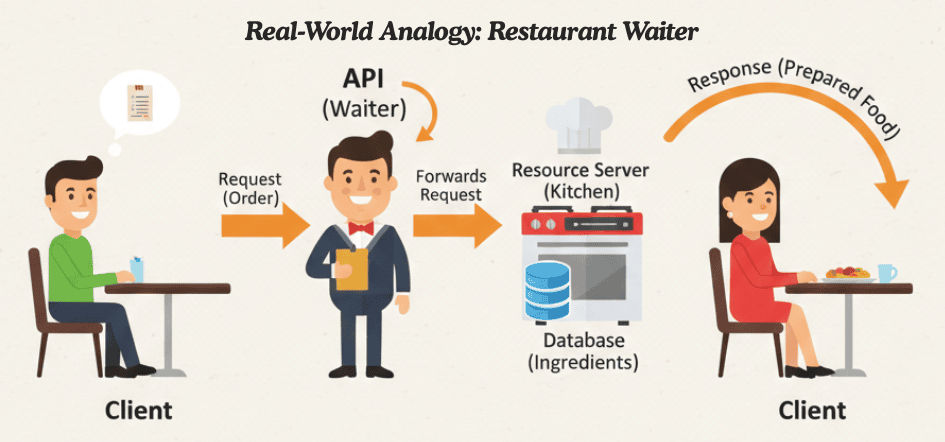
You never enter the kitchen directly — the waiter acts as the intermediary. Similarly, REST APIs let the frontend communicate with the backend without direct access to databases or server logic.
HTTP Methods in REST API (CRUD Operations)
REST APIs use standard HTTP methods to perform CRUD operations:
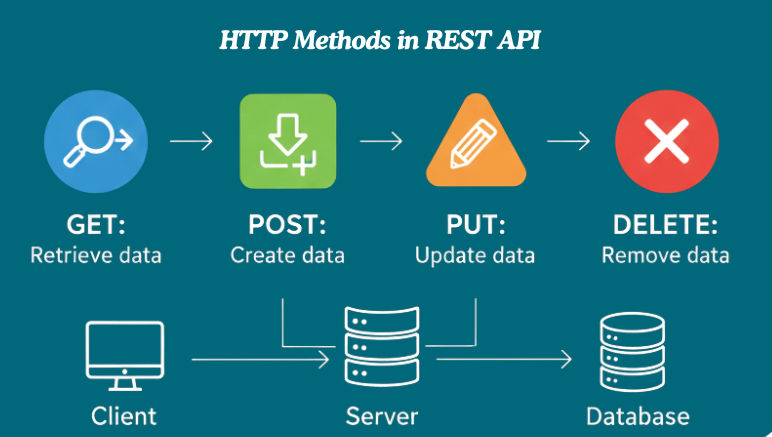
1️⃣ GET – Retrieve Data
The GET method fetches data from a server without changing it. It’s safe and idempotent, so multiple requests return the same result.
Analogy: Like looking up a book in a library — you get information without taking or altering it.
Example Request:
GET /api/users
Response (JSON):
[
  {
    "id": 1,
    "name": "Amit Sharma",
    "email": "[email protected]"
  },
  {
    "id": 2,
    "name": "Riya Singh",
    "email": "[email protected]"
  }
]
Real-World Example: Searching trains on IRCTC:
GET /api/trains?from=LKO&to=DEL
Key Points:
- Safe: doesn’t modify data
- Idempotent: same result on multiple calls
- Cacheable: can improve performance
- Supports URL parameters:
/api/users?city=Lucknow
2️⃣ POST – Create Data
The POST method is used to add new data to the server. It changes the server state by creating a new resource.
Analogy: Like placing a new order at a restaurant — you tell the kitchen what to prepare.
Example Request:
POST /api/users
Request Body (JSON):
{
"name":"Amit",
"email":"[email protected]"
}
Real-World Example: Placing a new order on Zomato:
POST /api/orders
Key Points:
- Creates new resources
- Changes server state
- Usually returns the created object with a 201 Created status
3️⃣ PUT – Update Data
The PUT method is used to update or replace an existing resource on the server. It sends the full updated data for the resource.
Analogy: Like editing your food order at a restaurant — you tell the kitchen to replace the old order with a new one.
Example Request:
PUT /api/users/5
Key Points:
- Updates an existing resource completely
- Changes server data
- Idempotent: multiple calls with the same data give the same result
4️⃣ DELETE – Remove Data
The DELETE method is used to remove a resource from the server.
Analogy: Like canceling an order at a restaurant — the kitchen removes it from the list.
Example Request:
DELETE /api/users/5
Key Points:
- Deletes a specific resource
- Changes server data
- Idempotent: deleting the same resource multiple times has the same effect
REST API Status Codes
Status codes show the result of a client’s request. They help both developers and clients understand if the request succeeded or failed.
| Code | Meaning | Example |
|---|---|---|
| 200 | OK – Request successful | GET data |
| 201 | Created – New resource added | POST new user |
| 400 | Bad Request – Invalid input | Malformed request |
| 401 | Unauthorized – Authentication required | Missing API key |
| 404 | Not Found – Resource doesn’t exist | Wrong endpoint or ID |
| 500 | Internal Server Error – Server problem | Server-side error |
Real Example: User Management System
A User Management System is a practical REST API example used in web and mobile apps. It allows you to create, read, update, and delete users (CRUD operations).
Fetch a Single User
Request:
GET /api/users/5
Response (JSON):
{
"id":5,
"name":"Amit Sharma",
"email":"[email protected]",
"city":"Lucknow"
}
Explanation:
Retrieves a user’s details. JSON is lightweight, easy to read, and widely supported.
Spring Boot Example (Simple Controller)
import org.springframework.beans.factory.annotation.Autowired;
import org.springframework.http.HttpStatus;
import org.springframework.http.ResponseEntity;
import org.springframework.web.bind.annotation.*;

@RestController
@RequestMapping("/api/users")
public class UserController {

    @Autowired
    private UserService userService;

    // Fetch a user by ID
    @GetMapping("/{id}")
    public ResponseEntity<User> getUser(@PathVariable Long id) {
        User user = userService.findById(id);
        if (user == null) {
            return ResponseEntity.notFound().build();
        }
        return ResponseEntity.ok(user);
    }

    // Create a new user
    @PostMapping
    public ResponseEntity<User> createUser(@RequestBody User user) {
        User savedUser = userService.save(user);
        return ResponseEntity.status(HttpStatus.CREATED).body(savedUser);
    }
}
Explanation:
@RestController→ Defines this class as a REST API controller.@RequestMapping("/api/users")→ Base URL for all user-related endpoints.@GetMapping("/{id}")→ Fetches a single user by ID. Returns 404 Not Found if the user doesn’t exist.@PostMapping→ Creates a new user and returns the saved user with 201 Created status.ResponseEntity→ Helps return both data and proper HTTP status codes.
Tools for Testing REST APIs
Testing REST APIs is crucial to ensure they work correctly. Here are some popular and beginner-friendly tools:
- Postman – A powerful tool to send requests, inspect responses, and test APIs easily.
- Swagger UI – Automatically generates interactive API documentation, allowing you to explore endpoints.
- cURL – Command-line tool for sending HTTP requests and testing APIs quickly.
- Browser Developer Tools – Built into browsers, these let you inspect network calls and see API requests/responses in real time.
REST API Best Practices
Following best practices ensures your APIs are clean, secure, and easy to maintain:
- Use nouns for endpoints – Keep URLs simple and meaningful, e.g.,
/users,/products. - Support versioning – Use version numbers in URLs like
/api/v1/usersto manage updates without breaking existing clients. - Return consistent JSON structure – Example:
{
"success":true,
"data":{ ...},
"message":"Operation successful"
}
- Use proper HTTP status codes – e.g.,
200 OK,201 Created,404 Not Found,500 Internal Server Error. - Secure your APIs – Implement JWT, OAuth, or API keys to protect endpoints.
- Keep URLs clean and readable – Avoid unnecessary parameters or long paths.
REST vs SOAP – Key Differences
REST and SOAP are two common ways to build APIs. Here’s a simple comparison:
| Feature | REST | SOAP |
|---|---|---|
| Full Form | Representational State Transfer | Simple Object Access Protocol |
| Data Format | JSON (main), XML (optional) | XML only |
| Speed | Fast & lightweight | Slower due to XML overhead |
| Complexity | Simple & flexible | Complex & strict standards |
| Scalability | Highly scalable | Limited scalability |
| Use Case | Modern web & mobile apps | Enterprise or legacy systems |
| Security | HTTPS, OAuth, JWT | WS-Security, built-in enterprise security |
| Caching | Supported | Not natively supported |
Where REST APIs Are Used
REST APIs are everywhere in modern software. Here are some common use cases:
- Web Applications – For dynamic websites that fetch and display data in real-time.
- Mobile Apps – To communicate with servers and sync data across devices.
- Microservices – To allow small, independent services to talk to each other efficiently.
- Cloud Systems – To interact with cloud storage, servers, and services via APIs.
- Payment Gateways – For secure transactions in apps like PayPal, PhonePe, or Stripe.
- Social Media Platforms – To fetch posts, comments, likes, and user data from platforms like Facebook, Instagram, or Twitter.
Advantages of REST API
REST APIs are widely used because they offer several benefits:
✔ Easy to Learn & Implement – Simple to understand for beginners and quick to develop.
✔ Platform Independent – Can be used across different operating systems, devices, and programming languages.
✔ Fast & Scalable – Lightweight and efficient, suitable for handling large-scale applications.
✔ Stateless Architecture – Each request is independent; no server-side session storage is required.
✔ Compatible with Modern Technologies – Works seamlessly with web, mobile, cloud, and microservices architectures.
Conclusion
REST APIs are the backbone of modern application development. They enable systems to communicate smoothly, securely, and efficiently, making them essential for web, mobile, and cloud-based applications.
By understanding HTTP methods, status codes, and JSON data, you can confidently create, consume, and test REST APIs in real projects.
For a more hands-on learning experience, check out these practical tutorials:
? Introduction to REST API Concepts | Spring Boot
? Create REST API using Spring Boot (Hindi)
? Store API data using Spring Boot Data JPA
Frequently Asked Questions (FAQ) – REST API
1. What is a REST API?
A REST API allows one application to communicate with another over the internet using standard HTTP methods like GET, POST, PUT, and DELETE, usually exchanging data in JSON format.
2. What are the main HTTP methods in REST APIs?
- GET – Retrieve data
- POST – Create data
- PUT – Update data
- DELETE – Remove data
3. What is the difference between REST and SOAP?
- REST: Lightweight, uses JSON, simple, ideal for modern apps
- SOAP: XML-based, strict standards, used in legacy/enterprise systems
4. How do I test REST APIs?
Use tools like Postman, Swagger UI, cURL, or Browser DevTools to send requests and view responses.
5. Where are REST APIs commonly used?
- Web applications
- Mobile apps
- Microservices
- Cloud systems
- Payment gateways and social media platforms