
Durgesh Tiwari
Author
A distributed cache stores frequently accessed data in memory so applications can read it quickly without querying the main database every time.
A Redis-like cache is a common example.
Suppose an online store frequently needs this product:
Product ID: 101
Name: Wireless Mouse
Price: ₹999
Instead of reading it from the database for every request, we can store it in the cache:
Key:
product:101

Value:
{
  "name": "Wireless Mouse",
  "price": 999
}
The next request can read the product directly from memory, which is usually much faster than going to the database.
Caching is simple on one server. At a larger scale, however, we need to handle millions of keys, multiple cache nodes, high traffic, expiration, hot keys, failures, and cluster scaling.
In this case study, we will design a Redis-like distributed cache system and understand how its main components work together.
We need to design a distributed cache that stores key-value data in memory and supports fast read and write operations.
Basic operations include:
SET user:101 "Rahul"
GET user:101
DELETE user:101
Unlike a single-node cache, a distributed cache spreads data across multiple cache servers:
               Distributed Cache
             /       |       |       \
            ▼        ▼       ▼        ▼
         Node A   Node B   Node C   Node D
The system must decide which node stores each key and route requests to the correct node.
It should also handle:
Cache node failures
Hot keys and uneven traffic
Key expiration
Limited memory and eviction
Adding or removing cache nodes
Replication for better availability
The main goal is to provide low-latency data access while reducing load on databases and backend services.
Applications often request the same data repeatedly. If every request goes to the database, response time and database load can increase.
A distributed cache keeps frequently used data in RAM, making repeated reads much faster.
A common read flow is:
Application
     │
     ▼
   Cache
     │
     ├── Cache Hit → Return Data
     │
     └── Cache Miss
             │
             ▼
          Database
             │
             ▼
        Return Data
A cache hit means the requested data is already in the cache, so it can be returned directly.
A cache miss means the data is not available in the cache. The application reads it from the database and can cache the result for future requests.
A distributed cache mainly helps us:
Reduce database load
Lower application latency
Handle high read traffic
Scale cache memory across multiple servers
This is especially useful when the same data is read frequently and database access would otherwise become a performance bottleneck.
Functional requirements describe what the distributed cache should do. Our system needs to support basic key-value operations, expiration, multiple cache nodes, and failure handling.
Applications should be able to store data as key-value pairs.
SET user:101 "Aman"Structured data can also be cached:
SET product:501 {
  "name": "Laptop",
  "price": 65000
}
Each key should uniquely identify its cached value.
Applications should be able to retrieve data using its key.
GET product:501Response:
{
  "name": "Laptop",
  "price": 65000
}
If the key exists, the cache returns the value quickly. If it is missing, the application can fetch the data from the main database.
Applications should be able to remove cached data when it becomes outdated or is no longer needed.
DELETE product:501After deletion, a GET request for the same key should return a cache miss or NOT_FOUND.
Cache entries should support a TTL (Time To Live) so temporary data can expire automatically.
SET otp:9821 "453218" TTL 300 secondsAfter the TTL expires, the key should no longer be returned as valid cached data.
TTL is commonly useful for:
OTPs
User sessions
API responses
Frequently changing data
A single cache node has limited memory and processing capacity. The system should distribute data across multiple nodes as it grows.
Distributed Cache
      │
      ├── Node A → Some keys
      ├── Node B → Some keys
      └── Node C → Some keys
This allows the cache to store more data and handle more traffic by scaling horizontally.
The cache should continue operating when a node becomes unavailable.
Depending on the design, we can use:
Replication
Health checks
Automatic failover
Routing requests to healthy nodes
If a failed node has a healthy replica, that replica can serve or take responsibility for its data. If cached data is lost, it may also be rebuilt from the main database when the database is the source of truth.
The goal is to ensure that one cache node failure does not bring down the entire distributed cache.
Non-functional requirements describe how well the distributed cache should perform. Since caching is mainly used for speed, the system should stay fast, available, and scalable as traffic grows.
Cache operations should complete with very low delay.
GET requests should return data quickly.
SET requests should update data with minimal overhead.
Frequently used data should be served without hitting the main database.
The goal is to reduce application response time.
The cache should handle a large number of requests at the same time, including:
Heavy read traffic
Frequent writes
Many concurrent clients
As load increases, the cache should continue serving requests without becoming a bottleneck.
The cache should remain usable even when one node fails.
We can improve availability using:
Replication
Health checks
Automatic failover
Multiple cache nodes
The design should avoid a single point of failure.
The system should scale by adding more cache nodes when traffic or data grows.
More traffic or data
        ↓
Add cache nodes
        ↓
Redistribute keys
This allows the cluster to increase both memory capacity and request-handling capacity without redesigning the whole system.
RAM is limited and expensive, so cache memory should be used carefully.
When memory becomes full, the system may remove:
Expired keys
Less recently used data
Less frequently used data
This is called cache eviction. We will discuss eviction policies later.
The cache should remain stable during both normal and peak traffic.
We should avoid problems such as:
Hot keys
Uneven key distribution
Overloaded nodes
Sudden traffic spikes
The goal is to provide consistent low-latency performance as the distributed cache grows.
Before designing the cache cluster, we should estimate how much memory and capacity the system may need.
Assume the application needs to cache:
100 million keysIf each key-value pair takes about:
500 bytesthe raw memory requirement is:
100,000,000 × 500 bytes
≈ 50 GB
The actual memory usage will be higher because the cache also needs space for:
Key metadata
TTL information
Internal data structures
Memory allocator overhead
Replica copies, if replication is enabled
Suppose we plan for around:
100 GB usable cache memoryIf each cache node provides about:
16 GB usable memorywe need roughly:
100 / 16
≈ 7 cache nodes
In practice, we should keep some headroom instead of running every node close to full capacity. Replication will also increase the total memory requirement.
So the final cluster size depends on data size, replication factor, traffic, and safety margin.
Now let us estimate how much traffic the distributed cache needs to handle.
Assume:
Cache reads  = 400,000 requests/second
Cache writes = 100,000 requests/second
Total traffic is:
400,000 + 100,000
= 500,000 operations/second
If this traffic is evenly distributed across 10 cache nodes:
500,000 / 10
≈ 50,000 operations/second per node
This gives us a rough idea of the expected load on each cache node.
In practice, traffic is rarely perfectly balanced. Some keys may receive much more traffic than others, which can overload a single node. This is called the hot key problem, which we will discuss later.
A distributed cache mainly stores data as a key-value pair.
For example:
user:101 → {"name": "Aman"}A cache entry may also include useful metadata:
CACHE_ENTRY
--------------------------------
key
value
expires_at
version
Example:
key        = product:501
value      = {"name":"Laptop","price":65000}
expires_at = 16:10
version    = 3
Here:
key uniquely identifies the cached data.
value stores the actual data.
expires_at defines when the entry becomes invalid.
version can help detect or manage stale updates when versioning is needed.
The cache keeps this data mainly in memory so reads and writes remain fast.
A Redis-like distributed cache can provide simple commands to store, read, delete, and update data.
The SET command stores a value for a key.
SET user:101 "Aman"If the key already exists, its value can be updated based on the command's behavior.
The GET command retrieves the value stored for a key.
GET user:101Response:
AmanIf the key does not exist or has expired, the cache returns a missing or null result.
The DELETE command removes a key from the cache.
DELETE user:101This is useful when cached data becomes outdated or is no longer needed.
Temporary data can be stored with a TTL (Time To Live).
SET session:abc123 user101 TTL 1800After the TTL expires, the key is no longer available.
TTL is useful for:
User sessions
OTPs
Temporary tokens
Short-lived cached data
A Redis-like system can support atomic counter operations.
INCR page:view:101INCR increases the counter without requiring the application to read and write the value separately.
Counters are useful for:
Page views
Rate limiting
Likes or reactions
Temporary statistics
These basic operations form the foundation of a key-value cache. More advanced features such as partitioning, replication, expiration, and failure handling can be built around them.
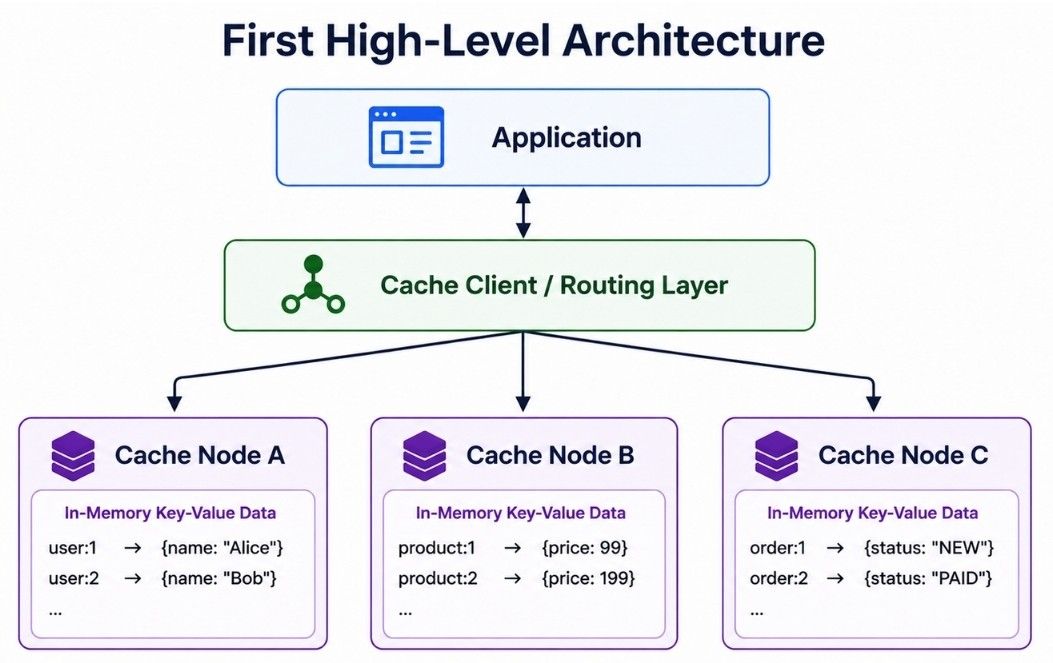
A simple distributed cache architecture has three main parts:
                 ┌──────────────┐
                 │ Application  │
                 └──────┬───────┘
                        │
                        ▼
               ┌─────────────────┐
               │ Cache Client /  │
               │ Routing Layer   │
               └────────┬────────┘
                        │
          ┌─────────────┼─────────────┐
          │             │             │
          ▼             ▼             ▼
   ┌────────────┐ ┌────────────┐ ┌────────────┐
   │ Cache Node │ │ Cache Node │ │ Cache Node │
   │     A      │ │     B      │ │     C      │
   └────────────┘ └────────────┘ └────────────┘
Application: Sends cache requests such as GET, SET, and DELETE.
Cache Client / Routing Layer: Finds the cache node responsible for a key.
Cache Nodes: Store key-value data in memory.
The key design question is:
How do we decide which cache node should store a particular key?
A basic way to distribute keys is hash-based partitioning.
The routing layer calculates:
hash(key) % number_of_nodesSuppose we have four cache nodes:
Node 0
Node 1
Node 2
Node 3
For the key product:501, we calculate:
hash("product:501") % 4If the result is 2, the key is routed to:
Node 2This approach is:
Simple to understand and implement
Fast for finding the target node
Able to distribute keys across multiple nodes
However, it has a major weakness: adding or removing a cache node can change the mapping for many keys.
This problem leads us to consistent hashing.
Simple modulo hashing works well as long as the number of cache nodes does not change.
For example:
hash(key) % 4If we add another node, the formula becomes:
hash(key) % 5Now many keys may map to different nodes. This can cause:
More cache misses
Extra database traffic
Unnecessary key movement
Expensive cache rebuilding
So modulo hashing is not ideal for a cache cluster that changes often.
A better approach is consistent hashing.
Consistent hashing distributes keys across cache nodes while reducing how many keys need to move when nodes are added or removed.
Think of the hash space as a ring:
                  0
             ┌─────────┐
        Node A         Node B
          │               │
          │               │
        Node D         Node C
             └─────────┘
Both nodes and keys are placed on this ring.
A key is assigned to the next node in a chosen direction.
For example:
Key K1 → Node B
Key K2 → Node C
Key K3 → Node A
If a new node is added, only some nearby keys need to move. Most keys stay on their existing nodes.
This gives us:
Less key movement
Fewer cache misses during cluster changes
Easier horizontal scaling
Better stability when nodes are added or removed
In simple words, consistent hashing makes distributed cache scaling less disruptive.
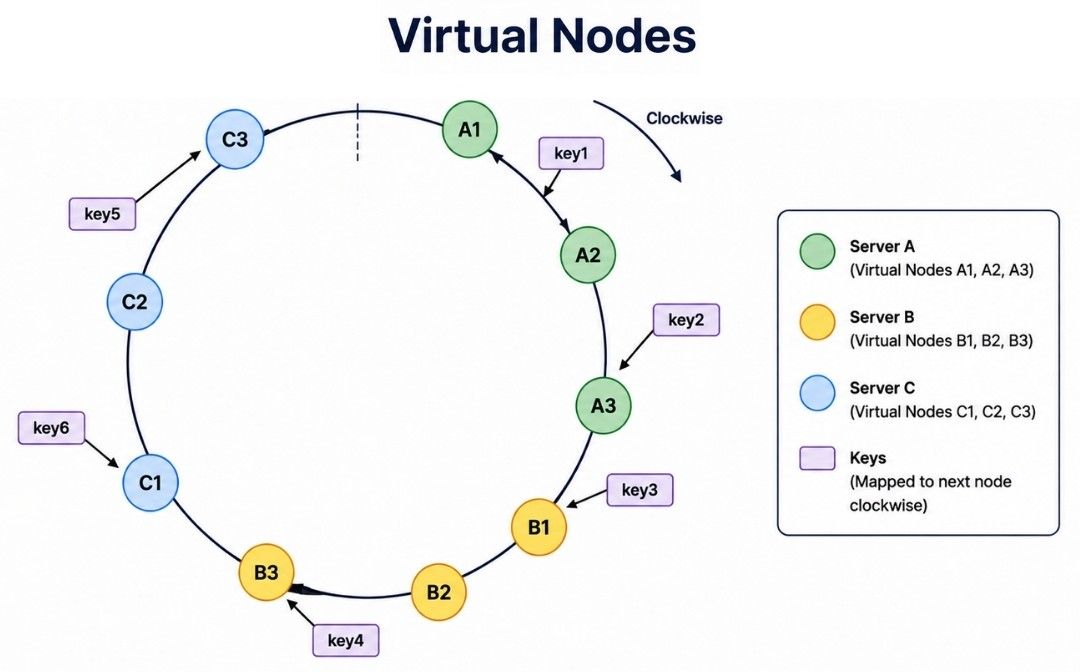
Even with consistent hashing, using only one ring position per physical node can create uneven distribution.
To improve balance, we use virtual nodes, also called vnodes.
Instead of placing Node A only once on the ring, we place multiple virtual positions for it:
Node A → A1, A2, A3, A4
Node B → B1, B2, B3, B4
Node C → C1, C2, C3, C4
Virtual nodes help:
Spread keys more evenly
Balance traffic across physical nodes
Make node addition and removal smoother
Support nodes with different capacities by assigning more vnodes to stronger machines
So, virtual nodes improve the balance and flexibility of consistent hashing.
Suppose the application wants to read product:501.
The request flows like this:
Application
     │
     ▼
Cache Client
     │
     ▼
Hash the Key
     │
     ▼
Find Cache Node
     │
     ▼
Read From Memory
     │
     ├── Found   → Return Value
     │
     └── Missing → Return NOT_FOUND
The cache client uses the key to find the correct cache node. The selected node checks whether the key exists and is still valid.
The result is either:
Cache Hit: The key exists and its value is returned.
Cache Miss: The key is missing or has expired.
A cache hit happens when the requested data is already available in the cache.
Application
     │
     ▼
   Cache
     │
     ▼
 Data Found
     │
     ▼
Return Data
This is the ideal case because the application gets the data directly from memory without querying the database.
A cache miss happens when the requested data is missing or expired.
Application
     │
     ▼
   Cache
     │
     ▼
Cache Miss
     │
     ▼
 Database
     │
     ▼
 Fetch Data
     │
     ▼
Update Cache
     │
     ▼
Return Data
The application can fetch the value from the database and store it in the cache for future requests.
A high cache hit rate is generally desirable because it reduces database load and improves response time.
Cache-aside is a common caching pattern where the application manages both the cache and the database.
The flow is simple:
Application
     │
     ▼
   Cache
     │
     ├── Hit → Return Data
     │
     └── Miss
           │
           ▼
       Database
           │
           ▼
       Update Cache
           │
           ▼
       Return Data
For example:
GET product:501
       ↓
Cache Miss
       ↓
Read from Database
       ↓
SET product:501 <product-data>
       ↓
Return Product
The first request may need a database read, but later requests can use the cached value until it expires or is invalidated.
Cache-aside works well for read-heavy systems because it keeps the caching logic simple and only caches data when it is actually requested.
In write-through caching, data is written to the cache and the main database as part of the same write flow.
Application
     │
     ▼
   Cache
     │
     ▼
 Database
For example, when a product price changes, the updated value is written to the cache and persisted in the database before the write is considered complete.
Benefits:
Keeps cached data fresh
Reduces stale reads
Makes updated data available for future cache reads
The main trade-off is higher write latency, because the database must also be updated before the operation completes.
In a write-back cache, also called write-behind caching, data is written to the cache first and saved to the database asynchronously later.
Application
     │
     ▼
   Cache
     │
     ▼
Background Write
     │
     ▼
 Database
This makes writes faster, but it introduces some risks:
Recent data may be lost if the cache fails before persistence
Cache and database can temporarily be inconsistent
Recovery and failure handling become more complex
Write-back caching is useful when write performance is important, but it requires stronger durability and recovery mechanisms.
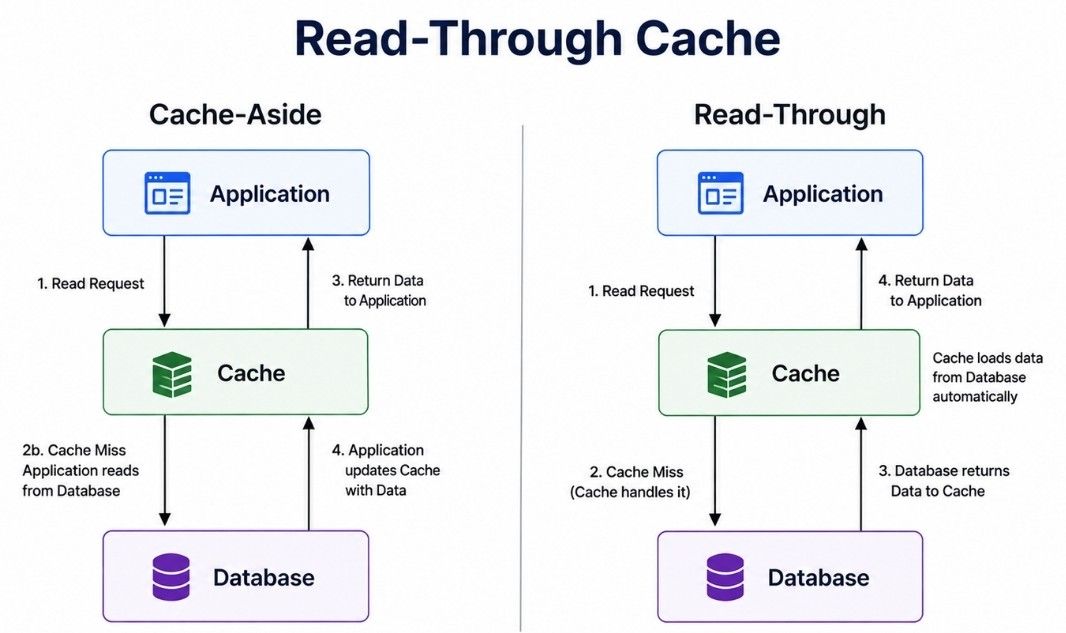
In a read-through cache, the application reads through the cache layer.
If the key is missing, the cache layer loads the value from the database, stores it, and returns it.
Application
     │
     ▼
   Cache
     │
     ├── Hit → Return Data
     │
     └── Miss
           │
           ▼
       Database
           │
           ▼
       Store in Cache
           │
           ▼
       Return Data
The key difference from cache-aside is who handles a cache miss:
Cache-aside: The application fetches missing data from the database.
Read-through: The cache layer fetches missing data automatically.
Read-through caching can make application code simpler by keeping cache-loading logic inside the caching layer.
A Time To Live (TTL) defines how long a key remains valid in the cache.
For example:
Key: product:501
TTL: 3600 seconds
After the TTL expires, the key should no longer be returned as valid cached data.
TTL helps us:
Remove stale data
Free memory
Refresh data when needed
Control the lifetime of temporary data
The right TTL depends on the data. Frequently changing data usually needs a shorter TTL, while more stable data can use a longer TTL.
With lazy expiration, the cache checks a key's expiration time when the key is accessed.
GET key
   ↓
Check TTL
   ↓
Expired?
  /     \
Yes      No
 ↓        ↓
Remove   Return Value
 ↓
Cache Miss
This approach is efficient because the cache does not continuously check every key.
The downside is that expired keys that are never accessed may remain in memory until they are cleaned up later.
With active expiration, the cache removes expired keys in the background.
Background Process
        ↓
Check Some Keys
        ↓
Find Expired Keys
        ↓
Remove Them
A Redis-like system can combine both approaches:
Lazy expiration: Checks expiration when a key is accessed.
Active expiration: Periodically finds and removes expired keys in the background.
Together, these approaches remove expired data efficiently without continuously scanning the entire cache.
Cache memory is limited. When there is not enough memory for new data, the system may need to remove existing keys.
This process is called cache eviction.
An eviction policy decides which keys should be removed. Common approaches include:
LRU (Least Recently Used): Removes keys that have not been used recently.
LFU (Least Frequently Used): Removes less frequently accessed keys.
FIFO (First In, First Out): Removes older inserted keys first.
Some cache systems can also be configured to reject new writes instead of evicting data.
The best eviction policy depends on the application's access pattern, memory limits, and data requirements.
LRU (Least Recently Used) removes keys that have not been accessed for the longest time.
For example:
Key A → Used recently
Key B → Used a few minutes ago
Key C → Not used for a long time
If memory is full, Key C is a likely candidate for eviction.
LRU works well when recently accessed data is likely to be used again.
LFU (Least Frequently Used) removes keys that are used less often.
For example:
Key A → Frequently accessed
Key B → Rarely accessed
Key C → Frequently accessed
Here, Key B is more likely to be removed.
LFU is useful when some keys remain popular for a long time and should stay in the cache.
FIFO (First In, First Out) removes keys in the order they were added.
First inserted → First removedIt is simple, but it does not consider how often or how recently a key is accessed. As a result, an old but popular key may still be removed.
Random eviction removes a randomly selected key when memory is full.
It has low overhead because the cache does not need to track access frequency or recency. However, it may accidentally remove a popular key.
It can be useful when cache entries have similar importance or a simple eviction strategy is enough.
There is no single best eviction policy. The right choice depends on the application's access pattern.
LRU: Good when recently used data is likely to be used again.
LFU: Good when some keys stay popular over time.
Random: Useful when a simple, low-overhead policy is enough.
No eviction: Rejects new writes instead of removing existing keys when memory is full.
TTL is related to expiration, not an eviction algorithm itself. A key expires because its lifetime ends, while eviction removes keys mainly to free memory.
A Redis-like cache can provide different policies so we can choose one based on the workload, memory limits, and access pattern.
If a key exists on only one cache node, it becomes unavailable when that node fails.
For example:
Key A → Node A
Key B → Node B
Key C → Node C
If Node B fails, requests for Key B may fall back to the database, increasing database load.
Replication reduces this risk by keeping copies of cached data on multiple nodes.
        Primary Cache Node
          /            \
         ▼              ▼
    Replica A        Replica B
Replication provides:
Better availability
Faster recovery from node failures
Lower impact during failures
The trade-off is extra memory usage and replication overhead.
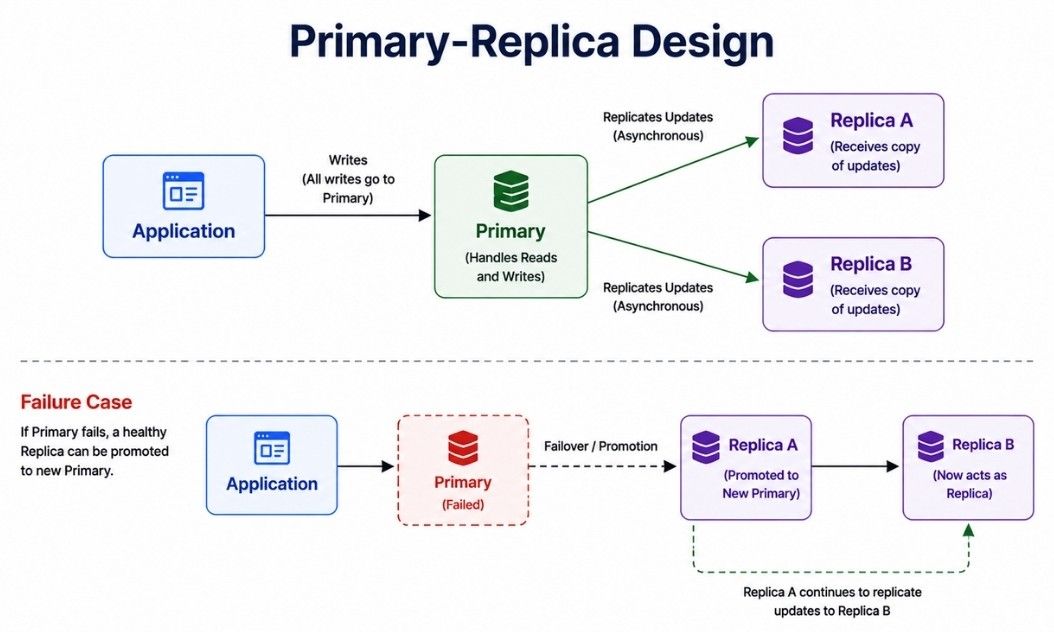
In a primary-replica design, writes usually go to the primary and are copied to one or more replicas.
              Primary
             /       \
            ▼         ▼
       Replica A   Replica B
Depending on the design:
Writes go to the primary.
Replicas receive copies of the updates.
Reads may be served by the primary or replicas.
If the primary fails, a healthy replica can be promoted.
This improves availability, but replicas may not always have the latest value because replication can be asynchronous.
Replication lag is the delay between an update on the primary and the same update reaching a replica.
For example, the primary may contain:
user:101 = "Aman"while a replica temporarily holds an older value.
This means a read from a replica can sometimes return stale data.
For many cache workloads, a small amount of stale data is acceptable. If fresh data is critical, the system needs stronger consistency guarantees or should avoid serving those reads from lagging replicas.
Cache consistency becomes important when the database changes but the cache still contains an old value.
For example:
Database → price = ₹899
Cache    → price = ₹999
If the application reads from the cache, it may return the old price. This is called stale data.
The consistency strategy should minimize how long stale values remain in the cache.
A common solution is to invalidate the cached value after updating the database.
Update Database
      ↓
Delete Cache Key
      ↓
Next Read → Cache Miss
      ↓
Read Fresh Data From Database
      ↓
Store It in Cache
For example:
Update product in database
          ↓
Delete product:501 from cache
The next request loads the latest value and caches it again.
This approach works well with the cache-aside pattern.
Problems can appear when multiple requests read and update the same data concurrently.
For example:
Request A → Reads old data
Request B → Updates database
Request A → Caches old data
Now the database has the latest value, but the cache contains stale data.
Depending on the consistency requirements, we can reduce this risk using:
Short TTLs
Version numbers
Event-based invalidation
Careful read/write ordering
Conditional writes or conflict handling
The right approach depends on how much stale data the application can tolerate and how strong its consistency requirements are.
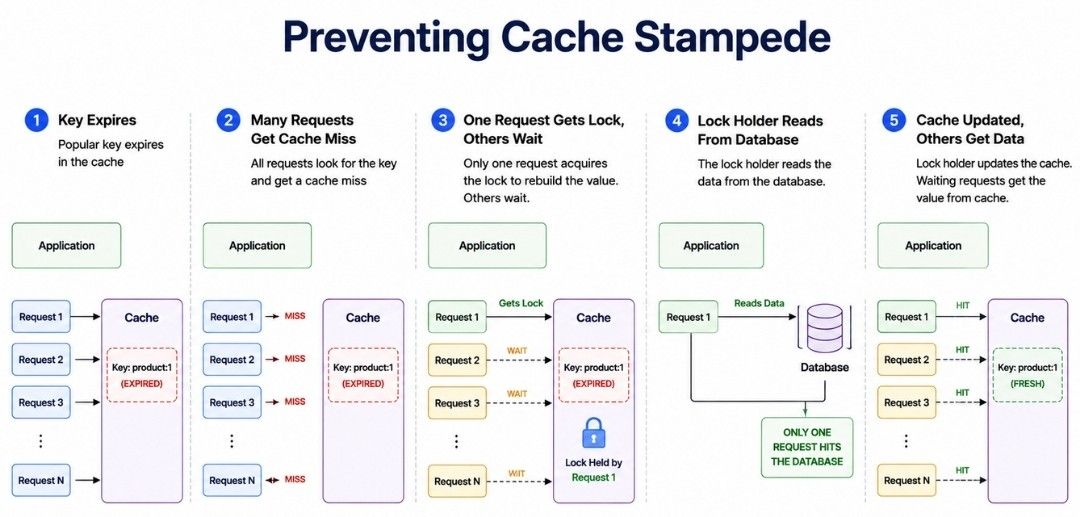
A cache stampede happens when a popular key expires or becomes unavailable and many requests try to reload the same data at the same time.
Popular Key Expires
        ↓
Many Requests Arrive
        ↓
     Cache Miss
        ↓
Database Gets Many Requests
        ↓
Sudden Load Spike
This can increase latency and may overload the database.
The main goal is to ensure that many requests do not rebuild the same cache entry at the same time.
A common solution is request locking or request coalescing.
Popular Key Expires
        ↓
Request A → Gets Lock → Reads Database
Request B → Waits
Request C → Waits
        ↓
Request A Updates Cache
        ↓
Other Requests Read From Cache
Only one request refreshes the value while the others wait or reuse available data.
Other useful techniques include:
Serve stale data: Temporarily return an older value while it is refreshed in the background.
TTL jitter: Add a small random offset to TTLs so many keys do not expire at the same time.
TTL = base TTL + random offsetThese techniques help protect the database from sudden cache miss storms.
Cache penetration happens when repeated requests ask for data that does not exist.
For example:
GET product:-999999
GET product:-999998
GET product:-999997
Because these keys are missing from both the cache and database, repeated requests can keep reaching the database unnecessarily.
Two common solutions are negative caching and Bloom filters.
When the database confirms that a key does not exist, we can cache that result for a short time.
product:-999999 → NOT_FOUND
TTL = short duration
Future requests for the same key can return NOT_FOUND directly from the cache.
A short TTL is useful because the record might be created later.
A Bloom filter is a memory-efficient data structure used to check whether a key might exist before querying the main data source.
Request Key
    ↓
Bloom Filter
    │
    ├── Definitely Not Present → Skip Database
    │
    └── Maybe Present → Continue Lookup
A standard Bloom filter can return a false positive—it may say that a key might exist when it actually does not. However, it does not return false negatives for items that were correctly added to the filter.
Bloom filters are especially useful when the system receives large numbers of requests for non-existing keys.
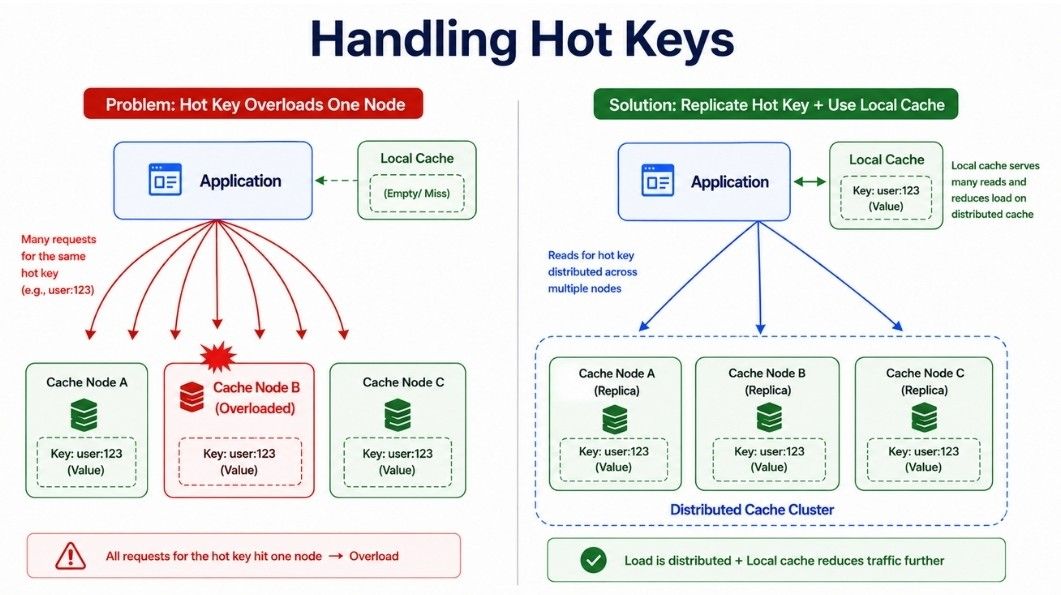
A hot key is a cache key that receives much more traffic than other keys.
For example:
trending:news:1With normal partitioning, requests for the same key usually go to the same cache node.
       Many Requests
            ↓
    trending:news:1
            ↓
       Cache Node B
            ↓
        Overloaded
Even if the cluster has many nodes, one node can still become a bottleneck because all requests for that hot key reach the same place.
This can cause:
Higher latency
Uneven traffic
Node overload
Request failures during traffic spikes
So, adding more cache nodes alone does not always solve the hot key problem.
The main goal is to spread reads for a popular key instead of sending all requests to one node.
Common solutions include:
Replicate hot data: Keep copies on multiple nodes and distribute reads.
Local caching: Store frequently accessed values in application memory.
Read from replicas: Spread read traffic across replicas when the consistency model allows it.
Edge caching or CDN: Useful for cacheable public content that can be served closer to users.
For example, a local cache adds another fast layer:
Application
     │
     ▼
Local Cache
     │
     └── Miss
          ↓
   Distributed Cache
The right approach depends on traffic volume, update frequency, and how fresh the data must be.
A hot key is one heavily accessed key. A hot partition happens when multiple high-traffic keys are mapped to the same cache node.
Node A → Normal Traffic
Node B → Normal Traffic
Node C → Very High Traffic
Even when the overall cluster has enough capacity, Node C can become overloaded.
We can reduce hot partitions using:
Good hash functions
Virtual nodes
Partition rebalancing
Moving load to other nodes
Adding capacity when needed
The goal is to distribute both keys and traffic as evenly as possible.
When traffic or memory usage grows, we may add another cache node.
Node A
Node B
Node C
   +
Node D
With consistent hashing, adding Node D requires only a portion of the keys to move.
Add New Node
     ↓
Update Hash Ring
     ↓
Move Affected Keys
     ↓
Rebalance Traffic
This causes less disruption than simple modulo hashing.
The new node can also be warmed gradually with frequently accessed data to reduce cache misses during the transition.
If a cache node fails or is removed, the cluster must redirect its workload to healthy nodes.
Node Fails
    ↓
Detect Failure
    ↓
Update Cluster Topology
    ↓
Route Requests to Healthy Nodes
With replication, a replica may already contain the required data and can take over depending on the failover design.
Without replication, missing cache entries can be rebuilt from the main database.
This is why partitioning, replication, and failure detection work together to keep a distributed cache available as nodes join or leave the cluster.
A new or restarted cache often starts with little or no data. This is called a cold cache.
If full production traffic reaches a cold cache immediately, many requests can miss the cache and hit the database at the same time.
Cache warming reduces this risk by preloading frequently accessed data before or while traffic is gradually introduced.
Common data to warm includes:
Popular products
Frequently accessed content
Common configuration
Trending data
A simple flow is:
New Cache Node
      ↓
Load Popular Data
      ↓
Gradually Send Traffic
      ↓
Normal Operation
Cache warming helps reduce cache misses, database load, and latency spikes during startup or cluster expansion.
A distributed cache needs information about the current cluster structure. This is called cluster metadata.
Clients or cache nodes may need to know:
Which nodes are available
Which node owns a key or partition
Which nodes are healthy
When nodes are added or removed
Cluster metadata can be maintained using approaches such as:
Service discovery or configuration systems
Cluster coordinators
Gossip protocols
Client-side topology information
The goal is to keep routing and cluster state up to date as nodes join, leave, or fail.
In client-side routing, the cache client decides which node should handle a key.
Application
     │
     ▼
Cache Client
     │
     ▼
Hash Key
     │
     ▼
Find Cache Node
     │
     ▼
Send Request
For example, the client can use consistent hashing to find the correct cache node.
Benefits:
Fewer network hops
Low routing latency
No central proxy in the request path
Trade-offs:
Clients need up-to-date cluster metadata.
Client libraries become more complex.
Topology changes must reach clients quickly.
Client-side routing is a good choice when low latency matters and clients can reliably track cluster topology.
In proxy-based routing, the application sends cache requests to a proxy instead of directly contacting cache nodes.
Application
     │
     ▼
 Cache Proxy
   /   |   \
  ▼    ▼    ▼
Node A Node B Node C
The proxy finds the correct cache node and forwards the request.
Benefits:
Application clients stay simple.
Routing logic is managed in one layer.
Cluster topology changes can be hidden from clients.
Trade-offs:
Adds an extra network hop.
The proxy layer needs to scale with traffic.
Multiple proxy instances are needed to avoid a single point of failure.
Proxy-based routing works well when simpler clients and centralized routing are more important than minimizing network hops.
Both approaches can work well, but they make different trade-offs.
Client-Side Routing | Proxy-Based Routing |
|---|---|
Client selects the cache node | Proxy selects the cache node |
Fewer network hops | Extra network hop |
Clients need cluster metadata | Proxy manages cluster topology |
More complex client logic | Simpler application clients |
No proxy layer to scale | Proxy layer must scale and remain available |
The choice depends on whether the system prioritizes lower latency or simpler client-side logic.
A Redis-like cache may need to handle many connections and small commands efficiently.
An event-driven architecture can use event loops and non-blocking I/O to process many connections without creating one operating-system thread for every connection.
Typical cache commands are small:
GET key
SET key value
INCR counter
This reduces thread-management overhead and helps provide high throughput with low latency.
The exact implementation depends on the cache system and version, but the main idea is to keep network and command processing efficient.
A distributed cache keeps its main working data in RAM, which provides much faster access than repeatedly reading data from persistent storage.
For example:
GET user:101In-memory storage provides:
Fast reads and writes
Low latency
High throughput
Less database traffic
However, RAM is more expensive and limited compared with disk storage. In-memory data can also be lost when a node fails unless replication or persistence is used.
This leads to an important question: Does the cache need persistence, or can its data be rebuilt from the main database?
A cache does not always need persistence. If the database is the source of truth, lost cache entries can usually be rebuilt when needed.
However, Redis-like systems can support persistence when faster recovery or additional durability is useful.
Two common approaches are:
Snapshots: Periodically save the in-memory dataset to disk.
Append-only logs: Record write operations so the state can be reconstructed after a restart.
Persistence improves recovery, but it also adds disk I/O, storage usage, and operational complexity. For a pure caching layer, rebuilding data from the main database may be simpler.
With snapshot-based persistence, the system periodically saves the current in-memory data to disk.
The basic flow is:
In-Memory Data
      ↓
Create Snapshot
      ↓
Save to Disk
      ↓
Server Restarts
      ↓
Load Snapshot
Snapshots provide some useful benefits:
Simple recovery process
Compact backup of cache state
Less continuous disk-write overhead
However, changes made after the latest snapshot may be lost if the server fails before the next snapshot is created.
So, snapshots provide periodic durability rather than durability for every write.
An append-only log records write operations as they happen.
For example:
SET user:1 Aman
SET product:1 Laptop
DELETE user:4
INCR page:views
After a restart, the system can replay these operations to rebuild its state.
The basic flow is:
Write Operation
      ↓
Append to Log
      ↓
Update Cache
      ↓
Server Restarts
      ↓
Replay Log
      ↓
Restore Data
This approach can reduce data loss compared with occasional snapshots.
However, it also has some trade-offs:
Additional disk writes
Larger log files over time
Longer recovery if the log becomes large
Need for log rewriting or compaction
Adding persistence makes cache recovery easier, but it also increases system complexity.
With persistence:
Better recovery after restarts
Less cached data needs to be rebuilt
Additional disk and storage overhead
Without persistence:
Simpler cache architecture
Lower persistence overhead
Lost cache data must be rebuilt from the main database
If the database is the source of truth and cached data can be safely rebuilt, persistence may not be necessary.
If faster recovery or better durability is important, snapshots, append-only logging, or a combination of both can be used.
In a distributed cache, network failures can happen between the application and cache nodes. The application should not wait too long for an unavailable cache server.
A short timeout can help:
Request Cache
     ↓
Cache Does Not Respond
     ↓
Timeout
     ↓
Use Fallback
     ↓
Read From Database
Useful failure-handling practices include:
Set short cache timeouts.
Avoid unlimited retries.
Use another healthy replica when available.
Fall back to the database when it is safe.
Monitor failed and slow cache requests.
The cache is designed to improve performance. For normal caching use cases, it should not become a reason for the entire application to stop working.
Suppose the application requests:
GET product:501If the cache is unavailable but the main database is healthy, the application can read the product directly from the database.
Application
     ↓
   Cache
     ↓
Cache Unavailable
     ↓
  Database
     ↓
Return Data
The request may be slower, but the application can still serve the user.
A useful design principle is:
For many applications, a cache failure should reduce performance rather than cause a complete application failure.
However, this depends on how the Redis-like system is being used. If it stores critical sessions, distributed locks, counters, or queues, its failure may have a bigger impact than a normal cache failure.
A large cache failure can create another serious problem.
If many requests normally use the cache and the cache suddenly becomes unavailable, those requests may all fall back to the database.
Cache Failure
     ↓
Many Cache Misses
     ↓
Requests Hit Database
     ↓
Database Overload
     ↓
Possible Second Failure
This is known as a thundering herd problem.
We can reduce the risk using:
Rate limiting
Load shedding
Local application caches
Cache replicas
Circuit breakers
Gradual traffic recovery
Cache warming
The goal is not only to recover the cache but also to protect the database during cache failures.
If a cache node is repeatedly failing, continuously sending requests to it wastes resources and increases response time.
A circuit breaker can temporarily stop requests to the unhealthy cache.
Cache Failures Increase
        ↓
Circuit Opens
        ↓
Skip Cache Temporarily
        ↓
Use Fallback
        ↓
Test Cache Again Later
        ↓
Resume When Healthy
This helps:
Avoid repeated calls to an unhealthy cache
Reduce unnecessary waiting
Protect application resources
Improve failure recovery
Circuit breakers are especially useful when cache failures continue for some time instead of being a single temporary error.
In a distributed caching system, the same data may exist in several places:
Primary Cache
Replica Cache
Local Application Cache
When the original value changes, every cached copy may not update at exactly the same time. Some requests may temporarily receive stale data.
Whether this is acceptable depends on the type of data.
Product information or public profiles: Slightly stale data may be acceptable.
Frequently changing business data: May require shorter TTLs or better invalidation.
Critical financial data: Should usually rely on a strongly consistent source of truth rather than treating cache as the authoritative value.
The key lesson is that cache consistency should be designed according to the freshness and correctness requirements of the data.
Caching improves performance, but not every type of data should be cached.
Caching may not be useful when:
Data changes very frequently.
The same data is rarely requested again.
The application always needs the latest value.
Cache entries are very large.
The cost of using memory is higher than the performance benefit.
The database operation is already fast and inexpensive.
Before caching data, we should ask whether it will reduce database load or improve response time. If it provides little benefit, adding a cache only increases system complexity.
A distributed cache may store sensitive or private data such as:
User sessions
User profile information
Authentication tokens
Temporary account data
Because of this, the cache should be properly protected.
Important security practices include:
Authentication: Allow only trusted clients to connect.
Authorization: Limit what each client can access or modify.
Encryption: Protect data while it travels over the network.
Private network access: Keep cache nodes inside a trusted network.
Secret management: Store credentials securely instead of hardcoding them.
Restricted admin commands: Prevent unauthorized configuration changes.
Audit logging: Track important administrative and security events.
A distributed cache should not be directly exposed to the public internet.
A faulty or misconfigured application can send too many requests to the cache and affect other services using the same cluster.
We can protect the distributed cache using:
Connection limits
Request rate limits
Per-client quotas
Memory quotas
Maximum key or value sizes
These controls help prevent one application from consuming too many cache resources and affecting other clients.
Very large cache values can reduce the benefits of caching.
For example, a large value requires more:
RAM
Network bandwidth
Serialization and deserialization work
Time to transfer between the application and cache
Large values can also create uneven memory usage across cache nodes.
For this reason, cache entries should generally be kept small and focused on frequently accessed data.
For large files such as images, videos, or downloadable content, object storage with a CDN is usually a better choice than storing the complete file in a distributed in-memory cache.
A good cache key design makes data easier to identify, manage, and debug.
Instead of using only an ID:
101use a clear key that describes the type of data:
user:101Similarly:
product:501
order:1001
session:abc123
A common key format is:
<resource>:<id>For applications that need versioning, we can include a version in the key:
product:v2:501Good cache keys should be:
Clear: The key should indicate what type of data it stores.
Unique: Different resources should not accidentally use the same key.
Consistent: Follow the same naming pattern across the application.
Simple: Avoid unnecessarily long or complex keys.
A clear naming strategy makes the distributed cache easier to maintain as the system grows.
A key collision can happen when different services use the same cache key for different types of data.
For example, suppose both User Service and Product Service use:
123One service may store user data while another stores product data under the same key. This can cause incorrect values to be returned or overwritten.
A simple solution is to use namespaces or prefixes:
user:123
product:123
order:123
Now each key clearly belongs to a different type of data.
For a microservices system, we can make the namespace even more specific when needed:
user-service:user:123
product-service:product:123
Using clear namespaces helps prevent key collisions and makes cached data easier to identify and debug.
A distributed cache should be monitored continuously to make sure it is fast, healthy, and actually reducing load on the main database.
Important cache metrics include:
Cache hit rate: How often requested data is found in the cache.
Cache miss rate: How often the application needs to use the database or another source.
Memory usage: How much cache memory is being used.
CPU usage: Helps identify overloaded cache nodes.
Requests per second: Shows the amount of traffic handled by the cache.
Latency: Measures how quickly cache requests are completed.
Evictions: Shows how often keys are removed because of memory pressure.
Expired keys: Tracks keys removed because their TTL ended.
Network traffic: Helps identify bandwidth or communication problems.
Connection count: Shows how many clients are connected.
Replication lag: Measures delays between primary and replica nodes.
Hot keys: Identifies keys receiving unusually high traffic.
Monitoring these metrics helps us find performance problems, overloaded nodes, memory pressure, and poor cache usage before they affect the application.
The cache hit rate is one of the most useful metrics for understanding cache performance.
A cache hit happens when the requested data is found in the cache. A cache miss happens when the data is not available and must be loaded from another source.
The hit rate can be calculated as:
Cache Hit Rate =
Cache Hits / Total Cache Requests × 100
For example:
Cache Hits   = 900
Cache Misses = 100
Total        = 1000

Hit Rate = 900 / 1000 × 100
         = 90%
A higher hit rate generally means the cache is successfully serving frequently requested data and reducing backend traffic.
A low hit rate may indicate problems such as:
TTL values are too short.
Cache memory is too small.
Useful keys are being evicted too often.
The wrong type of data is being cached.
Requests access mostly unique or random data.
The cache has recently started and is still cold.
However, a high hit rate alone does not guarantee good performance. We should also monitor latency, memory usage, evictions, hot keys, and backend load to understand the overall health of the distributed cache.
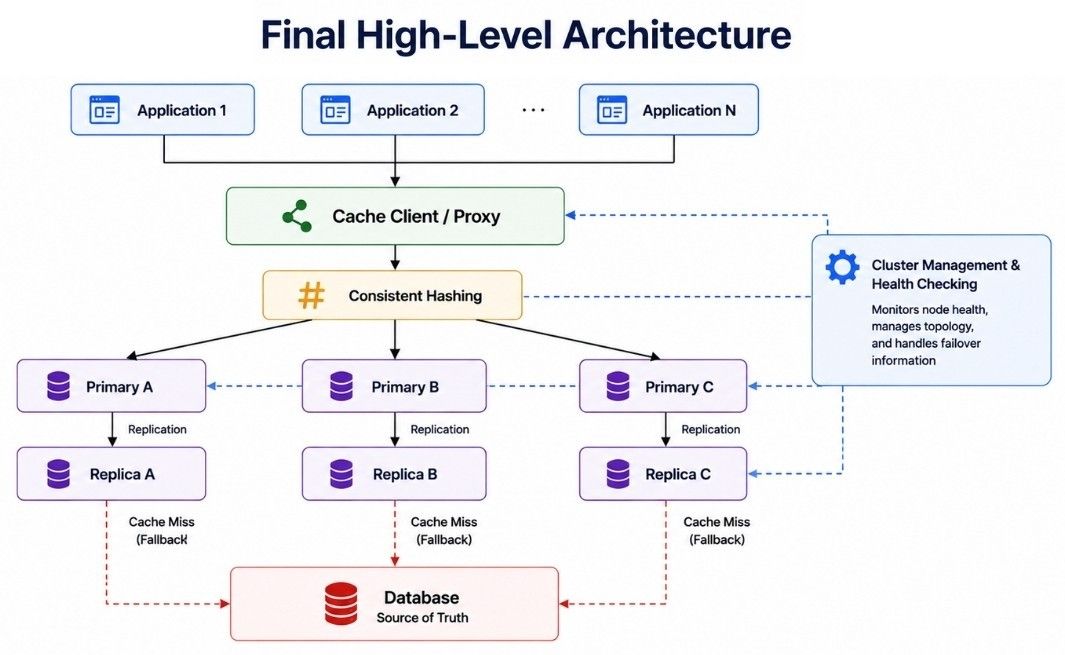
After adding partitioning, consistent hashing, replication, and cluster management, our Redis-like distributed cache can look like this:
                        ┌─────────────────┐
                        │  Applications   │
                        └────────┬────────┘
                                 │
                                 ▼
                     ┌────────────────────┐
                     │ Cache Client/Proxy │
                     └─────────┬──────────┘
                               │
                       Consistent Hashing
                               │
             ┌─────────────────┼─────────────────┐
             │                 │                 │
             ▼                 ▼                 ▼
      ┌────────────┐    ┌────────────┐    ┌────────────┐
      │ Primary A  │    │ Primary B  │    │ Primary C  │
      └─────┬──────┘    └─────┬──────┘    └─────┬──────┘
            │                  │                  │
            ▼                  ▼                  ▼
      ┌────────────┐    ┌────────────┐    ┌────────────┐
      │ Replica A  │    │ Replica B  │    │ Replica C  │
      └────────────┘    └────────────┘    └────────────┘
             │                 │                 │
             └─────────────────┼─────────────────┘
                               │
                               ▼
                    ┌────────────────────┐
                    │ Cluster Management │
                    │ & Health Checking  │
                    └────────────────────┘
The main components work together as follows:
Applications: Send cache operations such as GET, SET, and DELETE.
Cache Client/Proxy: Routes each request to the correct cache node.
Consistent Hashing: Distributes keys across nodes while reducing key movement when the cluster changes.
Primary Nodes: Store and serve the main copy of cached data for their partitions.
Replica Nodes: Keep copies of data and improve availability during node failures.
Cluster Management: Tracks node health, failures, and changes in the cluster topology.
The normal request flow stays simple:
Application
     ↓
Cache Client / Proxy
     ↓
Find Correct Cache Node
     ↓
Read or Write Data
     ↓
Return Response
This architecture allows the distributed cache to provide low-latency access, horizontal scalability, better availability, and efficient failure handling as traffic and cached data grow.
Suppose the application needs product data:
GET product:501With the cache-aside pattern, the complete read flow looks like this:
Application
     ↓
GET product:501
     ↓
Cache Client
     ↓
Consistent Hashing
     ↓
Cache Node B
     ↓
Check Key and TTL
   /             \
 Hit              Miss
  ↓                ↓
Return Data     Database
                   ↓
              Read Product
                   ↓
              Update Cache
                   ↓
              Return Data
The flow works as follows:
The application requests product:501.
The cache client hashes the key and finds the correct cache node.
The selected node checks whether the key exists and is still valid.
On a cache hit, the cached value is returned immediately.
On a cache miss, the application reads the latest data from the database.
The result is stored in the cache for future requests.
The product data is returned to the user.
This keeps frequently accessed data in memory and reduces repeated database queries.
Suppose the price of product:501 changes.
With the cache-aside pattern, the database remains the source of truth.
Update Product
      ↓
Update Database
      ↓
Database Confirms
      ↓
Delete product:501
From Cache
      ↓
Next Read → Cache Miss
      ↓
Read Latest Data
From Database
      ↓
Store Fresh Data
In Cache
The application updates the database first and then invalidates the old cache entry.
The next request gets a cache miss, loads the latest value from the database, and stores it back in the cache.
This approach is simple and widely used, but concurrent reads and writes can still create short periods of stale data, so TTLs or versioning may be added when stronger consistency is needed.
If a cache node fails, the system should detect the failure and route requests away from that node.
With replication, a healthy replica can take over:
Cache Node B Fails
        ↓
Detect Failure
        ↓
Use or Promote Replica
        ↓
Update Cluster Topology
        ↓
Route New Requests
During recovery:
Some requests may temporarily become slower.
Replicas can serve cached data when available.
Cluster routing information must be updated.
Missing values can be rebuilt from the database.
The goal is to recover from a node failure without bringing down the entire application.
Suppose homepage:trending suddenly receives millions of requests.
Even with consistent hashing, requests for the same key normally reach the same cache node. This can create a hot key and overload that node.
We can reduce the load using:
Multiple copies of the hot value
Local application caches
Reads from replicas
Edge caching or a CDN when suitable
Automatic hot-key detection
             Hot Key
          /     |     \
         ▼      ▼      ▼
     Cache A  Cache B  Cache C
The key lesson is that adding more cache nodes alone does not solve a hot key. Traffic for that specific key must also be distributed.
If the cache is only a performance layer, the main database still contains the source data and the cache can be rebuilt.
The main risk is a cache miss storm: if all requests suddenly reach the database, it may become overloaded.
A safer recovery looks like this:
Cache Recovers
      ↓
Warm Popular Keys
      ↓
Restore Traffic Gradually
      ↓
Monitor Cache and Database
      ↓
Return to Normal Operation
During recovery, we can also use rate limiting, load shedding, local caches, and request coalescing to protect the database.
The goal is to restore the cache gradually without moving the failure to the database.
As a distributed cache grows, several bottlenecks can affect latency, throughput, and availability. We should identify them early and scale the right part of the system.
Cache nodes have limited RAM. When memory becomes full, useful keys may be evicted or new writes may fail.
We can reduce memory pressure by:
Adding more cache nodes
Choosing the right eviction policy
Setting appropriate TTLs
Keeping cached values small
Avoiding unnecessary cached data
A few popular keys can send too much traffic to a single node.
Common solutions include:
Replicating hot values
Using local application caches
Spreading reads across replicas
Using edge caching when suitable
Some nodes may receive more data or traffic than others, causing uneven CPU, memory, and network usage.
Good hashing, virtual nodes, and rebalancing can help distribute the load more evenly.
At high request volumes, network bandwidth can become a bottleneck, especially when cached values are large.
To reduce network overhead:
Keep values reasonably small.
Avoid unnecessary data transfers.
Keep cache nodes close to application servers when possible.
Many cache misses at the same time can suddenly overload the database. This can happen after a cache failure, cold start, or expiration of popular keys.
We can reduce this risk using:
Cache stampede protection
Cache warming
TTL jitter
Rate limiting or load shedding
Serving stale data when appropriate
Too many connections or slow clients can consume cache resources and increase latency.
Useful protections include:
Connection pooling
Connection limits
Request timeouts
Monitoring active connections
The goal is to prevent one key, node, client, or resource from becoming a bottleneck for the entire distributed cache system.
A distributed cache involves several important trade-offs:
Consistent Hashing vs Modulo: Modulo is simple, while consistent hashing handles node changes with less key movement.
LRU vs LFU: LRU removes less recently used data, while LFU removes less frequently used data.
Replication vs Memory: Replication improves availability but requires more RAM.
Client Routing vs Proxy: Client-side routing is faster, while proxy routing keeps clients simpler.
Persistence vs Pure Cache: Persistence improves recovery but adds complexity.
Long TTL vs Short TTL: Long TTL improves cache hits, while short TTL keeps data fresher.
There is no perfect choice. The right design depends on traffic, data freshness, availability, performance, and cost.
A distributed cache stores frequently used data in memory. It helps reduce database load, improve response time, and scale across multiple servers.
A common approach is consistent hashing with virtual nodes. It distributes keys across servers and reduces key movement when nodes are added or removed.
A replica or another healthy node can handle requests. If some cached data is lost, it can be rebuilt from the main database.
A cache stampede happens when many requests miss the same cached data at once and all query the database.
Common solutions include:
Locking or request coalescing
Serving slightly stale data
Adding random variation to TTLs
A hot key is a cache key that receives much more traffic than other keys, which can overload one cache node.
We can:
Replicate hot values
Use local application caches
Spread reads across replicas
Use edge caching when suitable
Cache penetration happens when repeated requests ask for data that does not exist. Every cache miss may then reach the database.
Use negative caching for missing values or a Bloom filter to avoid unnecessary database lookups.
The cache can remove existing data using an eviction policy such as LRU, LFU, FIFO, or random eviction.
Consistent hashing helps distribute keys across cache nodes while reducing unnecessary key movement when servers are added or removed.
