
Durgesh Tiwari
Author
Every software application starts with a plan. That plan is called software architecture, and it defines how different parts of an application work together.
This plan is called software architecture.
Whether you are building a small mobile app or a large platform like Amazon, Netflix, or Google, software architecture helps organize the application and ensures that all its components work together efficiently.
A well-designed software architecture makes an application easier to build, maintain, scale, secure, and improve as business requirements change.
In this article, you'll learn the fundamentals of Software Architecture, including what software architecture is, why it is important, common architectural styles, architecture comparisons, and how to choose the right architecture for your application.
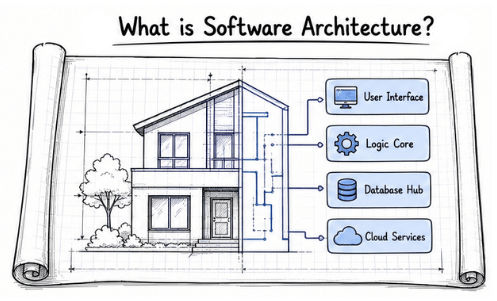
Software Architecture is the high-level structure of a software application. It defines how different components, modules, services, databases, and other parts of the system are organized and communicate with each other.
Simply put, software architecture is the plan that defines how different parts of an application work together.
Just as engineers create a blueprint before building a house, software architects design the overall structure of an application before development begins.
Software architecture helps developers decide:
How different components communicate
Where application data is stored
How user requests are processed
How different modules work together
How the application can grow in the future
Making these decisions early helps avoid problems later as the application becomes larger and more complex.
Think about an online shopping application.
It includes features such as:
User Authentication
Product Catalog
Shopping Cart
Payment Processing
Order Management
Notifications
Although users interact with a single application, many components work together behind the scenes.
Software architecture defines how these components communicate, where data is stored, and how user requests are processed. Without a proper architecture, the application becomes difficult to maintain, scale, and extend as new features and users are added.
A good software architecture helps developers build applications that are easier to maintain, scale, secure, and improve over time. It also provides a strong foundation for future growth.
It helps developers:
Keep the application organized and easier to maintain.
Improve application performance.
Support more users as the application grows.
Add new features with fewer changes to existing code.
Improve security and reliability.
Help development teams work together more efficiently.
Simplify testing, deployment, and future updates.
A good software architecture should support both current and future business needs. It should make applications easier to build, maintain, secure, and scale as they grow.
Some of the key characteristics of a good software architecture are:
Scalability: Allows an application to handle more users, data, or workload without affecting performance.
Maintainability: Keeps the code organized so developers can easily update, fix, and improve the application.
Reliability: Ensures the application works consistently, even if some parts of the system fail.
Security: Protects user data, application resources, and business information from unauthorized access and cyber threats.
Flexibility: Makes it easier to adapt the application to changing business requirements or new technologies.
Performance: Helps the application process requests quickly and use system resources efficiently.
An architectural style is a standard way of designing and organizing a software application. It defines how different parts of an application are structured and how they work together.
There is no single architectural style that is suitable for every application. The right choice depends on the application's requirements, complexity, and future growth.
Some of the most common software architecture styles are:
Monolithic Architecture
Modular Monolith
Layered (N-Tier) Architecture
Service-Oriented Architecture (SOA)
When choosing an architectural style, developers usually consider:
Application size
Business requirements
Expected number of users
Development team size
Scalability needs
Future growth plans
Monolithic Architecture is one of the simplest and most widely used software architecture styles. In this architecture, the entire application is built and deployed as a single unit.
All features, business logic, database operations, and user interface are part of the same application and share a single codebase.
Simply put, Monolithic Architecture keeps the entire application in one codebase and deploys it as a single application.
It is commonly used for:
Small applications
Startup projects
Simple business systems
In a monolithic application:
All features are part of the same project.
Business logic, user interface, and database access are combined into one application.
The entire application is built and deployed as a single unit.
For example, an online shopping application may include:
User Management
Product Management
Shopping Cart
Payment Processing
Order Management
Although each feature has a different purpose, they all run inside the same application. If developers update the payment module, the entire application usually needs to be tested and deployed again.
Easy to develop and understand.
Simple to test and deploy.
Faster development for small projects.
Suitable for small teams and startup applications.
The codebase becomes harder to manage as the application grows.
Individual features cannot be scaled independently.
Small updates usually require redeploying the entire application.
A problem in one module can affect the whole application.
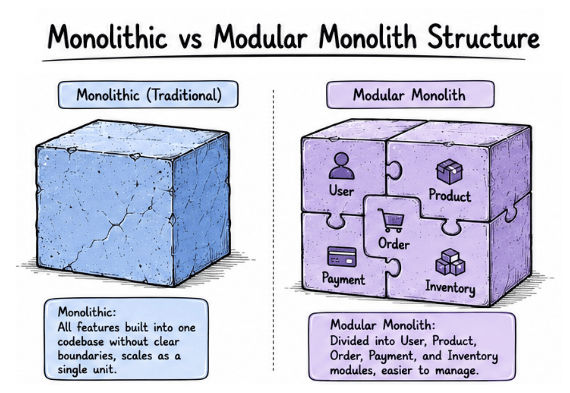
Modular Monolith is an improved version of the traditional Monolithic Architecture. The application is still built and deployed as a single application, but its code is organized into separate modules.
Each module has a specific responsibility and manages its own business logic. This makes the application easier to understand, maintain, and extend as it grows.
Simply put, a Modular Monolith is a single application that is divided into well-organized modules.
In a Modular Monolith, the application is divided into different modules based on business functions.
For example, an e-commerce application may include:
User Module
Product Module
Order Module
Payment Module
Inventory Module
Each module handles its own functionality and communicates with other modules through well-defined interfaces. Although the modules are separated logically, they are still deployed together as a single application.
Keeps the code organized and easier to manage.
Easier to maintain than a traditional monolithic application.
Allows different teams to work on separate modules.
Makes testing and debugging simpler.
Provides a smoother path to Microservices in the future.
The entire application is still deployed as one unit.
Individual modules cannot be scaled independently.
A failure in one module can affect the whole application.
Designing clear module boundaries requires careful planning.
Layered Architecture, also known as N-Tier Architecture, is a software architecture style that divides an application into multiple layers. Each layer has a specific responsibility and communicates only with the layer directly above or below it.
Simply put, Layered Architecture organizes an application into separate layers, where each layer is responsible for a specific task.
This architecture is commonly used in:
Enterprise applications
Business software
Web applications
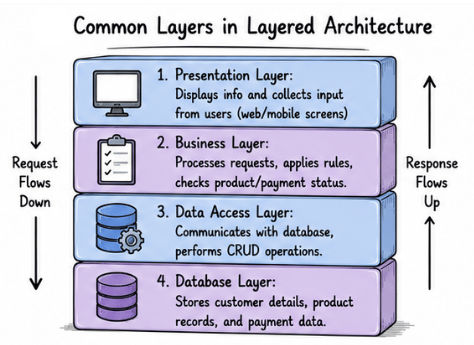
A Layered Architecture separates an application into different layers, with each layer handling a specific part of the application.
The most common layers are:
Presentation Layer
The Presentation Layer is the part users interact with. It displays information, receives user input, and sends requests to the Business Logic Layer.
Examples include web pages, mobile app screens, and desktop applications.
Business Logic Layer
The Business Logic Layer contains the application's business rules. It processes user requests, performs calculations, validates data, and decides how the application should behave.
Data Access Layer
The Data Access Layer acts as a bridge between the application and the database. It retrieves, updates, and stores data without exposing database operations to other layers.
Database Layer
The Database Layer stores all application data, such as user accounts, products, orders, and transaction records.
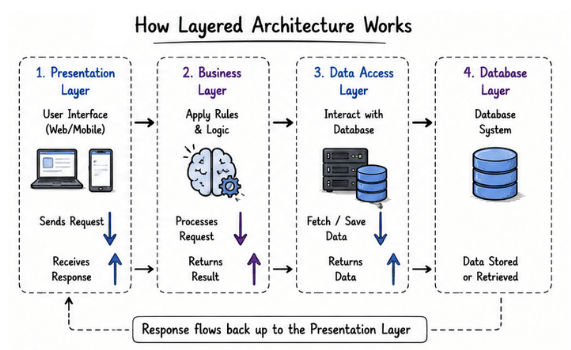
Consider an online banking application.
When a customer transfers money:
The Presentation Layer receives the request.
The Business Logic Layer validates the transaction.
The Data Access Layer updates the account information.
The Database Layer stores the updated records.
Each layer performs its own responsibility, making the application easier to manage and maintain.
Easy to understand and develop.
Keeps responsibilities separated.
Easier to test and maintain.
Changes in one layer usually have minimal impact on other layers.
Suitable for business and enterprise applications.
Adding too many layers can increase complexity.
Requests must pass through multiple layers, which can affect performance.
Poor layer design can create unnecessary dependencies between layers.
Service-Oriented Architecture (SOA) is a software architecture style where an application is divided into multiple independent services. Each service is responsible for a specific business function and communicates with other services using APIs or messaging systems.
Simply put, SOA divides a large application into separate services that work together to complete business tasks.
Unlike Monolithic Architecture, where all features are part of a single application, SOA separates business functions into reusable services. This makes large applications easier to manage and expand.
SOA is commonly used in:
Enterprise applications
Banking systems
Healthcare platforms
Large business software
In SOA, the application is divided into multiple services, and each service performs a specific task.
The basic process works like this:
A user sends a request.
The request is forwarded to the required service.
The service processes the request.
If needed, it communicates with other services.
The final response is returned to the user.
Consider an online banking application.
The application may include services such as:
Customer Service
Account Service
Payment Service
Loan Service
Notification Service
When a customer transfers money, the Account Service verifies the account, the Payment Service processes the transaction, and the Notification Service sends a confirmation message. Together, these services complete the request.
Services can be reused across different applications.
Makes large applications easier to maintain.
Different teams can work on different services independently.
New services can be added without changing the entire application.
Supports business growth more easily than a monolithic application.
More complex to design and manage.
Service communication can increase network overhead.
Testing becomes more difficult because multiple services work together.
Requires additional tools for monitoring, security, and service management.
Feature | Monolithic Architecture | Modular Monolith |
|---|---|---|
Application Structure | All features are built into one application without clear module boundaries. | The application is divided into separate modules, but still runs as one application. |
Code Organization | The codebase can become difficult to manage as the application grows. | Features are organized into well-defined modules, making the code easier to manage. |
Maintenance | Maintenance becomes harder as the application becomes larger. | Easier to maintain because each module has a specific responsibility. |
Deployment | The entire application is deployed as a single unit. | All modules are deployed together as a single application. |
Scalability | Individual features cannot be scaled independently. | Modules are better organized, but the complete application still scales as one unit. |
Best For | Small to medium-sized applications with simple requirements. | Growing applications that need better code organization without adopting microservices. |
Feature | Layered Architecture | Service-Oriented Architecture (SOA) |
|---|---|---|
Structure | Organizes an application into multiple layers. | Divides an application into multiple independent services. |
Communication | Layers communicate with the layer directly above or below them. | Services communicate with each other using APIs or messaging systems. |
Deployment | The entire application is deployed as one unit. | Services can be developed and deployed independently. |
Scalability | The complete application is usually scaled together. | Individual services can be scaled independently. |
Complexity | Easier to design and manage. | More complex because multiple services need to work together. |
Best For | Business applications with a clear separation of responsibilities. | Large enterprise applications that need flexibility and reusable services. |
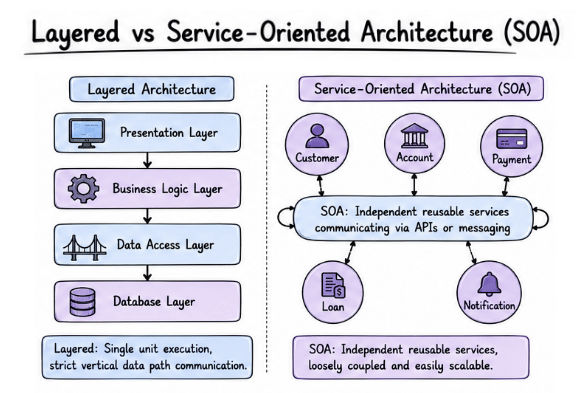
Choosing the right software architecture is one of the most important decisions in software development. It affects your application's performance, scalability, maintenance, and future growth.
There is no single architecture that works for every project. The best choice depends on your application's requirements and business goals.
Application Size: Small applications usually work well with simpler architectures, while large applications often need more structured or service-based architectures.
Expected Traffic: If your application is expected to handle a large number of users, choose an architecture that can scale as demand grows.
Development Team Size: Small teams often prefer simple architectures that are easier to build and maintain. Large teams can manage complex architectures with multiple modules or services.
Business Requirements: The architecture should support your business needs. For example, a banking application focuses on security and reliability, while a startup may prioritize faster development and quick releases.
Future Growth: If you expect the application to grow over time, choose an architecture that makes it easier to add new features and handle increasing traffic.
There is no perfect architecture. The right choice is the one that best fits your application's current needs while supporting future growth.
The following table can help you choose a software architecture based on your application's requirements.
Application Requirement | Recommended Architecture |
|---|---|
Small application with simple features | Monolithic Architecture |
Growing application that needs better code organization | Modular Monolith |
Business application with clear separation of responsibilities | Layered (N-Tier) Architecture |
Large enterprise application with reusable services | Service-Oriented Architecture (SOA) |
Application with multiple independent services | Microservices Architecture |
Application that processes real-time events | Event-Driven Architecture |
Software architecture is the foundation of every software application. It defines how different parts of an application are organized, communicate, and work together.
In this article, you learned:
Software Architecture is the blueprint of a software application.
A good architecture makes applications easier to maintain, scale, secure, and improve over time.
Monolithic Architecture keeps the entire application in a single unit.
Modular Monolith organizes a monolithic application into well-defined modules.
Layered (N-Tier) Architecture separates an application into layers, where each layer has a specific responsibility.
Service-Oriented Architecture (SOA) divides a large application into reusable and independent services.
Choosing the right architecture depends on your application's size, business requirements, scalability needs, team size, and future growth.
There is no single software architecture that is best for every project. The right choice is the one that matches your application's requirements and supports its future growth. Understanding these software architecture fundamentals will help you build applications that are easier to develop, maintain, and scale.
