
Durgesh Tiwari
Author
When you start learning programming, your main goal is to write code that works. As your projects grow, writing working code is no longer enough. Your code should also be easy to read, maintain, and update.
This is where Software Design Principles come in. They help developers organize code so applications remain clean, flexible, and easy to maintain as they grow.
Whether you're using Java, Python, JavaScript, C#, Go, or PHP, these principles can help you write better software.
Software design principles are a collection of best practices that help developers design well-structured software. They are not strict rules but practical guidelines that help you make better design decisions while building applications.
By following these principles, you can organize your code into smaller, reusable, and independent components, making applications easier to develop, maintain, and scale.
As software grows, new features are added, bugs are fixed, and business requirements change. Without good design, the code can quickly become difficult to understand and maintain.
Following software design principles helps you:
Write cleaner and more organized code.
Make applications easier to maintain.
Reuse existing code instead of writing the same logic again.
Build software that can grow more easily.
Test individual components independently.
Collaborate more effectively with other developers.
Modern software applications perform many tasks, such as user authentication, product management, payment processing, and sending notifications. If all these responsibilities are placed in a single class or file, the code quickly becomes difficult to understand and maintain.
Separation of Concerns (SoC) is a software design principle that divides an application into smaller, independent components. Each component is responsible for one specific task.
In simple words, every component should do one job and do it well.
Many beginners place all application logic in one file because it works for small projects. As the application grows, however, this approach becomes difficult to maintain.
For example, one component might handle:
User Login
Product Display
Payment Processing
Order Management
Email Notifications
Over time, this makes the code:
Difficult to maintain
Harder to debug
More difficult to extend
More likely to introduce bugs when changes are made
A better approach is to separate each responsibility into its own component.
E-Commerce Application

        |
--------------------------
|         |              |
User    Order        Payment
Service  Service      Service
           |
     Notification Service
Each service focuses on a single responsibility.
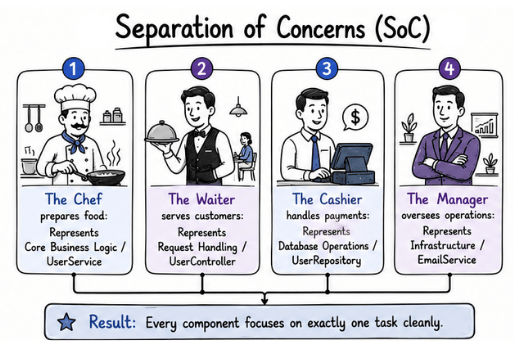
Think about a restaurant.
The Chef prepares food.
The Waiter serves customers.
The Cashier handles payments.
The Manager oversees operations.
Because everyone has a specific responsibility, the restaurant runs smoothly. Software applications work the same way. When every component focuses on one task, the system becomes easier to manage.
Without Separation of Concerns
UserController

- Validate User
- Save User
- Send Email
- Generate Reports
The UserController is responsible for multiple unrelated tasks.
With Separation of Concerns
UserController
      |
UserService
      |
UserRepository

EmailService
Here, each component has a single responsibility:
UserController handles user requests.
UserService contains business logic.
UserRepository manages database operations.
EmailService sends emails.
Easier maintenance
Better code readability
Easier testing
Better scalability
Improved team collaboration
As software projects grow, managing everything in one place becomes difficult. The code becomes larger, finding bugs takes more time, and adding new features becomes harder.
Modularity is a software design principle that divides a large application into smaller, independent modules. Each module is responsible for one specific feature or functionality.
In simple words, instead of building one large application, you divide it into smaller modules, where each module handles a specific task.
Imagine you're building an online banking application. Instead of placing all the code in one file, you organize it into different modules.
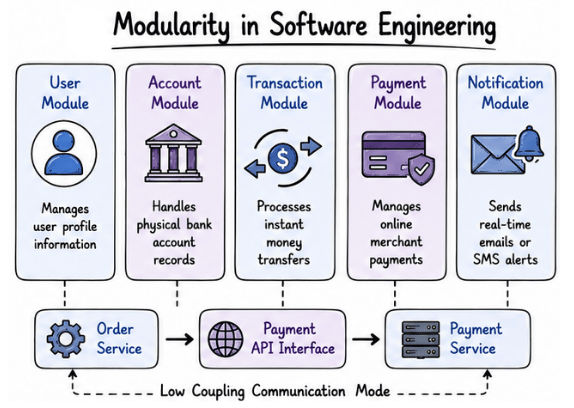
Banking System

├── User Module
├── Account Module
├── Transaction Module
├── Payment Module
└── Notification Module
Each module has a specific responsibility.
User Module manages user information.
Account Module handles bank accounts.
Transaction Module processes money transfers.
Payment Module manages payments.
Notification Module sends emails or SMS alerts.
Organizing the application this way makes it easier to understand, maintain, test, and expand.
A well-designed module should have high cohesion and low coupling.
High cohesion means everything inside a module is related to the same responsibility.
Payment Module

- Process Payment
- Refund Payment
- Payment History
All these tasks belong to the payment feature, so the module has a single responsibility.
A poorly designed module mixes unrelated tasks.
Payment Module

- Process Payment
- User Login
- Email Sending
- Report Generation
Mixing different responsibilities makes the module harder to understand, test, and maintain.
Low coupling means modules should have as little dependency on each other as possible.
A tightly coupled design looks like this:
Order Service
      |
Payment Database
Here, the Order Service directly depends on the payment database. If the payment system changes, the Order Service may also need to change.
A loosely coupled design communicates through an interface or API.
Order Service
      |
Payment API
      |
Payment Service
Now, the Order Service communicates with the Payment Service through the Payment API instead of accessing the database directly. This makes the application more flexible and easier to maintain.
Think about your smartphone.
It has different apps such as:
Camera
Maps
Music
Messages
Each app performs its own task independently.
For example, updating the Maps app doesn't affect the Camera app. Software modules work the same way—changes in one module usually don't affect the others.
Easier maintenance
Better code organization
Easier testing
Better code reusability
Better scalability
Faster development
Better team collaboration
When building software, it's important to protect data from unauthorized or invalid changes. If every part of the application can directly access and modify an object's data, maintaining security and data integrity becomes difficult.
Encapsulation is a software design principle that keeps data and the methods that work on that data together in a single class. It also restricts direct access to the data from outside the class.
In simple words, encapsulation protects an object's data and allows access only through controlled methods.
Without encapsulation, different parts of the application can directly modify important data, which may lead to bugs, invalid values, and security issues.
For example, in a banking application, directly changing the account balance like this is not a good practice:
account.balance = 100000;Instead, the balance should be updated through methods such as:
deposit()
withdraw()
getBalance()
These methods validate the request before updating the data, making the application more secure and reliable.
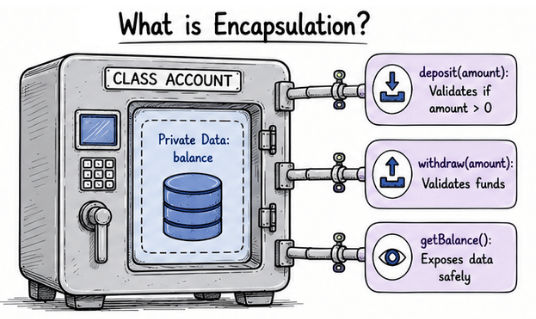
Think about an ATM machine.
You cannot directly change your bank balance. Instead, you can only perform actions such as:
Enter PIN
Withdraw Money
Check Balance
The ATM performs all the internal banking operations while allowing only authorized actions.
Encapsulation works in the same way by hiding data and providing controlled access.
Without Encapsulation
class BankAccount {
    public double balance;
}
Since balance is public, any part of the application can modify it directly.
With Encapsulation
class BankAccount {

    private double balance;

    public void deposit(double amount) {
        if (amount > 0) {
            balance += amount;
        }
    }

    public double getBalance() {
        return balance;
    }
}
Here, balance is private and can only be accessed through methods like deposit() and getBalance(). This ensures that the data is modified only through validated operations.
Protects important data
Improves application security
Makes code easier to maintain
Keeps code organized and readable
Prevents invalid data changes
Many software features perform complex operations behind the scenes, but users don't need to understand those details to use them.
Abstraction is a software design principle that hides unnecessary implementation details and exposes only the functionality that users or developers need.
In simple words, abstraction focuses on what a system does instead of how it works internally.
Applications often perform multiple operations internally while exposing only a simple interface to users.
For example, when you click the Login button on a website, the application automatically performs tasks such as:
Database queries
Password encryption
User verification
Session creation
Token generation
Users simply click Login without needing to understand how these operations are performed.
By hiding implementation details, abstraction reduces complexity and makes software easier to use.
Think about driving a car.
You only use:
Steering Wheel
Accelerator
Brake
You don't need to understand how the engine or transmission works. The car hides the complex implementation and provides simple controls.
Software applications work in the same way by hiding unnecessary complexity and exposing only the required functionality.
Suppose an application supports multiple payment methods.
Payment

     |
-----------------------
|         |            |
Card      UPI      Bank Transfer
The application simply calls:
makePayment();Each payment method provides its own implementation, while the rest of the application interacts through the same interface.
Reduces code complexity
Makes applications easier to use
Improves code flexibility
Encourages code reusability
Simplifies maintenance
Encapsulation | Abstraction |
|---|---|
Protects an object's data from unauthorized access. | Hides complex implementation details from users. |
Controls how data is accessed and modified using methods. | Shows only the essential features while hiding internal working. |
Focuses on data security and controlled access. | Focuses on simplifying the user or developer experience. |
Commonly implemented using private variables and access modifiers. | Commonly implemented using interfaces and abstract classes. |
Prevents direct modification of internal data. | Allows users to use a feature without knowing how it works internally. |
When designing software, two important concepts help create clean, flexible, and maintainable applications: Coupling and Cohesion.
A well-designed software system aims for:
Low Coupling
High Cohesion
Together, these concepts make applications easier to maintain, test, and scale.
Coupling describes how much one module or component depends on another.
In simple words, coupling measures how dependent one part of the application is on another.
The less dependency between modules, the better the software design.
High coupling means one module is directly connected to another module's implementation.
Order Service
      |
Payment Database
Here, the Order Service directly depends on the payment database. If the payment system changes, the Order Service may also need to change, making the application harder to maintain and update.
Difficult maintenance
Harder testing
Changes in one module can affect other modules
Less flexibility for future updates
Low coupling means modules communicate through well-defined interfaces or APIs instead of depending directly on each other.
Order Service
      |
Payment API
      |
Payment Service
Here, the Order Service communicates with the Payment Service through a Payment API. It doesn't need to know how the payment system works internally, making the application more flexible and easier to maintain.
Easier maintenance
Better scalability
Easier testing
Greater flexibility
Independent component updates
Cleaner and more maintainable code
Cohesion measures how closely related the responsibilities inside a module or class are.
In simple words, a module should focus on one specific task instead of handling unrelated responsibilities.
The more closely related the responsibilities are, the higher the cohesion. High cohesion makes software easier to understand, maintain, and reuse.
A module with high cohesion contains only related functionality.
Authentication Service

- Login
- Logout
- Password Reset
- Token Generation
All these tasks are related to user authentication, so the module has a single, well-defined responsibility.
A module with low cohesion handles multiple unrelated tasks.
User Service

- Login
- Payment Processing
- Email Sending
- Report Generation
This module mixes different responsibilities, making the code harder to understand, test, and maintain.
Instead, each responsibility should be moved to its own module, such as Payment Service, Email Service, and Report Service.
Think about a company.
Different departments handle different responsibilities.
HR Department manages employees.
Finance Department manages accounts.
Sales Department manages customers and sales.
Since each department focuses on its own responsibility, the company operates more efficiently. Software modules work in the same way.
Cleaner and more organized code
Easier maintenance
Simpler testing and debugging
Better code reusability
Easier to understand and extend
As software applications grow, they become more complex. New features, changing requirements, and regular updates can make the code difficult to maintain if it is not properly designed.
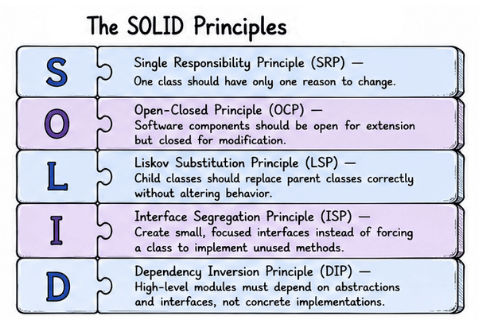
SOLID is a collection of five software design principles that help developers write code that is easier to maintain, extend, test, and understand.
Letter | Principle | Purpose |
|---|---|---|
S | Single Responsibility Principle (SRP) | One class should have one responsibility |
O | Open-Closed Principle (OCP) | Extend behavior without modifying existing code |
L | Liskov Substitution Principle (LSP) | Child classes should replace parent classes correctly |
I | Interface Segregation Principle (ISP) | Use small, focused interfaces |
D | Dependency Inversion Principle (DIP) | Depend on abstractions, not implementations |
The Single Responsibility Principle (SRP) states:
A class should have only one responsibility and only one reason to change.
In simple words, a class should focus on one specific job instead of handling multiple unrelated tasks.
A common mistake beginners make is putting too much logic into one class.
For example, an Employee class might handle:
Employee information
Salary calculation
Report generation
Email sending
When different features change, the same class must be updated repeatedly. Over time, it becomes larger, more difficult to understand, and harder to maintain.
Each responsibility should be placed in its own class.
class Employee {

    saveEmployee();
    calculateSalary();
    generateReport();
    sendEmail();

}
This class handles multiple unrelated tasks.
Employee
     |
------------------------------
|          |                |
Salary   Report         Email
Service  Service        Service
Each class has a single responsibility.
Employee stores employee information.
SalaryService calculates salaries.
ReportService generates reports.
EmailService sends emails.
If the salary calculation changes, only SalaryService needs to be updated.
Think about a restaurant.
Chef prepares food.
Waiter serves customers.
Cashier handles payments.
Manager manages operations.
Since everyone focuses on a specific job, the restaurant runs efficiently.
Cleaner and more organized code
Easier maintenance
Better code readability
Simpler testing
Lower code complexity
Better code reusability
Apply SRP when you are:
Designing classes
Writing business logic
Building backend services
Developing large applications
Before adding new responsibilities to a class, ask yourself:
"Does this class have more than one reason to change?"
If the answer is Yes, the class should probably be divided into smaller, focused classes.
The Open-Closed Principle (OCP) states:
Software components should be open for extension but closed for modification.
In simple words, you should be able to add new features without changing existing, working code.
Instead of modifying existing code whenever requirements change, extend the application by creating new classes or components.
Software requirements change over time. As an application grows, you may need to add new features such as:
A new payment method
A new notification service
A new discount type
A new shipping option
If you modify existing code whenever a new feature is added, the application becomes harder to maintain and the chances of introducing bugs increase.
The Open-Closed Principle allows new functionality to be added without affecting existing code.
class Payment {

    processPayment(String type) {

        if(type == "UPI") {

        } else if(type == "CARD") {

        } else if(type == "PAYPAL") {

        }

    }

}
This design has several problems:
The class keeps growing.
Existing code must be modified for every new payment method.
Testing becomes more difficult.
Payment Interface
        |
--------------------------------
|             |               |
UPI        Card          PayPal
Payment    Payment       Payment
To support another payment method, simply create a new class that implements the Payment Interface. The existing code remains unchanged.
Think about your smartphone.
You can add new functionality by:
Installing apps
Connecting accessories
Using new services
The operating system continues to work without being rewritten whenever something new is added.
Easier to add new features
Reduces the risk of bugs
Easier maintenance
Better scalability
More flexible software design
Apply OCP when you are:
Building applications with changing requirements
Designing reusable components
Creating frameworks or libraries
Developing large software systems
Whenever possible, design software so new features can be added without modifying existing code.
The Liskov Substitution Principle (LSP) states:
Objects of a child class should be able to replace objects of the parent class without changing the expected behavior of the program.
In simple words, if one class inherits from another, it should behave the way the parent class is expected to behave.
Inheritance helps developers reuse code, but it should only be used when there is a true "is-a" relationship between the parent and child classes.
If a child class cannot perform the behavior expected from its parent, it can lead to bugs and poor software design.
The Liskov Substitution Principle helps create reliable inheritance hierarchies where child classes can safely replace their parent classes.
Suppose we create a parent class:
Bird

   fly()
Now we create:
Penguin extends BirdThe problem is that penguins cannot fly.
If the application calls:
Penguin.fly();the design breaks because the child class cannot perform the behavior expected from the parent class.
Bird
   |
-------------------------
|                       |
FlyingBird         NonFlyingBird
|                       |
Eagle              Penguin
Sparrow
Each class now represents the correct behavior.
FlyingBird represents birds that can fly.
NonFlyingBird represents birds that cannot fly.
This creates a more reliable inheritance hierarchy.
Imagine an online payment system.
Every payment method supports:
processPayment()Whether the payment is made using UPI, Credit Card, or PayPal, every payment class should process it correctly.
The application can use any payment method without requiring special handling.
Better inheritance design
Improves code reliability
Reduces runtime errors
Easier maintenance
Supports scalable object-oriented design
Apply LSP when you are:
Working with inheritance
Using polymorphism
Designing parent-child class relationships
Building object-oriented applications
Before creating an inheritance relationship, ask yourself:
Can this child class replace the parent class without breaking the application?
If the answer is No, redesign the inheritance hierarchy.
The Interface Segregation Principle (ISP) states:
A class should not be forced to implement methods it does not use.
In simple words, instead of creating one large interface, create multiple small and focused interfaces.
This allows each class to implement only the methods it actually needs.
A common mistake developers make is creating one large interface for different types of classes.
As the application grows, some classes are forced to implement methods that are not relevant to them. This adds unnecessary code, increases complexity, and makes the application harder to maintain.
The Interface Segregation Principle solves this problem by dividing large interfaces into smaller, purpose-specific interfaces.
Suppose we create a single interface for all workers.
interface Worker {

    work();
    eat();
    attendMeeting();

}
Now consider two different workers.
Human Worker
work()
eat()
attendMeeting()
Robot Worker
work()
eat()
attendMeeting()
A robot can work, but it doesn't eat or attend meetings. Even so, it is forced to implement these methods, which violates the Interface Segregation Principle.
Workable
---------
work()
Eatable
--------
eat()
MeetingParticipant
------------------
attendMeeting()
Now each class implements only the interfaces it needs.
Human
 ├── Workable
 ├── Eatable
 └── MeetingParticipant

Robot
 └── Workable
This makes the design cleaner, more flexible, and easier to maintain.
Think about the permissions requested by mobile apps.
A Camera App requests camera access.
A Maps App requests location access.
A Music App requests storage access.
Each app requests only the permissions it actually needs. Software interfaces should follow the same approach.
Cleaner interfaces
Reduces unnecessary dependencies
Better flexibility
Easier testing
Easier maintenance
Better code reusability
Apply ISP when you are:
Designing interfaces
Building APIs
Creating reusable libraries
Developing large applications
Before creating an interface, ask yourself:
Does every class implementing this interface really need every method?
If the answer is No, divide the interface into smaller, focused interfaces.
The Dependency Inversion Principle (DIP) is the fifth and final principle of SOLID. It states that:
High-level modules should not depend on low-level modules. Both should depend on abstractions.
In simple words, depend on interfaces instead of concrete implementations.
This allows your business logic to work independently of specific technologies or services, making the application easier to maintain and extend.
To understand DIP, let's first look at the two types of modules used in software development.
High-Level Modules
These contain the business logic of the application.
Examples:
Order Service
User Management
Payment Processing
Low-Level Modules
These handle implementation details.
Examples:
MySQL Database
Email Service
Payment Gateway
If a high-level module directly depends on a low-level module, changing the implementation may also require changes in the business logic. DIP avoids this problem by introducing a common abstraction.
Suppose an order system directly uses the Stripe payment service.
class OrderService {

    PaymentGateway payment = new StripePayment();

}
If the company switches from Stripe to PayPal, the OrderService must also be modified.
This creates tight coupling and makes the code harder to maintain.
A better approach is to introduce a common interface.
Payment Interface
        |
----------------------------
|            |             |
Stripe     PayPal        UPI
Payment    Payment      Payment
Now the Order Service depends only on the interface.
Order Service
        |
Payment Interface
To support another payment provider, simply create a new implementation of the Payment Interface. The business logic remains unchanged.
Think about charging your smartphone.
Your phone doesn't depend on a specific charger brand. It depends on a standard USB Type-C port.
As long as the charger supports USB Type-C, it works with your phone.
Software should follow the same approach by depending on a common interface instead of a specific implementation.
Reduces tight coupling
Easier maintenance
Simplifies testing with mock objects
Better flexibility
Easier to replace implementations
Supports scalable software design
Apply DIP when you are:
Building enterprise applications
Developing backend services
Using dependency injection
Designing scalable software
Working with multiple implementations
Many popular frameworks use this principle, including:
Spring Framework
Angular Dependency Injection
.NET Dependency Injection
Besides the SOLID principles, developers also follow a few simple design principles that help keep code clean, reusable, and easy to maintain.
The three most popular principles are:
DRY (Don't Repeat Yourself)
KISS (Keep It Simple)
YAGNI (You Aren't Gonna Need It)
Let's understand each one.
The DRY (Don't Repeat Yourself) Principle states:
Every piece of knowledge or logic should have a single representation within a system.
In simple words, don't write the same code multiple times. Write it once and reuse it wherever it's needed.
Instead of copying the same logic into different parts of your application, place it in a reusable function, class, or module.
Copying and pasting code may save time in the beginning, but it creates problems as the application grows.
If the same logic exists in multiple places, every change must be made in each copy. Missing even one update can lead to bugs and inconsistent results.
Following the DRY Principle keeps your code easier to maintain and reduces duplicate code.
Imagine an e-commerce application where discount calculation is written separately in:
Product Page
Shopping Cart
Checkout Page
If the discount policy changes, developers must update the logic in all three places.
This can lead to:
Duplicate code
Bugs
Inconsistent results
More maintenance work
A better approach is to create one reusable function.
calculateDiscount()Then use the same function wherever it's needed.
Product Page
      |
Shopping Cart
      |
Checkout Page
      |
calculateDiscount()
Now, any change to the discount logic is made in one place, making the application easier to maintain.
Think about a company's employee records.
Instead of storing the same employee information separately in HR, Payroll, and Attendance, all departments use one central employee database.
Software should follow the same approach by keeping shared logic in one place.
Reduces duplicate code
Easier maintenance
Faster development
Fewer bugs
Better code reusability
Improved readability
Apply the DRY Principle when you are:
Writing the same logic in multiple places
Creating reusable functions or classes
Designing software architecture
Building large applications
Tip: Don't overuse DRY. If two pieces of code solve different problems, keeping them separate is often the better design.
The KISS (Keep It Simple) Principle encourages developers to keep their code and software design as simple as possible.
In simple words, don't make a solution more complicated than it needs to be. If a simple solution solves the problem, there's no need to create a complex one.
Simple code is easier to read, understand, test, and maintain.
Many beginners believe that complex code makes them better programmers. In reality, unnecessary complexity makes software harder to understand, debug, and maintain.
The KISS Principle encourages developers to solve problems using the simplest approach that works.
Imagine you're building a simple calculator application.
Overcomplicated Approach
You create multiple classes, interfaces, and inheritance just to add two numbers.
This increases complexity without adding any real value.
Simple Approach
int sum = a + b;This solution is clear, easy to understand, and easy to maintain.
Think about a TV remote.
Most people use only a few buttons, such as:
Power
Volume
Channel
Adding dozens of unnecessary buttons would only make the remote confusing to use.
Software should follow the same idea by keeping things simple and easy to understand.
Easier to understand
Better code readability
Simpler testing and debugging
Easier maintenance
Better team collaboration
Faster development
Apply the KISS Principle when you are:
Designing software architecture
Writing functions and classes
Building APIs
Solving programming problems
Refactoring existing code
Before choosing a solution, ask yourself:
"Is there a simpler way to solve this problem?"
If the answer is Yes, choose the simpler solution.
The YAGNI (You Aren't Gonna Need It) Principle encourages developers to build only the features that are needed today.
In simple words, don't build features based on future assumptions. Build them only when they are actually required.
Adding unnecessary features makes an application more complex, increases development time, and creates extra maintenance work.
Many developers try to prepare for future requirements by adding features that nobody has requested.
Most of these features are never used, but they still increase the size of the codebase and make testing and maintenance more difficult.
The YAGNI Principle helps developers stay focused on current requirements and avoid unnecessary work.
Imagine you're developing an online bookstore.
The current requirement is:
Users can browse and purchase books.
Instead of focusing only on this feature, you also build:
Audiobook support
Subscription plans
Gift cards
Loyalty rewards
Since these features are not needed right now, they only add extra complexity and increase development time.
A better approach is to build the book purchasing feature first and add new features only when they are required.
Think about building a house.
If your family needs three bedrooms, you don't build ten extra bedrooms just because you might need them someday.
You build what you need now and expand the house later if your requirements change.
Software development follows the same approach.
Keeps the codebase smaller
Reduces unnecessary complexity
Speeds up development
Makes maintenance easier
Helps developers focus on current requirements
Reduces unused code
Apply the YAGNI Principle when you are:
Planning new features
Designing software architecture
Building MVPs (Minimum Viable Products)
Developing startup applications
Working on projects with changing requirements
Before adding a feature, ask yourself:
"Do we really need this feature right now?"
If the answer is No, don't build it yet.
Software design principles help you write code that is not only functional but also clean, organized, and easy to maintain.
In this guide, you learned important concepts such as Separation of Concerns, Modularity, Encapsulation, Abstraction, Coupling and Cohesion, SOLID, DRY, KISS, and YAGNI. Together, these principles help you reduce complexity, improve code quality, and build applications that are easier to maintain, test, and scale.
You don't need to apply every principle in every project. Start by understanding each concept and use it whenever it helps simplify your code. With practice, applying these principles will become a natural part of your development process.
Remember, great software isn't created by writing more code—it's created by writing clean, simple, and well-designed code.
