
Durgesh Tiwari
Author
AI agents often need access to external tools and data. For example, an agent may need to search files, query a database, access business software, or call an API.
Connecting every AI application separately to these systems can require a lot of custom integration work.
Model Context Protocol (MCP) helps solve this problem by providing a common standard for these connections.
MCP provides a standardized way for AI applications to connect with external tools and data sources.
MCP stands for Model Context Protocol. It is an open protocol that defines how AI applications can discover and interact with external capabilities.
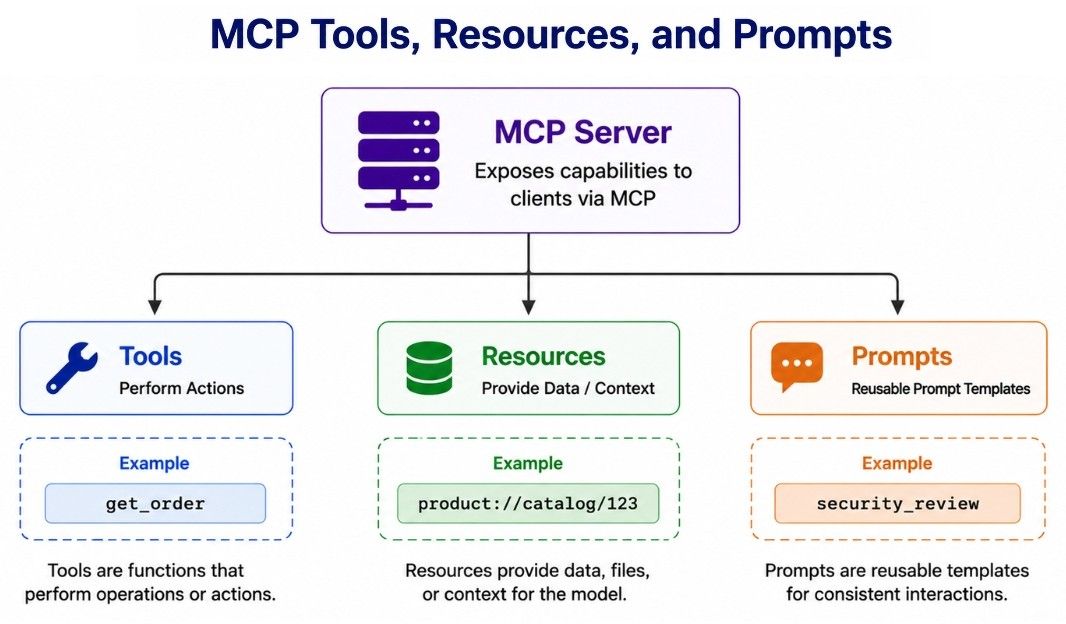
An MCP server can expose three main types of capabilities:
Tools — Actions the AI application can invoke.
Resources — Data or context the application can access.
Prompts — Reusable prompt templates.
For example:
AI Application
      ↓
     MCP
      ↓
  MCP Server
      ↓
Company System
A company could create an MCP server that provides controlled access to its internal systems. MCP-compatible applications can then interact with the capabilities exposed by that server.
MCP does not replace the LLM or make an AI system autonomous. It only provides the protocol used to connect the application with external capabilities.
Consider several AI applications that need access to systems such as:
Git Repository
Database
File System
Project Management System
Internal Documentation
Analytics Platform
Without a common protocol, developers may need to create and maintain application-specific integrations for these systems.
As the number of applications and integrations grows, this becomes harder to manage.
With MCP, external capabilities can be exposed through a common protocol and reused by compatible applications.
AI App A ─┐
AI App B ─┼──→ MCP Servers ──→ External Systems
AI App C ─┘
The main benefits are:
Standardization — A common protocol for exposing capabilities.
Reusability — The same MCP server can support multiple compatible applications.
Interoperability — Different MCP-compatible applications and servers can work together.
Maintainability — Less application-specific integration code to maintain.
MCP does not replace APIs, SDKs, databases, or other backend systems. An MCP server can use these technologies internally and expose selected capabilities through MCP.
In simple terms:
APIs and services provide the actual functionality; MCP provides a standard way for AI applications to access that functionality.
The Model Context Protocol (MCP) architecture follows a host–client–server model.
At a high level:
┌─────────────────────────────┐
│          MCP Host           │
│   AI Application / Agent    │
│                             │
│   ┌──────────┐ ┌──────────┐ │
│   │MCP Client│ │MCP Client│ │
│   └────┬─────┘ └────┬─────┘ │
└────────┼──────────────┼───────┘
         │              │
         │ MCP          │ MCP
         │              │
   ┌─────▼─────┐   ┌────▼──────┐
   │MCP Server │   │MCP Server │
   │ Database  │   │ Dev Tools │
   └─────┬─────┘   └────┬──────┘
         │              │
     Database       External API
The architecture has three main components:
MCP Host — The AI application that the user interacts with. It manages the overall experience and creates MCP clients when it needs to connect to MCP servers.
MCP Client — Maintains the connection with an MCP server and handles communication using the MCP protocol.
MCP Server — Exposes capabilities such as tools, resources, and prompts to connected clients.
A host can connect to multiple MCP servers, allowing one AI application to work with different systems.
For example, one server may provide access to a database while another exposes development tools or external services.
The important point is that MCP is not simply an API connected directly to an LLM. The host manages the AI application, clients manage MCP connections, and servers expose external capabilities through a standardized protocol.
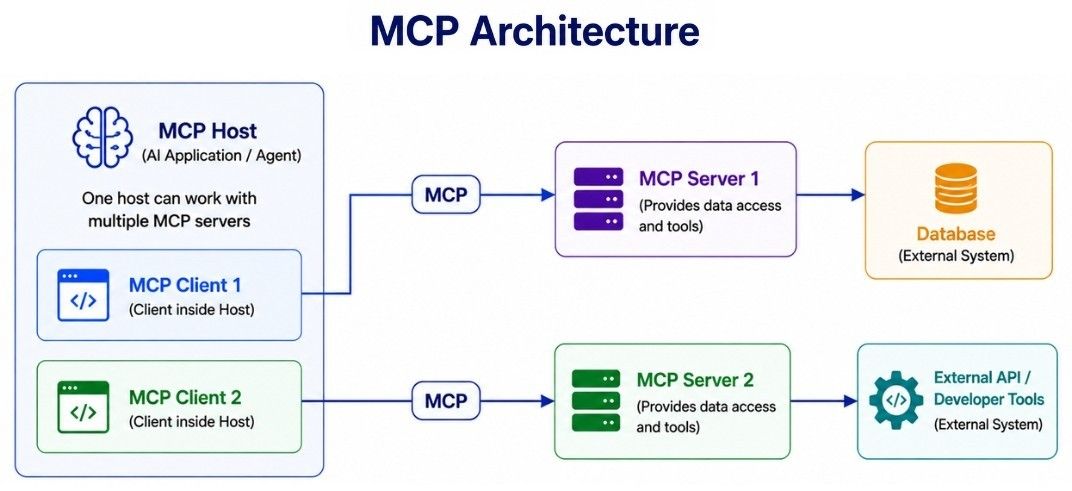
MCP architecture has three main components: host, client, and server. Each has a different responsibility.
The MCP host is the main AI application that the user interacts with.
Examples include:
AI assistants
IDEs and coding assistants
Desktop applications
Custom AI agents
Enterprise AI applications
The host manages the overall application experience and determines how MCP capabilities are used.
An MCP client is the component inside the host that establishes and manages communication with an MCP server.
MCP Host
   ↓
MCP Client
   ↓
MCP Server
The client can:
establish a connection with the server;
discover available capabilities;
send requests to the server;
receive results and make them available to the host.
A host can use multiple MCP clients to connect with multiple MCP servers.
An MCP server exposes capabilities that an AI application can use through MCP.
These capabilities can provide access to systems such as:
databases;
files;
search systems;
business applications;
developer tools;
internal services.
For example:
AI Application
      ↓
MCP Client
      ↓
Database MCP Server
      ↓
   Database
The underlying database does not need to support MCP directly. The MCP server acts as the integration layer, exposing approved database capabilities through MCP while interacting with the database using its normal APIs, drivers, or SDKs.
In short: Host = application, Client = connection, Server = capabilities.
MCP tools are actions or functions that an MCP server exposes for clients to invoke.
For example, an e-commerce MCP server might expose:
search_products
get_order
check_inventory
create_return
Each tool defines its purpose and the inputs it expects.
For example:
Tool: get_order

Input:
order_id

Purpose:
Retrieve information about an order
When an MCP client connects to a server, it can discover the tools available on that server. The AI application can then use an appropriate tool based on the user's request and the host's permissions and policies.
Suppose the user asks:
Where is order 9812?
The flow could be:
User Question
     ↓
AI Application
     ↓
get_order(order_id="9812")
     ↓
MCP Server
     ↓
Order System
     ↓
Tool Result
     ↓
AI Response
Tools allow AI applications and agents to do more than generate text. They can retrieve information, interact with external systems, and perform actions.
However, tool access should be carefully controlled. A read-only tool such as get_order has a very different risk level from an action such as create_return.
For sensitive or irreversible operations, applications should use appropriate permissions, validation, and human approval where required.
MCP resources are data or content that an MCP server makes available for applications to read and use as context.
A resource can represent:
files;
documents;
database records;
configuration data;
application data;
knowledge-base content.
MCP resources are identified using URIs.
For example:
resource://company/policies/returnsThis URI could identify a company's return-policy resource.
A server can also define resource templates for resources whose URI contains parameters. For example:
product://catalog/{product_id}This allows an application to access different products using the same resource pattern.
The main difference is their purpose:
MCP Tools | MCP Resources |
|---|---|
Perform operations | Provide data or context |
Are invoked | Are read |
Often action-oriented | Usually information-oriented |
May cause side effects | Normally represent data |
For example:
Resource:
product://catalog/123
This resource could provide information about product 123.
In comparison:
Tool:
update_product_price
This tool could perform an action that changes the product's price.
So, resources are mainly used to provide context or data, while tools are used to perform operations.
MCP prompts are reusable prompt templates that an MCP server can expose to clients.
For example, a code-review MCP server might provide prompts such as:
security_review
performance_review
The security_review prompt could help review code for security issues, while performance_review could focus on performance problems.
Prompts can also accept arguments, allowing the server to generate a prompt based on provided values.
Conceptually, an MCP server can expose:
MCP Server
   │
   ├── Tools      → Perform operations
   ├── Resources  → Provide data or context
   └── Prompts    → Provide reusable prompt templates
This distinction is useful:
Tool — performs an operation.
Resource — provides data or context.
Prompt — provides a reusable template for model interaction.
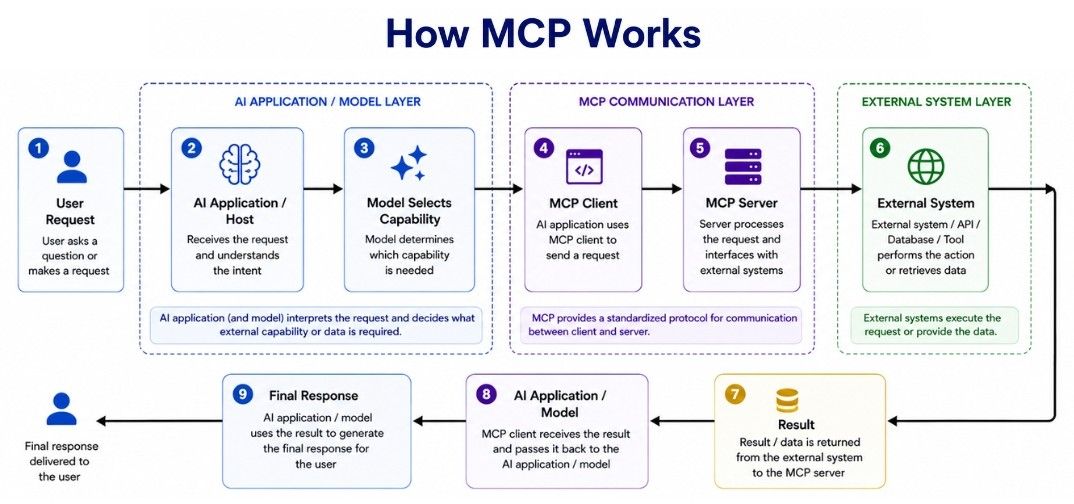
Now let's connect the MCP components together.
Suppose an AI assistant helps developers investigate software failures, and an MCP server exposes a tool for retrieving build logs.
A typical flow is:
User Request
     ↓
AI Application / Host
     ↓
Model determines a tool is needed
     ↓
MCP Client
     ↓
MCP Server
     ↓
External System
     ↓
Tool Result
     ↓
Model
     ↓
Final Response
For example, the user asks:
Find why build 842 failed.
The application may use an MCP tool such as:
get_build_logs(build_id="842")The flow becomes:
User
 ↓
AI Application
 ↓
MCP Client
 ↓
get_build_logs(842)
 ↓
MCP Server
 ↓
CI System
 ↓
Build Logs
 ↓
AI Application
 ↓
Explanation
The MCP server does not need to replace the CI system's existing API. It can call the normal REST API, SDK, or service interface behind the scenes and expose the required operation as an MCP tool.
MCP standardizes the interaction between the MCP client and MCP server, while the underlying system can continue using its existing technology.
An important change arrived with the MCP 2026-07-28 specification.
Earlier MCP versions used an initialization handshake and could maintain protocol-level sessions. The 2026-07-28 specification changed the core protocol to a stateless request/response model.
Each request is now self-describing, and the protocol-level initialize / initialized handshake and Mcp-Session-Id were removed. This makes it easier to route requests across server instances and scale MCP servers using standard infrastructure.
However:
Stateless MCP does not mean the AI application itself must be stateless.
Applications can still maintain conversation state, workflow state, or other application-level state when required. The important difference is that this state is no longer managed through an MCP protocol-level session.
This distinction is useful when reading older MCP tutorials because they may describe the previous session-based architecture.
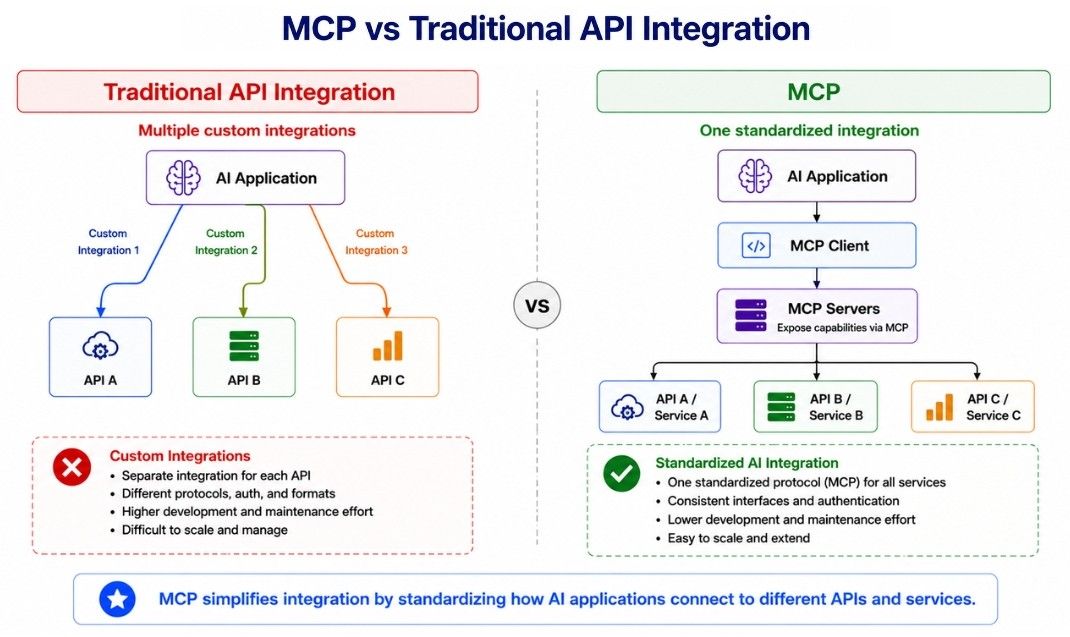
Aspect | Traditional API Integration | MCP |
|---|---|---|
Purpose | Provides a direct interface for one software system to communicate with another service. | Provides a standard protocol for AI applications to connect with external capabilities. |
Integration Style | The application integrates directly with each API. | An MCP client communicates with an MCP server using the MCP protocol. |
Interface | Each API can have its own endpoints, request formats, authentication, and conventions. | MCP defines common protocol concepts and interaction patterns. |
Capability Discovery | Developers usually learn available operations from API documentation or specifications. | Clients can discover capabilities exposed by an MCP server, such as tools, resources, and prompts. |
AI Focus | General-purpose and used by all kinds of software applications. | Designed specifically for connecting AI applications with external tools and data. |
Reusability | Integration code is often written for a particular application and API. | An MCP server can expose capabilities that multiple MCP-compatible applications can use. |
Underlying System | Usually communicates directly with the actual service or backend. | An MCP server can sit in front of existing APIs, SDKs, databases, or services. |
Best Suited For | Applications with fixed, well-known integrations where direct API access is sufficient. | AI applications where standardized, reusable, and discoverable integrations are valuable. |
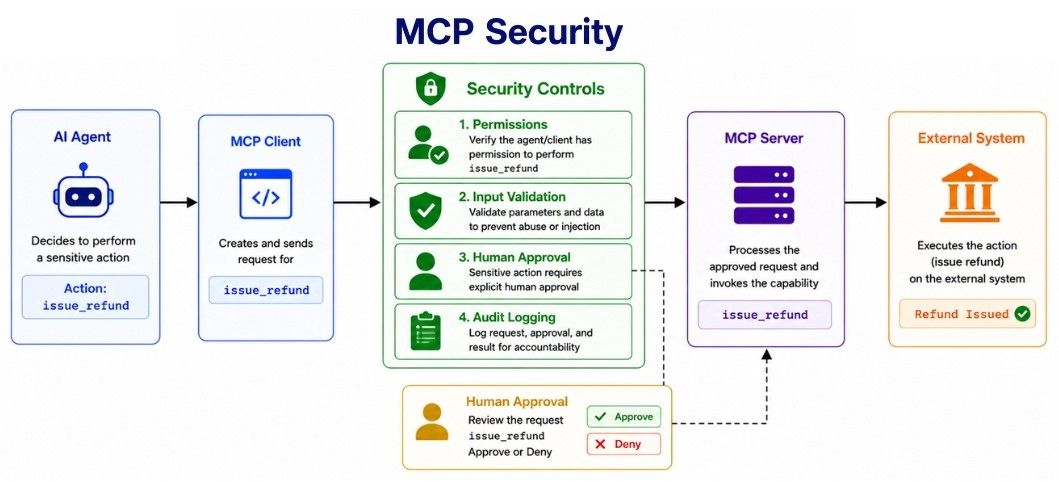
MCP can give AI applications access to real data and actions, so MCP servers must be designed with security in mind.
For example, these tools have very different risk levels:
read_customer
delete_customer
issue_refund
run_shell_command
send_email
A read-only tool should not receive the same permissions as a tool that modifies data or performs sensitive actions.
Give each MCP server and tool only the permissions required for its task.
For example, a reporting server that only reads sales data should not have permission to modify or delete orders.
High-impact actions should not always execute automatically.
For example:
Agent recommends refund
        ↓
User approves
        ↓
Refund tool executes
Actions such as issuing large refunds, deleting data, sending messages, or executing commands may require explicit approval.
An MCP server can expose tools, resources, and prompts to an application. Therefore, servers—especially third-party or remote servers—should not automatically be treated as trusted.
Only connect to servers that have been appropriately reviewed and authorized.
API keys, passwords, access tokens, and other secrets should not be unnecessarily exposed to the model or included directly in prompts.
Authentication and authorization should be handled through appropriate security mechanisms, with credentials scoped to the minimum required access.
Tool arguments generated or influenced by a model should be validated before execution.
Depending on the tool, validation may include:
data types and allowed values;
resource identifiers;
user permissions;
paths and URLs;
input size;
commands and parameters.
This is especially important for tools that can modify data or interact with sensitive systems.
Important MCP operations should be observable and auditable.
For sensitive actions, the system should be able to determine:
who requested the action;
which tool was called;
what relevant arguments were used;
whether approval was required and provided;
whether the operation succeeded or failed.
MCP makes external capabilities accessible to AI applications, but the application and server are still responsible for enforcing permissions, validation, approvals, and other security controls.
MCP is useful when AI applications need standardized access to external data, tools, or services. Common use cases include:
Coding agents can use MCP servers to access:
code repositories;
documentation;
issue trackers;
testing systems;
development tools.
For example, an agent could inspect a repository, retrieve an issue, run an approved test, and use the results to help diagnose a bug.
MCP servers can expose controlled database capabilities instead of giving an AI application unrestricted database access.
For example:
get_customer
find_order
sales_summary
inventory_status
This allows the application to perform specific database operations while keeping access limited to approved capabilities.
Organizations can expose approved information through MCP resources or tools, such as:
company policies;
technical documentation;
product information;
internal knowledge systems.
An AI assistant can use this information as context when answering employee questions.
A customer support agent can use MCP capabilities to access information such as orders, shipping status, customer records, return policies, and support history.
It can then use that information to answer customer questions or perform approved support actions.
Data analysis agents can retrieve information from business systems through MCP, analyze the results, and generate reports or insights.
For example:
User Question
     ↓
AI Agent
     ↓
MCP Tool
     ↓
Business Data
     ↓
Analysis
     ↓
ReportIDEs and coding assistants can connect to MCP servers to access development tools and project-specific context without requiring every capability to use a separate AI-specific integration.
Across these use cases, the basic idea remains the same:
AI Application
      ↓
     MCP
      ↓
External Tools and Data
MCP is especially valuable when the same external capabilities need to be reusable across multiple MCP-compatible AI applications.
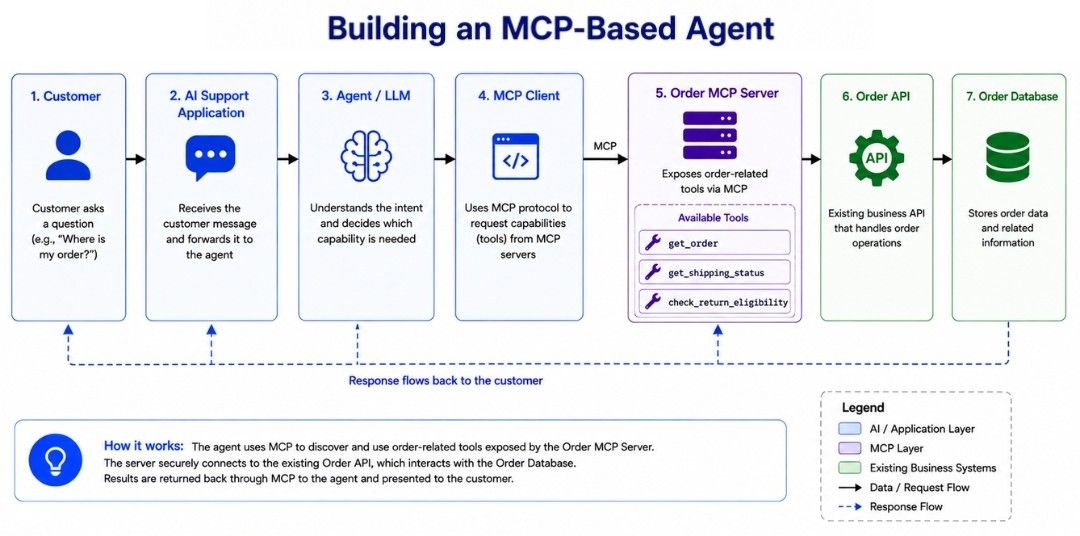
Let's connect the MCP concepts with a simple customer support agent.
Suppose the agent needs to answer questions about customer orders. The company already has an Order API, and an MCP server exposes selected capabilities from that API to the AI application.
Customer
   ↓
AI Support Application
   ↓
Agent / LLM
   ↓
MCP Client
   ↓
Order MCP Server
   ↓
Order API
   ↓
Order Database
The MCP server could expose tools such as:
get_order
get_shipping_status
check_return_eligibility
Suppose the customer asks:
Can I return order 7241?
The application can use the required MCP capabilities:
User Request
     ↓
get_order(7241)
     ↓
Order Information
     ↓
check_return_eligibility(7241)
     ↓
Eligibility Result
     ↓
Agent Response
The MCP server handles communication with the existing Order API, so the AI application can work with the exposed capabilities through the MCP interface instead of depending directly on the API's internal design.
Build the MCP server — Connect it to the existing Order API or backend system.
Expose required capabilities — Make only the tools or resources needed by the application available.
Apply validation and permissions — Control what data and operations each capability can access.
Connect the MCP client — Let the AI application connect to the server and discover its capabilities.
Use the capabilities — The application can invoke appropriate MCP tools and receive their results.
Generate the response — The model uses the returned information to continue the task and answer the user.
The key idea is that MCP provides a standardized connection between the AI application and external capabilities, while the existing API or backend system continues to perform the actual business operations.
Model Context Protocol (MCP) is an open standard that provides a standardized way for AI applications to connect with external tools and data.
MCP architecture consists of three main components:
Host — The AI application the user interacts with.
Client — Communicates with an MCP server.
Server — Exposes capabilities to the application.
An MCP server can expose:
Tools — Perform operations.
Resources — Provide data or context.
Prompts — Provide reusable prompt templates.
MCP does not replace APIs, databases, SDKs, or other backend systems. Instead, an MCP server can expose selected capabilities from these systems through a common AI-facing protocol.
This makes external capabilities easier to discover, reuse, and integrate across MCP-compatible AI applications. Because these capabilities may access real data or perform real actions, appropriate permissions and security controls are still essential.
The simplest way to remember MCP is:
APIs expose the functionality of software services; MCP provides a standard way for AI applications to discover and interact with selected external capabilities.
