
Durgesh Tiwari
Author
AI agents can use tools, interact with external systems, and complete multi-step tasks. But not every action should be fully autonomous.
When a decision involves money, sensitive data, customers, or production systems, human judgment may be required before the agent continues.
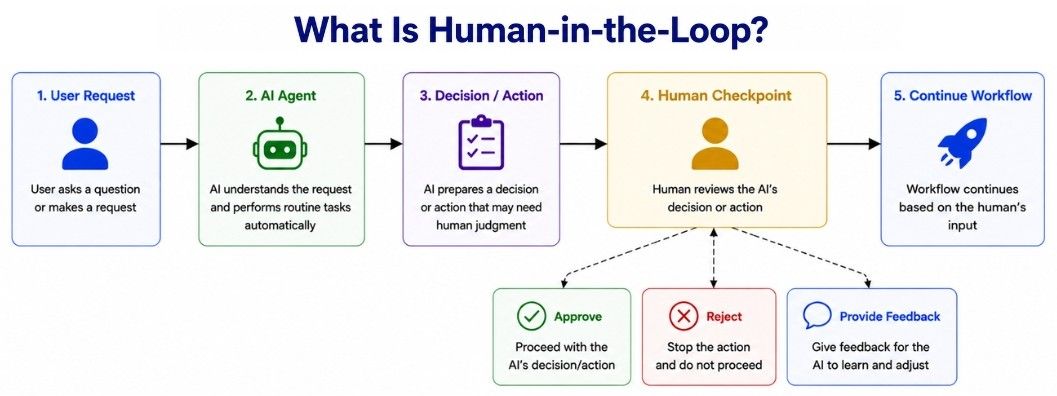
This approach is known as Human-in-the-Loop (HITL). It combines AI automation with human oversight so that agents can handle routine work while people remain involved in important decisions.
Human-in-the-Loop (HITL) is a design approach where human input is introduced at specific checkpoints in an AI agent workflow.
For example, a customer-support agent may automatically check an order, review the refund policy, and determine refund eligibility. If the refund exceeds an allowed limit, the workflow can pause and request human approval.
Customer Request
      ↓
AI Agent
      ↓
Check Order and Policy
      ↓
Approval Required?
   ┌──────┴──────┐
  No            Yes
   ↓             ↓
Continue     Ask Human
The agent handles the routine steps, while the human becomes involved only when required.
AI agents can make mistakes, and the consequences become more serious when they can take actions in real systems.
Human oversight is especially important when an action:
has significant financial impact;
changes or deletes important data;
affects customers or other people;
has legal or compliance implications;
is difficult to reverse;
involves high uncertainty;
affects a production system.
Human review should therefore be placed at high-risk or uncertain decision points, rather than after every agent action.
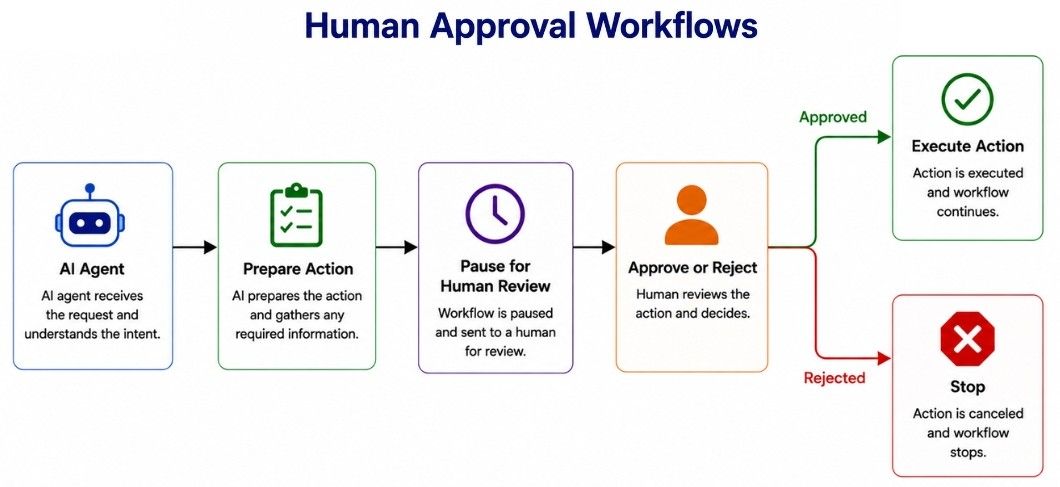
A human approval workflow pauses an AI agent before a specific action and waits for an authorized person to approve or reject it.
The basic pattern is:
Agent Prepares Action
        ↓
Approval Required?
   ┌──────┴──────┐
  No            Yes
   ↓             ↓
Execute        Pause
                 ↓
            Human Review
             ↓       ↓
          Approve  Reject
             ↓       ↓
          Execute   Stop
For example, an AI marketing agent may prepare an email campaign automatically. Before sending it to 100,000 customers, the workflow pauses and presents the proposed action for review:
Action: Send Marketing Campaign
Recipients: 100,000
Campaign: Summer Sale
Subject: Save 20% This Weekend

[Approve]  [Reject]
If approved, the workflow continues and executes the action. If rejected, the action is not performed.
In production systems, approval workflows commonly use a pause-and-resume mechanism. The workflow state is preserved while waiting for a decision, allowing execution to continue from the approval point instead of starting over.
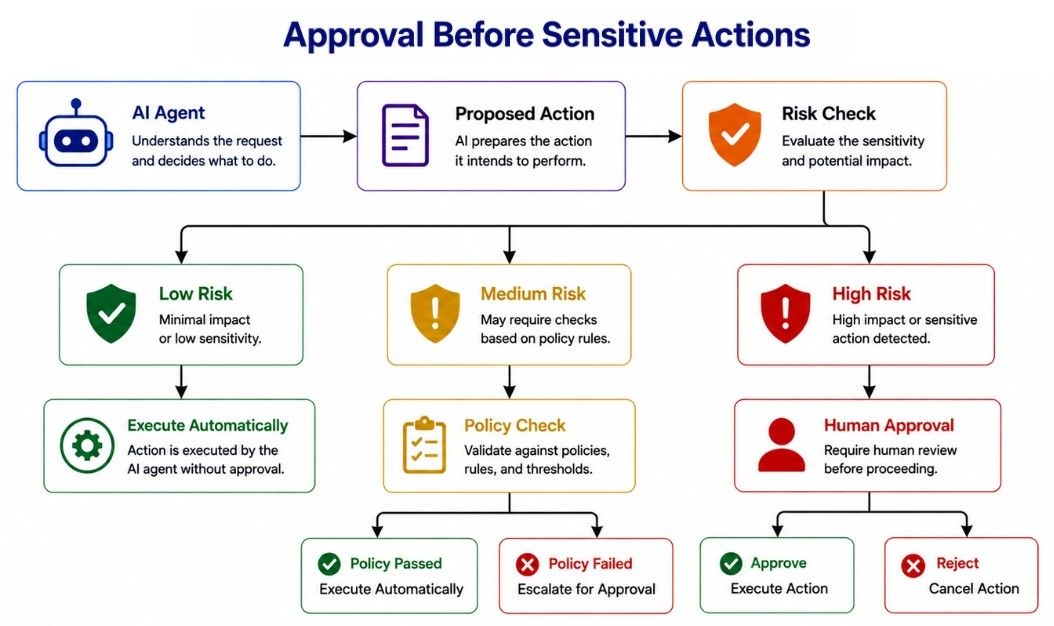
Not every agent action needs human approval. Requiring approval for low-risk tasks such as searching documentation or reading public data would create unnecessary delays.
A better approach is to apply approval based on risk and organizational policy.
Action | Typical Approval |
|---|---|
Search documentation | Usually no |
Read public data | Usually no |
Calculate totals | Usually no |
Read permitted customer data | Depends on policy |
Send external email | Depends on context |
Modify important data | Often yes |
Issue a large refund | Yes |
Delete important files | Yes |
Deploy to production | Yes |
A checkpoint that blocks an action until required approval is received is often called an approval gate.
Agent Requests Action
        ↓
Assess Risk
 ┌──────┼─────────┐
 Low   Medium     High
  ↓      ↓          ↓
Execute Policy   Human
        Check    Approval
Approval rules can also use thresholds. For example:
Refund ≤ $50
→ Automatic

Refund $51–$500
→ Supervisor Approval

Refund > $500
→ Manager Approval
This risk-based approval approach keeps low-risk operations efficient while adding stronger control to sensitive or high-impact actions.
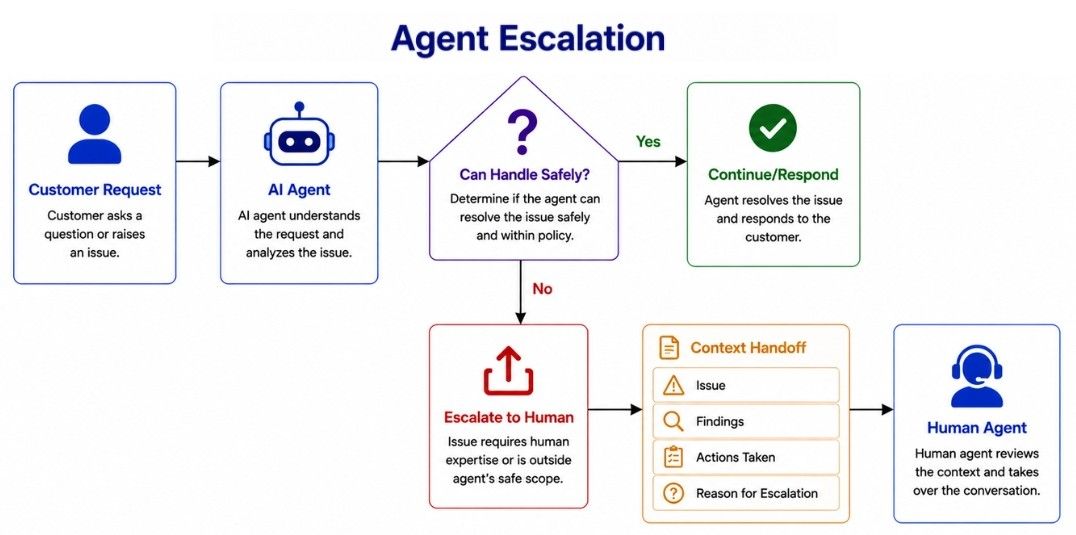
Sometimes an AI agent should stop handling a task and escalate it to a human.
Escalation is different from approval:
Approval: the agent has selected an action but needs permission to execute it.
Escalation: the agent cannot safely or appropriately handle the case, so a human takes over.
For example, a support agent may handle common customer requests automatically:
Customer Request
       ↓
Support Agent
       ↓
Can Handle Safely?
   ┌──────┴──────┐
  Yes            No
   ↓              ↓
Respond      Escalate to Human
An agent may escalate when:
required information is missing;
the request is outside its permissions or capabilities;
the customer asks for a human;
the case is sensitive or requires human judgment;
business rules require human handling.
A good escalation should also pass relevant context to the human.
Issue:
Customer was charged twice.

Agent Findings:
Two transactions were created within 14 seconds.

Actions Taken:
Checked payment history and refund policy.

Reason for Escalation:
Case requires human review.
This allows the human to continue from where the agent stopped instead of investigating the case from the beginning.
Humans can do more than approve or reject an agent's actions. They can also provide feedback that helps the agent improve its current output.
For example, an AI agent creates a report, and the reviewer responds:
The analysis is correct, but compare this quarter
with the same quarter last year.
The workflow sends this feedback back to the agent for revision:
Agent
  ↓
Draft
  ↓
Human Review
  ↓
Feedback
  ↓
Agent Revises
  ↓
Final Result
Human feedback can include:
Correction: Fix incorrect information.
Additional information: Provide context the agent does not have.
Direction: Tell the agent how the result should be improved.
Clarification: Resolve ambiguity before the agent continues.
For example:
Correction:
Use customer ID 742 instead of 724.

Additional Information:
The customer already spoke with the billing team.

Direction:
Compare both pricing plans before recommending one.
Human feedback is especially useful when a task requires judgment, preferences, or business context that cannot be fully captured by predefined rules.
An agent workflow defines how a task moves between AI agents, tools, application logic, and humans.
Instead of giving an agent one large instruction such as:
Research the customer, decide what to do,
update the CRM, send an email, and close the case.
we can break the task into controlled steps:
Receive Request
      ↓
Classify Request
      ↓
Retrieve Customer Data
      ↓
Agent Analysis
      ↓
Proposed Action
      ↓
Risk Check
      ↓
Human Approval if Required
      ↓
Execute Action
      ↓
Verify Result
This gives developers more control over how important decisions and actions are handled.
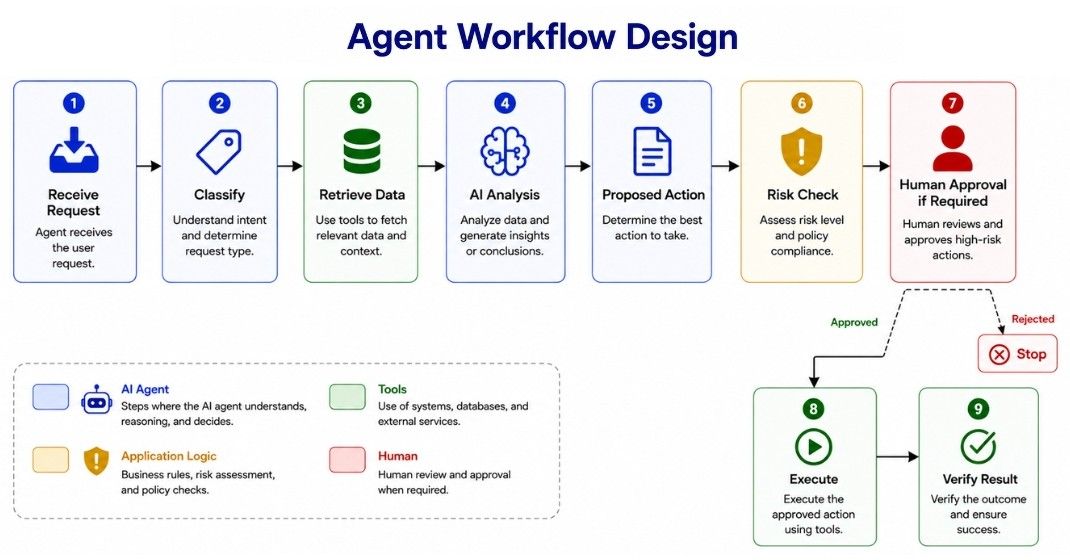
A well-designed agent workflow should answer questions such as:
What can the agent decide?
What should application code decide?
Which tools can the agent use?
When is human involvement required?
What happens if a step fails?
What state needs to be preserved?
How is successful completion determined?
Not every step needs an AI agent. If a decision can be expressed as a clear business rule, deterministic code is usually simpler and more reliable.
For example:
if refund_amount > 500:
    require_manager_approval()
There is no reason to ask an LLM to determine whether 700 > 500.
A practical design principle is to use AI for tasks that require language understanding, reasoning, or handling ambiguity, and deterministic code for clear rules and predictable operations.
A sequential workflow executes tasks in a defined order, where each step typically uses the output of the previous step.
Step A
  ↓
Step B
  ↓
Step C
  ↓
Step D
For example, a content workflow may look like this:
Research
   ↓
Write Draft
   ↓
Review
   ↓
Human Approval
   ↓
Publish
The research output is used to create the draft, which is then reviewed before human approval and publishing.
Sequential workflows are useful when later steps depend on the results of earlier steps.
The main trade-off is latency. Because steps wait for one another, their execution times add up. If five sequential steps each take about 10 seconds, the complete workflow may take roughly 50 seconds.
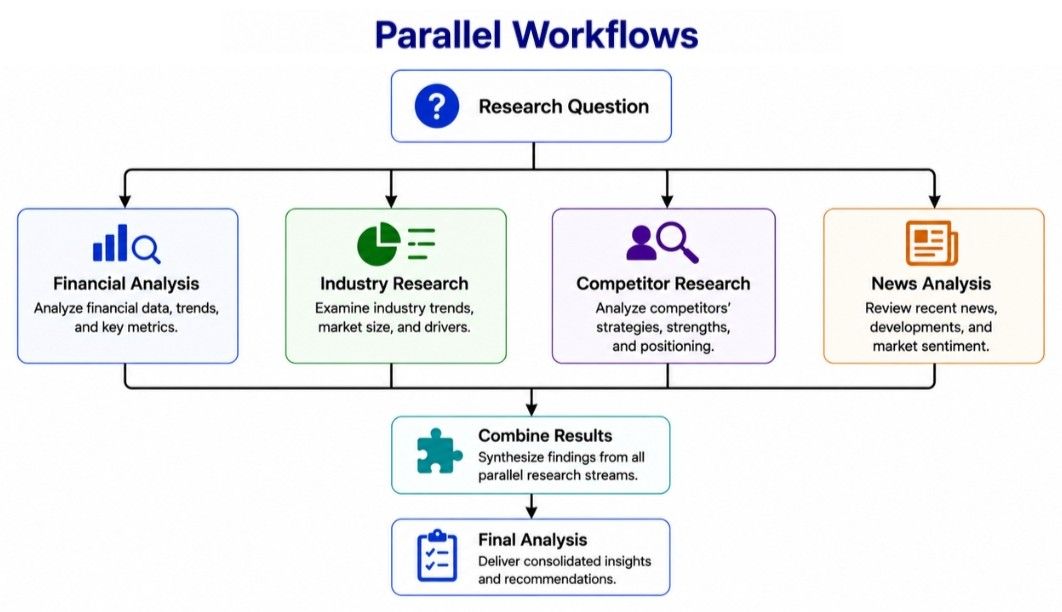
A parallel workflow runs independent tasks at the same time instead of waiting for each task to finish before starting the next one.
      ┌→ Task A ─┐
Start ├→ Task B ─┼→ Combine Results
      └→ Task C ─┘
For example, an investment research workflow may need to analyze:
company financials;
industry trends;
competitors;
recent news.
Because these tasks can be performed independently, they can run in parallel:
             ┌→ Financial Analysis ─┐
             ├→ Industry Research ──┤
Question ────┼→ Competitor Research ┼→ Combine Results
             └→ News Analysis ──────┘
Parallel execution can reduce overall workflow latency because independent tasks do not need to wait for one another.
However, the workflow still needs to combine the results and handle cases where a task fails or produces conflicting information.
Use parallel workflows when tasks are genuinely independent and can safely execute at the same time.
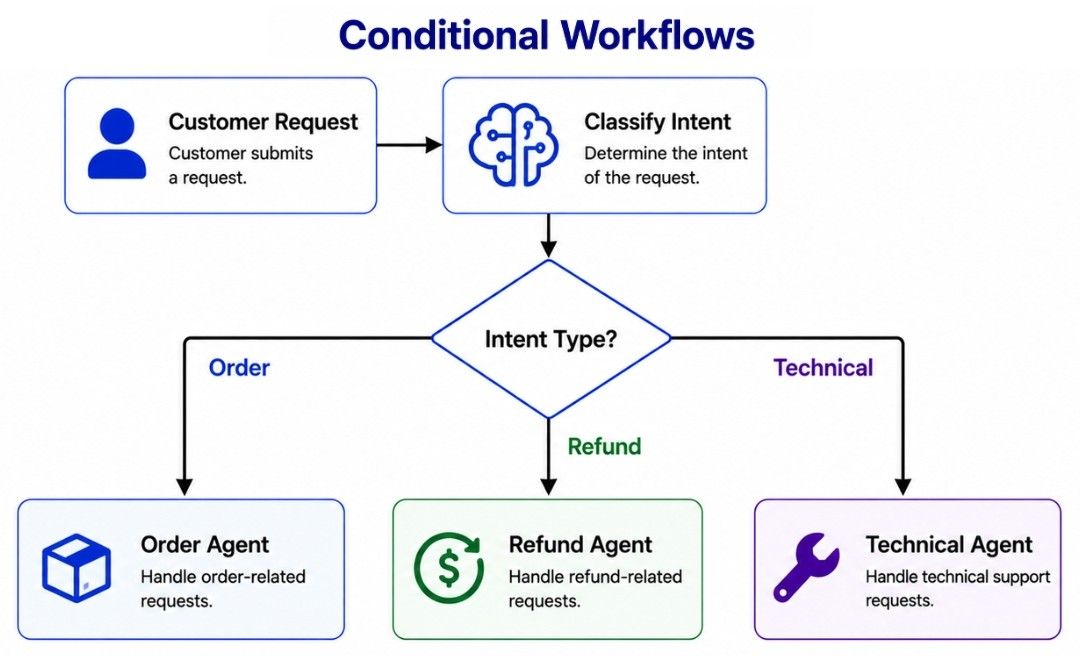
A conditional workflow chooses the next path based on a condition or the current state of the workflow.
It works similarly to an if/else decision in traditional programming.
Request
   ↓
Classify
   ↓
Request Type?
 ┌─────┼─────┐
 ↓     ↓     ↓
Sales Support Billing
For example, a customer-service workflow can route requests to different specialists:
Customer Request
       ↓
Classify Intent
       ↓
 ┌─────┼─────────┐
 ↓     ↓         ↓
Order Refund  Technical
 ↓     ↓         ↓
Order Refund  Technical
Agent Agent    Agent
Conditions can also determine whether a workflow continues automatically or requires human involvement:
Proposed Action
       ↓
Check Risk
   ┌────┴────┐
  Low       High
   ↓          ↓
Execute    Human Review
An important design choice is how the condition is evaluated.
Use deterministic code when the rule is precise:
refund_amount > 500Use an AI model when the decision requires language understanding or interpretation:
Is this customer request about billing,
technical support, or account security?
Conditional workflows are useful when different inputs, states, or risk levels require different execution paths.
AI agent workflows can fail for many reasons. An API may be unavailable, a model may return invalid output, a tool may fail, or a human may reject an action.
A production workflow should therefore define how failures are detected, handled, and recovered from.
Execute Step
    ↓
Success?
 ┌────┴────┐
Yes       No
 ↓         ↓
Next     Retry
Step       ↓
        Still Fails?
        ┌────┴────┐
       No        Yes
       ↓          ↓
    Continue    Fallback
                  ↓
               Escalate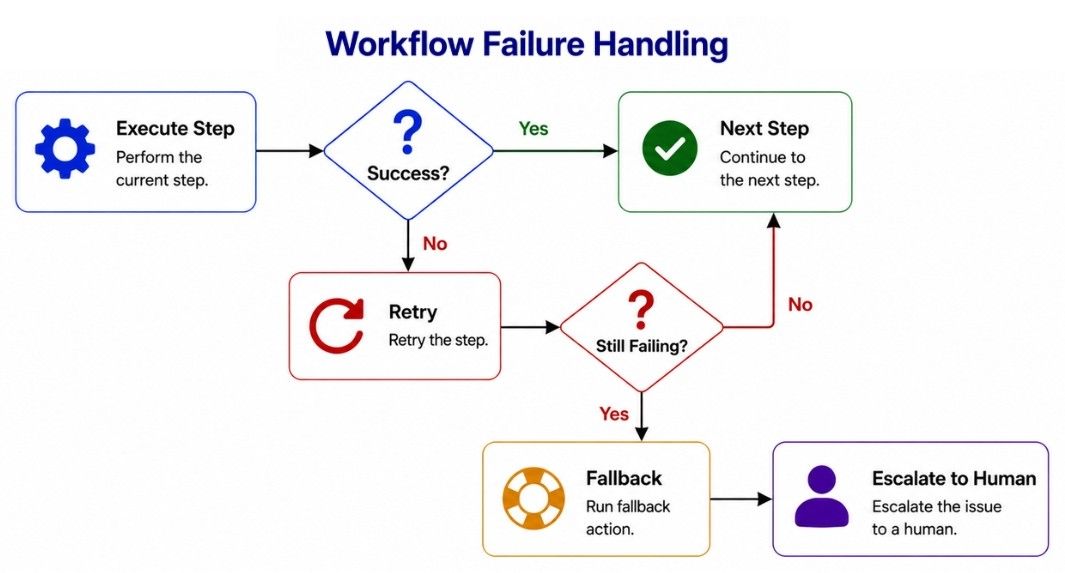
Temporary failures, such as network errors or unavailable APIs, may succeed when retried. Retries should always have a limit to avoid infinite loops and unnecessary cost.
Attempt 1
   ↓
Attempt 2
   ↓
Attempt 3
   ↓
Fail Safely or EscalateWhen the primary service or method fails, the workflow may switch to a safe alternative.
Primary Service
      ↓ fails
Fallback Service
A fallback should only be used when it can perform the task safely and provide an acceptable result.
Long-running workflows should preserve enough state to resume after a failure or human interaction.
This may include:
current step;
completed steps;
relevant tool results;
pending approvals;
human feedback;
error information.
Saving workflow state prevents completed work from being repeated unnecessarily.
Retries become risky when an action has side effects.
For example, a payment request may succeed even if the workflow never receives the response. Retrying the same request could accidentally create a second payment.
Where supported, important operations should use idempotency keys, transaction IDs, or duplicate checks so the same action is not performed twice.
If retries and safe fallbacks cannot resolve the problem, the workflow should stop automatic execution and escalate with relevant context.
Retry Limit Reached
        ↓
Stop Automation
        ↓
Escalate to Human
A reliable agent workflow should recover when possible and fail safely when recovery is not possible.
For reliable AI agent workflows:
Keep each workflow step clear and focused.
Use human approval only for high-risk actions.
Use deterministic code for exact business rules.
Preserve state during human pauses.
Set limits on retries, tool calls, time, and cost.
Verify important actions after execution.
Keep audit logs for critical workflows.
Start simple and add complexity only when needed.
Human-in-the-Loop (HITL) combines AI automation with human judgment where approval, feedback, or review is needed.
The key principle is simple: automate low-risk tasks and keep human control over high-risk decisions.
Human approval prevents sensitive actions from executing without authorization, while escalation transfers cases the agent cannot safely handle. Human feedback helps guide or correct agent work.
Agent workflows can be sequential, parallel, or conditional, depending on how tasks need to execute.
Reliable workflows should also handle failures safely through limited retries, fallbacks, state preservation, verification, and escalation.
Ultimately, good HITL design keeps AI efficient and humans in control where it matters most.
