
Durgesh Tiwari
Author
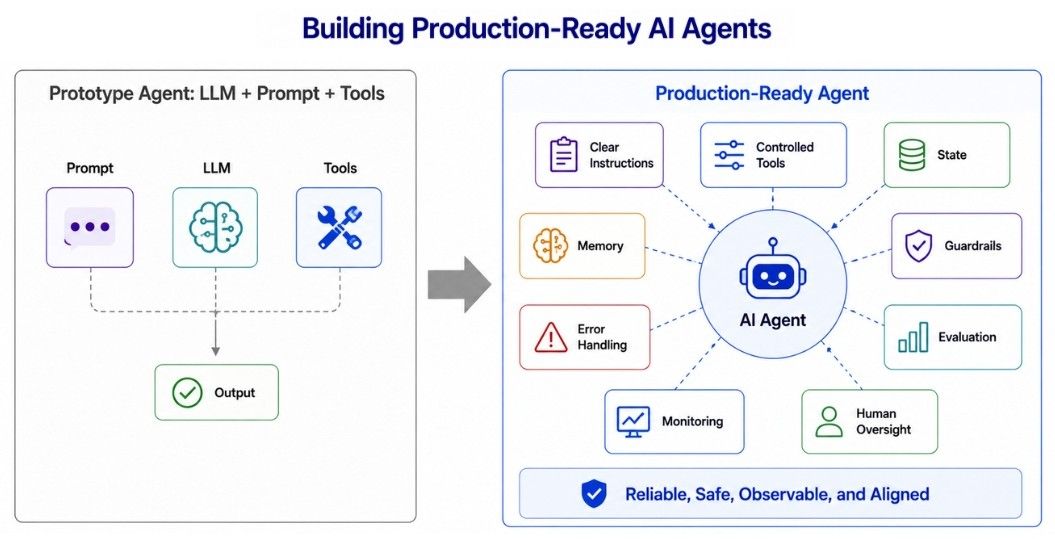
Building an AI agent that works in a demo is relatively easy. Building one that works reliably and safely for real users is much harder.
A production-ready AI agent needs more than an LLM, prompt, and a few tools. It requires a complete system around the model.
Prototype Agent
LLM + Prompt + Tools

Production-Ready Agent
LLM
+ Clear Instructions
+ Controlled Tools
+ State and Memory
+ Guardrails
+ Error Handling
+ Evaluation
+ Monitoring
+ Human Oversight
A production agent must also handle situations where things go wrong—for example, when information is missing, instructions are ambiguous, a tool fails, or the model produces an unreliable result.
The goal is not just to make the agent work, but to make it reliable, safe, observable, and maintainable in production.
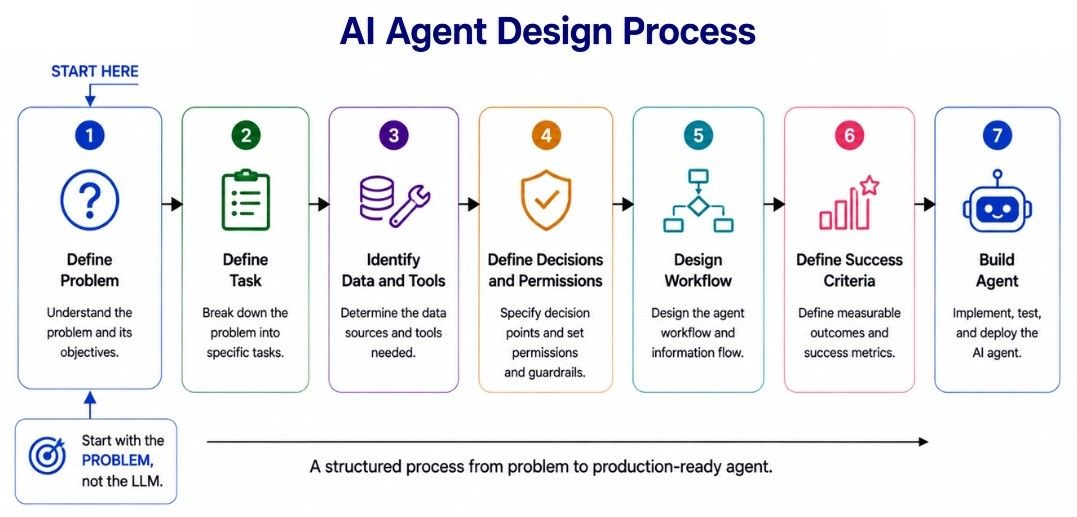
The best place to start when building an AI agent is the problem, not the model.
Before choosing an LLM or framework, define:
What task should the agent complete?
Who will use it?
What information does it need?
What tools does it need?
What decisions and actions can it perform?
Which actions require human approval?
What should happen when something fails?
How will success be measured?
For example, a customer-support agent might follow this process:
Customer Request
       ↓
Understand Problem
       ↓
Retrieve Relevant Data
       ↓
Check Company Policy
       ↓
Decide Next Step
       ↓
Use Approved Tool
       ↓
Verify Result
       ↓
Respond to Customer
Once the workflow is clear, the technical requirements become easier to identify. The agent may need customer-data access, policy retrieval, conversation state, specific tools, and escalation or approval rules.
A clear design process prevents giving an LLM unnecessary access or responsibility and makes the agent easier to build, test, and control.
The most powerful LLM is not always the best choice for an AI agent. The right model depends on the task, required capabilities, latency, cost, and reliability.
For example:
a coding agent needs strong reasoning and code understanding;
a routing agent may only need accurate classification;
a document-processing agent may need reliable structured output;
a conversational agent may prioritize fast, natural responses.
When choosing an LLM, consider:
Factor | Why It Matters |
|---|---|
Task quality | Can it perform the required task reliably? |
Tool use | Can it select and use tools correctly? |
Instruction following | Does it follow system rules consistently? |
Context needs | Can it handle the required context? |
Structured output | Can it produce reliable schemas? |
Latency | Is it fast enough for the application? |
Cost | Is the cost practical at production scale? |
Reliability | Does it perform consistently across different cases? |
Do not select a model only from public benchmarks. Evaluate candidate models on your actual agent tasks, including normal, difficult, ambiguous, and failure cases.
For production agents, evaluate the complete workflow—not just the final response. A model can produce a good answer while still making mistakes during tool selection, intermediate decisions, or multi-step execution.
Agent instructions define what an AI agent should do, how it should behave, and what boundaries it must follow.
Weak instructions such as:
You are a customer support agent.
Help the customer.
leave too much behavior undefined.
Good agent instructions should clearly specify:
role and goal;
responsibilities;
important constraints;
tool-use rules;
escalation and approval conditions;
expected output.
For example:
You are a customer support agent.

Help customers with order-related questions.

Use the order lookup tool when order information is required.
Never guess an order status.
Escalate account-security requests to a human.
Verify important actions before confirming success.
However, instructions should not contain every business rule. Rules that must always be enforced are usually better implemented in application code.
ifrefund_amount>approval_limit:require_human_approval()A practical principle is: use instructions to guide model behavior and deterministic code to enforce critical rules.
Tools allow an AI agent to interact with external systems and perform actions.
A customer-support agent might use tools such as:
search_policy
get_customer
get_order
check_shipping
create_return
issue_refund
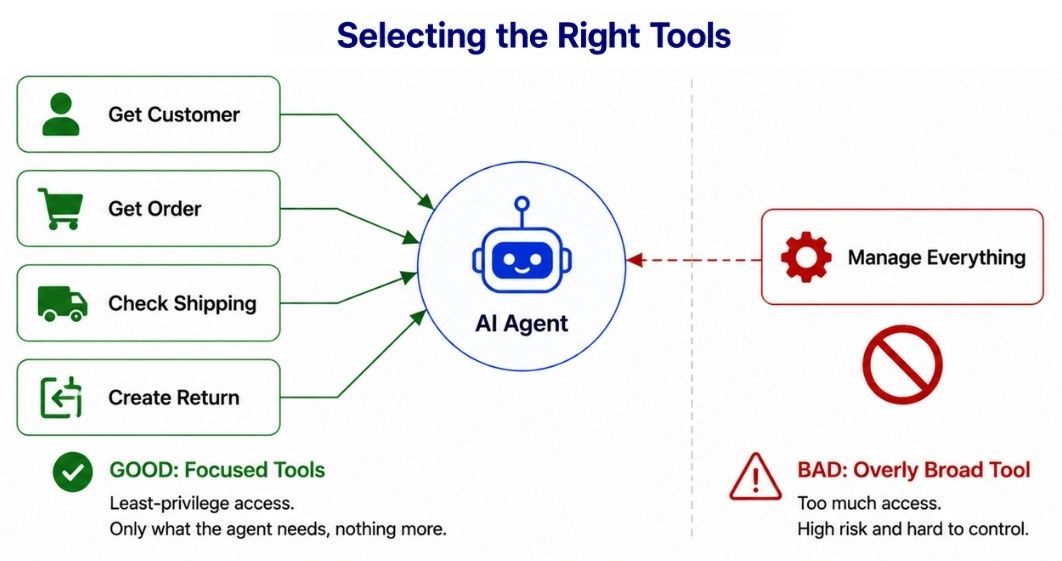
Tool design directly affects agent reliability and safety. Avoid tools with broad or unclear responsibilities, such as:
manage_customer_account()Instead, prefer focused tools with specific purposes:
get_customer()
get_order()
update_shipping_address()
create_return()
Each tool should clearly define what it does, when to use it, required arguments, and important limitations.
Tool permissions should also follow the principle of least privilege: give an agent only the capabilities it needs to perform its job. For example, an agent that only needs to read order information should not have permission to modify or delete orders.
Not every AI agent needs long-term memory. Add memory only when information from previous interactions can genuinely improve future tasks or decisions.
A practical AI agent memory strategy can separate information into layers:
Current Context
      ↓
Task / Session State
      ↓
Conversation History
      ↓
Long-Term Memory
      ↓
External Source of Truth
Current context: Information needed for the current model call.
Task state: Tracks progress and data for the current workflow.
Conversation history: Maintains relevant interaction history.
Long-term memory: Stores selected information useful across future sessions.
External source of truth: Authoritative business data from systems such as databases or CRMs.
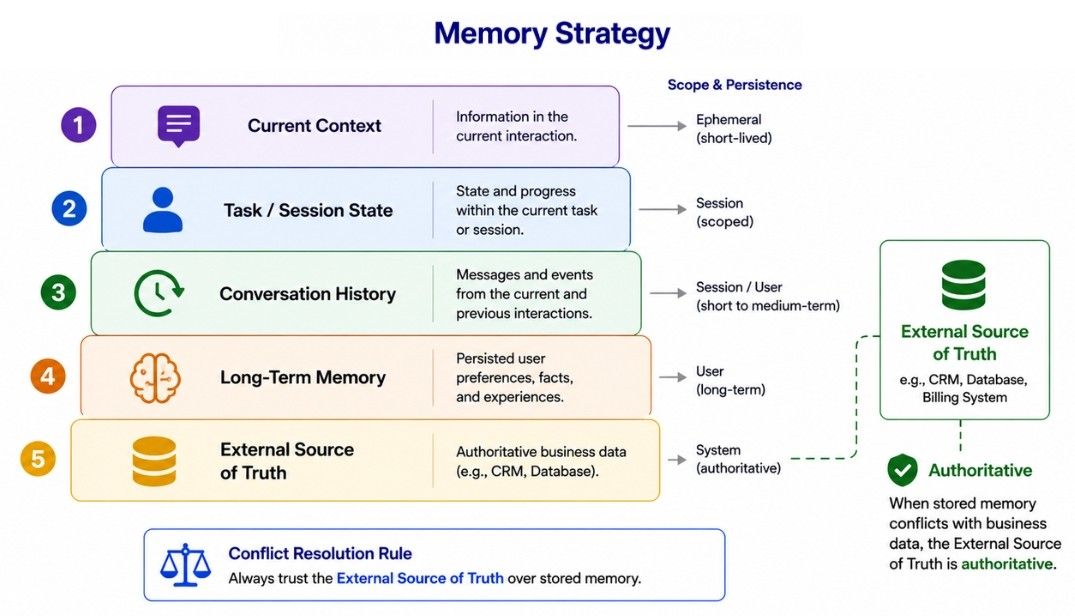
When memory conflicts with an authoritative source, the source of truth should normally take priority. For example, if an old memory contains a previous customer address but the CRM contains the updated address, the agent should use the CRM.
Avoid storing everything. Keep information that has clear future value, such as stable preferences, important events, or task outcomes.
Poor memory design can lead to stale information, irrelevant retrieval, privacy risks, and unnecessary context usage.
State and memory are related, but they are not the same. State tracks what is happening in the current workflow, while memory stores information that may be useful across tasks or sessions.
Workflow state may include:
task_id
customer_id
current_step
selected_action
tool_results
retry_count
approval_status
For example, if a workflow pauses and resumes later, the system needs to know:
which task is running;
which steps are already complete;
what results have been collected;
what decision or approval was received;
which step should execute next.
This is state management.
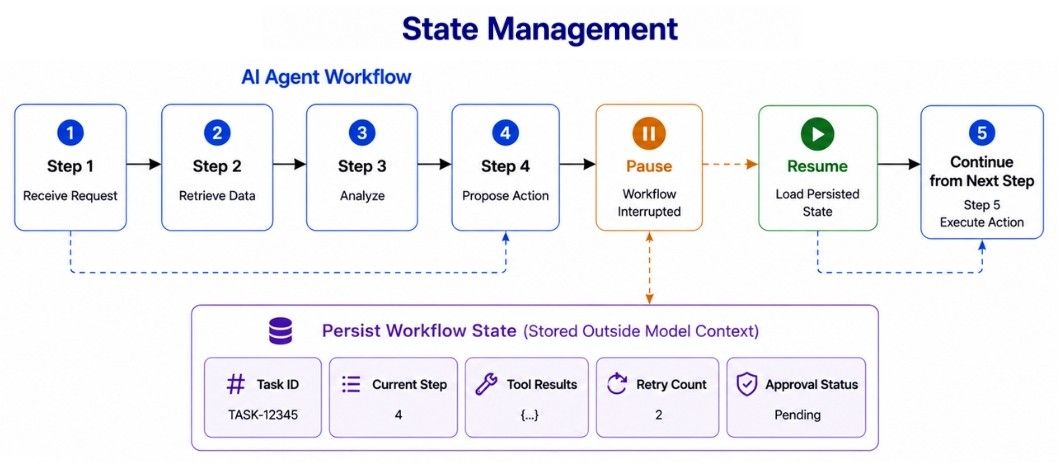
In production, important workflow state should be persisted outside the model's conversation context so the agent can reliably continue from the correct point.
Production AI agents should be designed with the assumption that failures will happen. APIs can time out, tools can fail, data may be unavailable, and models can return invalid output.
Different failures require different responses:
Agent Action
     ↓
   Error?
 ┌────┴─────┐
 No        Yes
 ↓           ↓
Continue   Classify Error
             ↓
      ┌──────┼──────┐
      ↓      ↓      ↓
   Retry  Fallback Escalate
For example:
temporary network failure → retry;
unavailable optional service → fallback;
permission error → fail safely;
problem requiring human judgment → escalate.
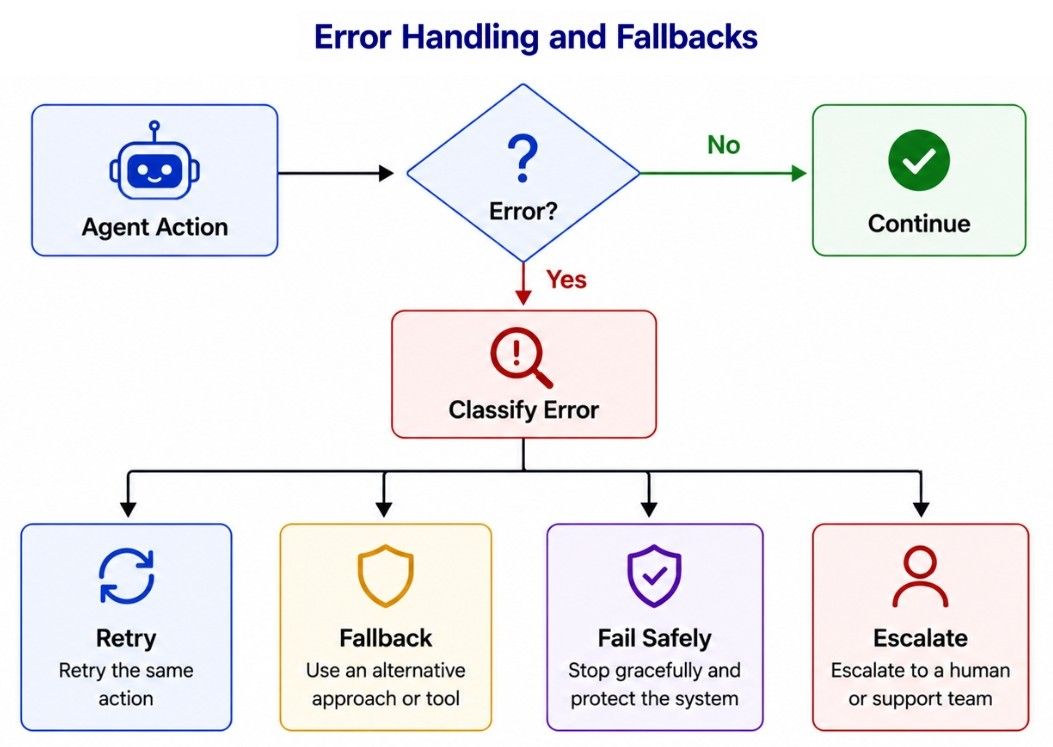
Tools should also return clear, structured errors when possible:
{
  "error":"invalid_order_id",
  "message":"Order ID must contain 8 digits.",
  "retryable":false
}
Structured errors help the application understand what failed and whether recovery is possible, instead of treating every failure the same way.
Retries are useful for temporary failures, but repeating every failed action is not a good recovery strategy.
For example, a temporary API timeout may succeed after another attempt:
Attempt 1 → Timeout
Wait
Attempt 2 → Timeout
Wait Longer
Attempt 3 → Success
However, a non-retryable error such as Permission denied should not be repeatedly retried.
A production retry strategy should define:
which errors are retryable;
maximum retry attempts;
delay between attempts;
what happens when retries are exhausted.
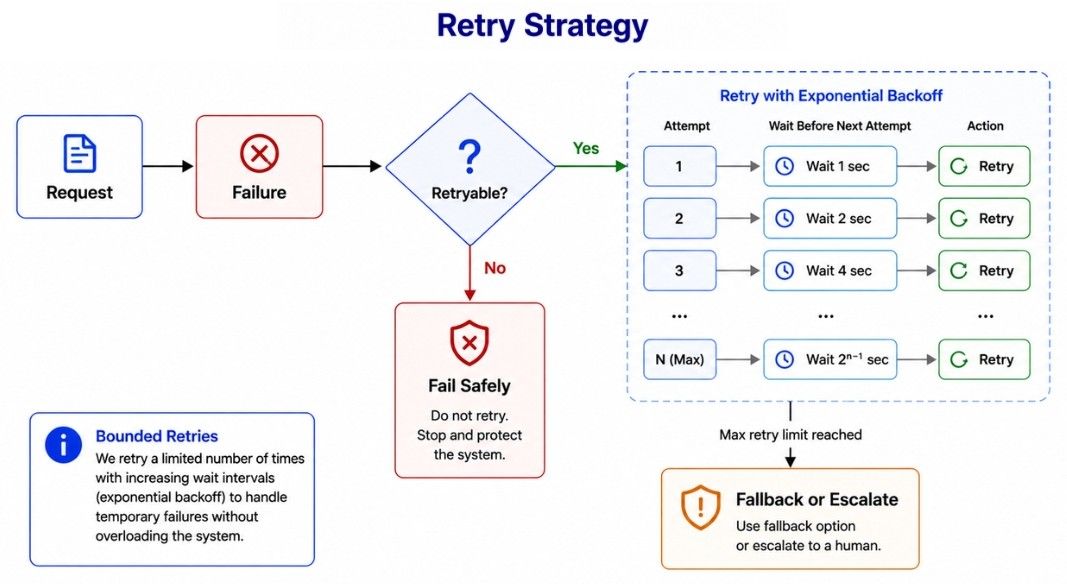
For temporary service failures, exponential backoff with jitter can help avoid repeatedly sending requests at the same interval.
Maximum Retries: 3
Maximum Tool Calls: 20
Maximum Workflow Time: 5 minutes
The exact limits depend on the application. Once the retry limit is reached, the system should fail safely, use an appropriate fallback, or escalate when necessary.
Agent guardrails are controls that keep an AI agent within defined safety, security, and operational boundaries.
Instructions alone are not enough, especially when an agent can access tools or perform sensitive actions. Guardrails can be applied at multiple layers:
User Input
    ↓
Input Controls
    ↓
Agent / LLM
    ↓
Permission & Argument Checks
    ↓
Approval Gate
    ↓
Tool Execution
    ↓
Output Validation
    ↓
User
Common guardrails include:
Input controls for unsupported or unsafe requests.
Tool permissions to restrict available actions.
Argument validation before tool execution.
Human approval for sensitive actions.
Output validation for required formats and rules.
Sandboxing for code execution or risky operations.
Access control to restrict data and resources.
Rate and spending limits to control excessive usage.
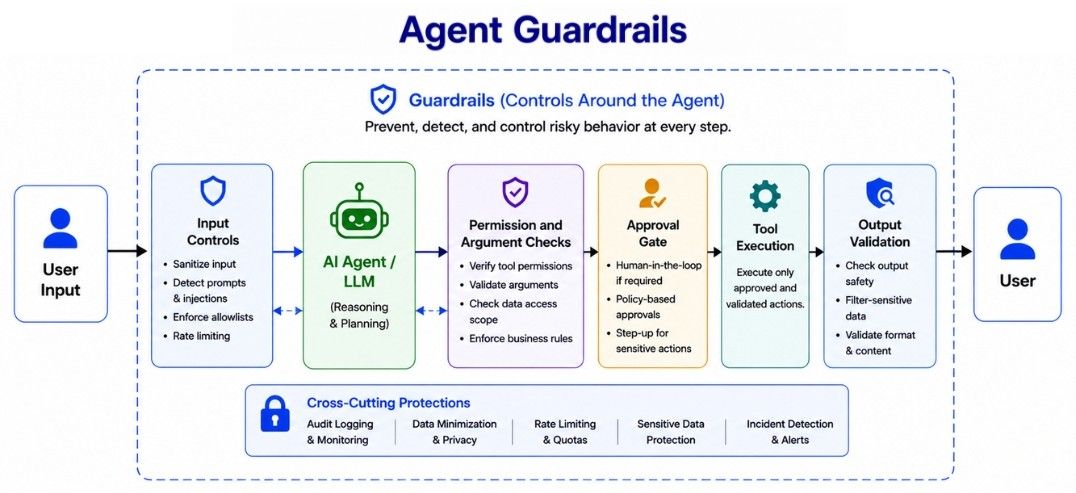
Critical restrictions should be enforced outside the model whenever possible. For example, if an agent must never transfer money, do not rely only on an instruction such as Never transfer money. Remove that capability or block it at the application or permission layer.
The key principle is: do not only control what the agent is instructed to do; control what it is technically allowed to do.
Common mistakes when building production AI agents include:
Too much autonomy: Start with limited permissions and expand only when needed.
Using AI when code is enough: Use deterministic code for clear rules.
Too many tools: Give the agent only the tools required for its task.
Poor memory design: Avoid storing irrelevant or outdated information.
Critical rules only in prompts: Enforce important rules through code and permissions.
Unlimited loops and retries: Set limits on retries, tool calls, time, and cost.
No human escalation: Provide a safe path for cases requiring human judgment.
Testing only ideal cases: Test failures, ambiguity, permission issues, and edge cases.
A production-ready AI agent should be designed as a complete system, not just an LLM with a prompt.
Key best practices include:
Start with the simplest architecture that solves the problem.
Define measurable success criteria and evaluations early.
Use deterministic code for clear business rules.
Keep tool permissions narrow and validate tool inputs.
Persist important state outside the model context.
Use memory selectively and keep authoritative data in source systems.
Design for failure with bounded retries, fallbacks, and escalation.
Add human approval only around consequential actions.
Limit agent loops, execution time, tool calls, and cost.
Make important operations idempotent where possible.
Log and trace important agent actions and failures.
Continuously evaluate and monitor production behavior.
Roll out major changes gradually.
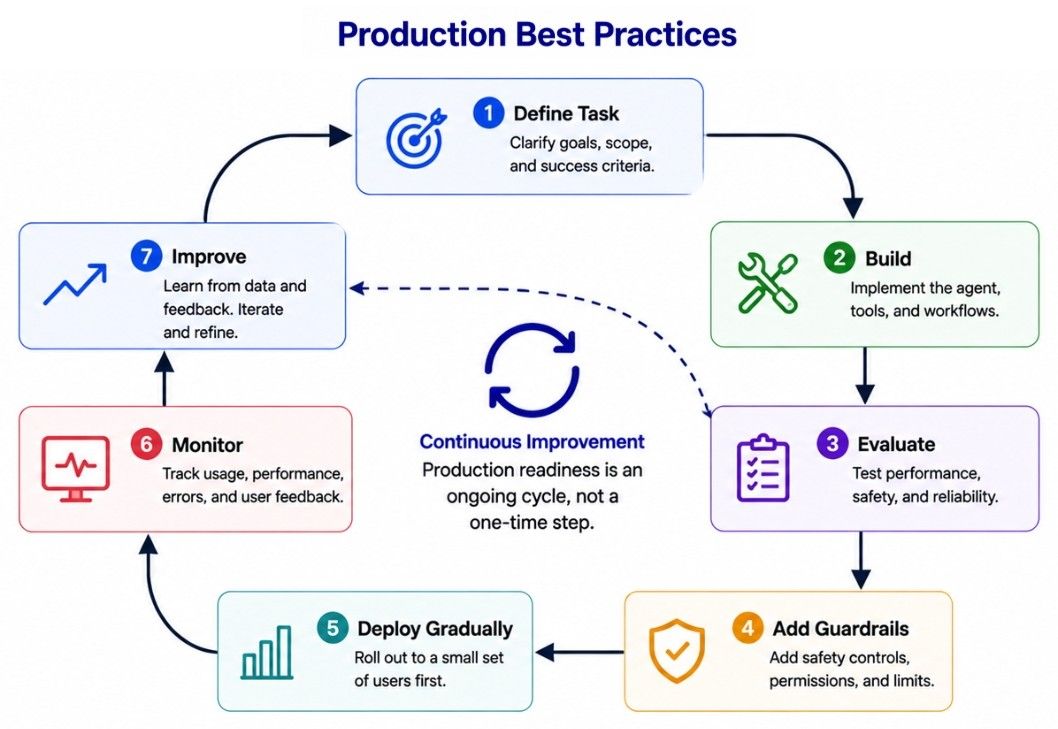
A practical production lifecycle is:
Define Task
    ↓
Build
    ↓
Evaluate
    ↓
Add Guardrails
    ↓
Deploy Gradually
    ↓
Monitor
    ↓
Improve
Production readiness is an ongoing process of evaluating, monitoring, and improving the complete AI agent system.
Building production-ready AI agents requires more than connecting an LLM to tools. The complete system must be designed for reliability, safety, control, and maintainability.
Start by defining the task and success criteria. Choose the LLM based on real evaluations, write clear instructions, use focused tools with limited permissions, and manage state and memory carefully.
Design for failure with bounded retries, fallbacks, persistent state, and safe escalation. Critical rules should be enforced through application-level validation, permissions, approval gates, and guardrails—not only through model instructions.
A production-ready agent does not need to be perfect. It should perform useful work reliably, fail safely, recover when possible, and keep humans in control when necessary.
