
Durgesh Tiwari
Author
Learning AI agent concepts is important, but building real-world AI agent projects is where those concepts become practical.
A real AI agent is rarely just an LLM with a prompt. Depending on the use case, it may need tools, APIs, retrieval, databases, state, memory, security controls, human approval, evaluation, and monitoring.
Different projects need different combinations of these components.
For example:
Project | Main Capabilities |
|---|---|
Research Agent | Search, retrieval, source analysis |
Customer Support Agent | RAG, business tools, escalation |
Coding Agent | Repository access, code editing, testing |
Data Analysis Agent | SQL, Python, calculations |
Email Agent | Email search, drafting, controlled actions |
Scheduling Agent | Calendar access, availability, event creation |
RAG-Based Agent | Knowledge retrieval, grounded responses |
MCP-Based Agent | External capabilities through MCP |
Multi-Agent System | Specialized agents and coordination |
The goal of this article is not to repeat the theory behind these technologies. Instead, we will see how previously learned concepts can be combined to build practical AI agent projects.
A research agent gathers information from multiple sources, analyzes the evidence, and produces a useful answer or report.
Instead of asking an LLM to answer entirely from its existing knowledge, the agent can actively search for relevant information.
Suppose a user asks:
Compare the latest approaches to evaluating AI agents.
The agent may need to:
understand the research question;
identify important subtopics;
search approved sources;
retrieve relevant information;
compare findings;
remove duplicate or weak evidence;
generate a structured answer;
attach supporting sources.
A typical workflow looks like this:
User Question
     ↓
Research Agent
     ↓
Plan Research
     ↓
Search Sources
     ↓
Read Relevant Information
     ↓
Compare Findings
     ↓
Generate Answer
     ↓
Citations / Sources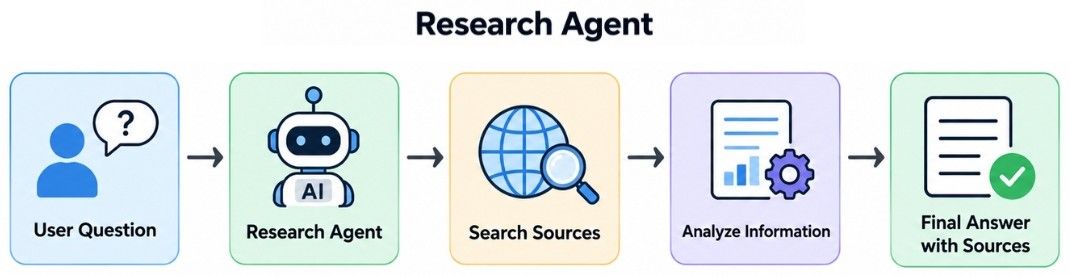
web_search
document_search
read_document
database_search
For example, the agent might use tools conceptually like this:
results = web_search(query)

for result in results:
    document = read_document(result)
    collect_relevant_evidence(document)

answer = generate_answer(evidence)
The exact implementation depends on the framework, but the important idea is that search and evidence collection happen outside the LLM's internal knowledge.
A good research agent should:
prefer relevant and trustworthy sources;
distinguish retrieved evidence from its own synthesis;
preserve source provenance;
avoid repeatedly searching for the same information;
stop research after sufficient evidence is collected;
treat external content as untrusted.
The goal is not to retrieve the maximum amount of information.
A good research agent retrieves enough high-quality evidence to answer the question reliably.
A customer support agent helps users solve problems related to products, orders, accounts, subscriptions, refunds, or company services.
Unlike a basic chatbot, it may need to interact with actual business systems.
A customer asks:
My package has not arrived. Can you check it?
The agent should not guess the order status.
Instead, it could:
identify the customer and order;
retrieve the latest order or shipping information;
search relevant company policies if needed;
determine the appropriate response;
perform an allowed action or escalate the request.
Customer
   ↓
Support Agent
   ↓
Understand Request
   ↓
Retrieve Order Data
   ↓
Search Company Knowledge
   ↓
Choose Action
   ↓
Respond / Act / Escalateget_customer
get_order
get_shipping_status
search_policy
create_ticket
create_returnA tool call might conceptually look like:
order = get_order(order_id)

if order.status == "delayed":
    return explain_delay(order)

if order.status == "lost":
    return create_support_ticket(order)
The LLM can understand the customer's request, while trusted application logic and tools retrieve or modify the actual business data.
Some support requests have greater impact.
Consider a refund:
Refund Request
     ↓
Check Order
     ↓
Check Refund Policy
     ↓
Determine Eligibility
     ↓
Risk / Policy Check
     ↓
Approval if Required
     ↓
Issue Refund
     ↓
Verify Result
A support agent is therefore a strong project for combining RAG, tool calling, business rules, state, access control, human oversight, and verification in one application.
A coding agent helps developers understand, create, modify, test, or debug software.
The important difference between a coding assistant and a more capable coding agent is that the agent can interact with the development environment instead of only suggesting code.
A developer asks:
Add validation to the user registration endpoint and update its tests.
The agent may follow this workflow:
Developer Request
       ↓
Inspect Repository
       ↓
Find Relevant Code
       ↓
Understand Existing Logic
       ↓
Plan Change
       ↓
Modify Code
       ↓
Run Tests
       ↓
Inspect Results
       ↓
Fix if Necessary
       ↓
Return Changesread_file
search_code
edit_file
run_tests
run_linterA simplified execution loop might look like:
files = search_code("user registration")

code = read_file(files[0])

edit_file(
    path=files[0],
    change="Add input validation"
)

result = run_tests()

if not result.passed:
    inspect_failure(result)
The important part is the feedback loop:
Change Code
    ↓
Run Tests
    ↓
Inspect Result
    ↓
Pass? ── Yes → Finish
  │
  No
  ↓
Fix Problem
    ↓
Run Tests Again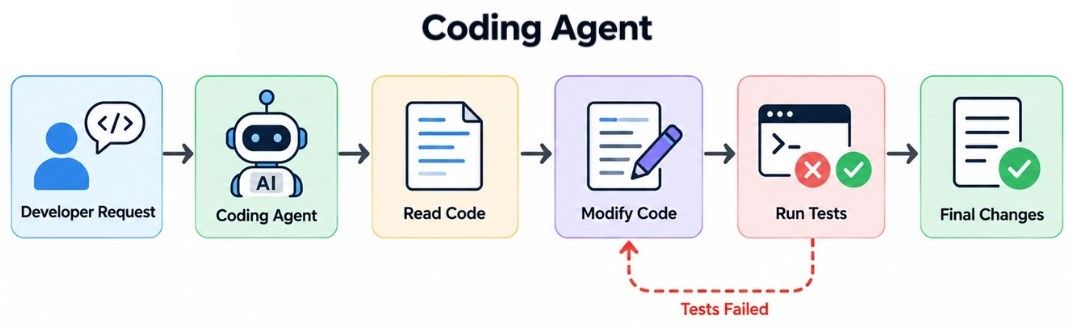
A production coding agent should have limits on:
number of modification attempts;
execution time;
filesystem access;
network access;
available commands;
credentials;
production-system access.
Generated code should be tested rather than assumed to be correct.
The agent writes code; the development tools provide evidence that the code actually works.
A data analysis agent helps users answer business or analytical questions using databases, calculations, code, and visualizations.
A user asks:
Which product category had the largest revenue growth last quarter?
The agent first needs to understand what the user means by revenue growth, identify the required data, perform the calculation, and explain the result.
Business Question
      ↓
Understand Question
      ↓
Identify Required Data
      ↓
Query Database
      ↓
Calculate Result
      ↓
Validate Calculation
      ↓
Generate Explanationquery_database
run_python
calculate_metric
create_chartFor example:
data = query_database("""
    SELECT category, quarter, revenue
    FROM product_revenue
""")

result = calculate_metric(
    data=data,
    metric="quarter_over_quarter_growth"
)
The exact SQL or Python should be generated and executed according to the application's controls.
An important design principle is:
LLM
 ↓
Understand the Question
 ↓
SQL / Python
 ↓
Perform the Calculation
 ↓
Validate Result
 ↓
LLM
 ↓
Explain the Result
Use the LLM for language understanding and explanation.
Use SQL, Python, or deterministic code for calculations and data processing.
This separation makes the result easier to verify and reduces dependence on the model for exact arithmetic.
An email agent can help users search, summarize, organize, draft, and sometimes send emails.
A user asks:
Find the latest email from the finance team and draft a reply confirming that I received the report.
The workflow could be:
User Request
     ↓
Understand Intent
     ↓
Search Email
     ↓
Read Relevant Message
     ↓
Create Draft
     ↓
User Approval
     ↓
Send Emailsearch_email
read_email
create_draft
send_email
archive_emailThe agent might first perform a read operation:
emails = search_email(
    sender="finance team",
    sort="latest"
)

message = read_email(emails[0])
It can then use the retrieved message to prepare a draft.
Not every email operation has the same impact.
Action | Typical Risk |
|---|---|
Search email | Lower |
Read email | Lower |
Create draft | Moderate |
Archive email | Moderate |
Send email | Higher |
Sending an external message changes the outside world, so a workflow may require user confirmation:
Create Draft
     ↓
User Reviews
     ↓
Approve?
 ┌───┴───┐
 No     Yes
 ↓       ↓
Edit    Send
Email content itself should also be treated as untrusted data, because a malicious email could contain instructions designed to influence the agent.
A scheduling agent helps users find available times and manage calendar events.
Suppose a user asks:
Schedule a 30-minute meeting with Sarah next Tuesday afternoon.
This short request contains several tasks.
The agent may need to determine:
which Sarah the user means;
what date corresponds to next Tuesday;
what the user considers afternoon;
the meeting duration;
both participants' availability;
applicable time zones;
whether confirmation is required before creating the event.
A practical workflow is:
User Request
     ↓
Resolve Contact
     ↓
Interpret Date / Time
     ↓
Check Availability
     ↓
Find Valid Slots
     ↓
Apply Preferences
     ↓
Confirm Selection
     ↓
Create Eventfind_contact
check_calendar
find_availability
create_event
update_eventFor multiple participants:
Person A Availability ─┐
Person B Availability ─┼→ Common Available Slots
Person C Availability ─┘
The scheduling logic may also need to consider working hours, meeting duration, time zones, existing events, and user preferences.
Calendar writes should be handled carefully because creating, moving, or cancelling an event can affect other people.
A RAG-based agent is useful when an agent needs access to external or organization-specific knowledge.
Suppose a company has thousands of internal documents.
A user asks:
What is our policy for international travel expenses?
Instead of placing every company document into the prompt, the system retrieves relevant information.
User Question
      ↓
Agent
      ↓
Need External Knowledge?
      ↓
Retrieve Relevant Documents
      ↓
Use Retrieved Evidence
      ↓
Generate Grounded Answer
      ↓
Return Sources
For example:
documents = search_knowledge_base(
    query="international travel expense policy"
)

context = select_relevant_documents(documents)

answer = generate_grounded_answer(
    question=user_question,
    context=context
)
The agent can go beyond a fixed RAG pipeline by deciding:
whether retrieval is needed;
which source or retrieval tool to use;
whether the first retrieval result is sufficient;
whether another search is necessary;
what action should follow from the retrieved information.
The project should be evaluated on whether it retrieves relevant evidence and whether the final response is actually grounded in that evidence.
An MCP-based agent demonstrates how an AI application can access external capabilities exposed through Model Context Protocol (MCP) servers.
A basic architecture is:
User
 ↓
AI Application / MCP Host
 ↓
MCP Client
 ↓
MCP Server
 ↓
External SystemSuppose an approved MCP server exposes developer capabilities such as repository search and issue management.
A user asks:
Find the open issues related to authentication.
The application can use the relevant MCP capability instead of building that integration directly into the agent.
User Request
     ↓
Agent
     ↓
Select MCP Capability
     ↓
MCP Server
     ↓
External Service
     ↓
Result
     ↓
Agent Response
Conceptually:
result = call_mcp_tool(
    tool="search_issues",
    arguments={
        "query": "authentication"
    }
)
The exact API depends on the MCP implementation being used.
The important project decisions are practical:
Which MCP servers should the application trust?
Which capabilities should be exposed to the agent?
What permissions should those capabilities receive?
Which actions require additional authorization or approval?
MCP standardizes the connection layer, but the application still remains responsible for how those capabilities are used.
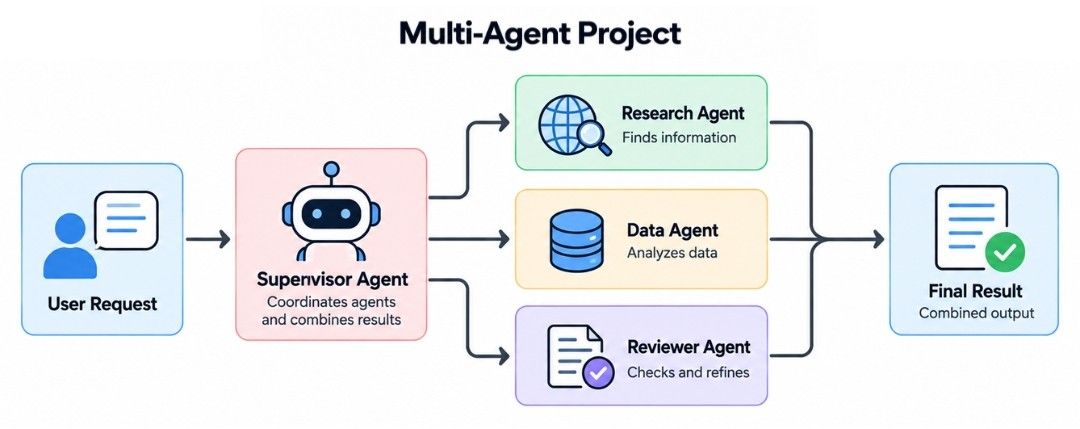
Some projects genuinely benefit from dividing work among multiple specialized agents.
Consider an enterprise research and analysis system.
A user asks:
Analyze our latest product performance and compare it with recent market trends.
The task requires both external research and internal data analysis.
                  User
                   ↓
               Supervisor
                   ↓
         ┌─────────┼─────────┐
         ↓         ↓         ↓
     Research     Data    Reviewer
      Agent       Agent     Agent
         └─────────┼─────────┘
                   ↓
Final ResultAgent | Responsibility |
|---|---|
Supervisor | Coordinates the workflow |
Research Agent | Collects external market information |
Data Agent | Analyzes internal business data |
Reviewer Agent | Checks the combined result |
A possible workflow is:
User Request
     ↓
Supervisor
     ↓
 ┌───────────────┐
 ↓               ↓
Research Agent   Data Agent
 ↓               ↓
Market Data      Internal Analysis
 └───────┬───────┘
         ↓
      Reviewer
         ↓
    Final Report
The main lesson is not that more agents are automatically better.
A multi-agent architecture makes sense when subtasks genuinely require different tools, context, permissions, or responsibilities.
If one agent with a few focused tools can complete the task reliably, the simpler architecture is usually easier to build, debug, and operate.
Now let's combine several concepts into a more complete enterprise customer-support agent.
Suppose a customer asks:
My order arrived damaged. Can I get a refund?
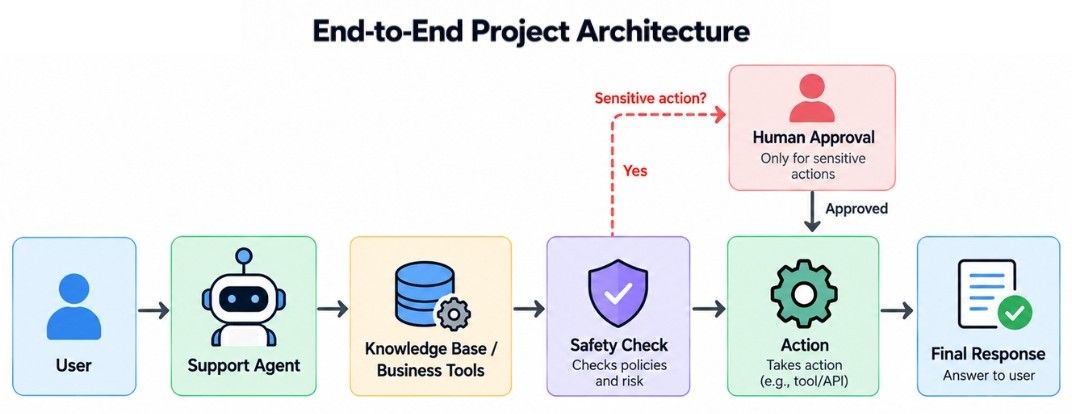
A production-style architecture could look like this:
                         User
                          ↓
                    Authentication
                          ↓
                     Agent Gateway
                          ↓
                     Support Agent
                          ↓
           ┌──────────────┼──────────────┐
           ↓              ↓              ↓
       RAG Search      Order Tool    Customer Tool
           ↓              ↓              ↓
     Knowledge Base    Order API     Customer DB
           └──────────────┼──────────────┘
                          ↓
                  Policy / Guardrails
                          ↓
                  Sensitive Action?
                     ┌────┴────┐
                     No        Yes
                     ↓          ↓
                  Execute   Human Approval
                     └────┬─────┘
                          ↓
                       Verify
                          ↓
RespondFor this request, the system may:
authenticate the customer;
identify the relevant order;
retrieve the company's refund policy;
check whether the order is eligible;
determine whether approval is required;
execute the refund through an authorized tool;
verify that the operation succeeded;
return the result to the customer.
Notice that the LLM does not directly perform the refund.
The LLM may help understand the request and decide the next appropriate step, while other components handle data access, business rules, permissions, execution, and verification.
The complete application may also require:
persistent workflow state;
appropriate memory;
authentication and authorization;
secrets management;
error handling and retries;
logging and tracing;
evaluation;
monitoring;
rate and cost controls.
These components were covered individually in earlier articles. In a real project, they work together around the agent.
The LLM is only one component of a production AI agent.
Once an AI agent project works during development, it should not immediately receive full production traffic.
A practical release path is:
Development
    ↓
Tool Tests
    ↓
Workflow Tests
    ↓
Evaluation
    ↓
Security Checks
    ↓
Staging
    ↓
Controlled Rollout
    ↓
Production Monitoring
Before deployment, test representative:
normal requests;
edge cases;
ambiguous requests;
tool failures;
permission failures;
important security scenarios.
After deployment, watch for practical problems such as failed tasks, incorrect tool usage, excessive retries, high latency, unexpected cost, and unnecessary escalations.
When an important production failure occurs:
Production Failure
       ↓
Inspect Trace
       ↓
Find Root Cause
       ↓
Fix System
       ↓
Add Regression Case
       ↓
Test
       ↓
Deploy Again
This creates a continuous engineering loop:
Build → Test → Deploy → Observe → Improve → Test AgainThe detailed techniques for testing, evaluation, security, and observability were covered in the previous production-focused articles. The important point here is that a real project brings all of them together.
You do not need to begin with the most complex architecture.
A practical learning path is:
Research Agent
      ↓
RAG-Based Agent
      ↓
Tool-Using Support Agent
      ↓
Data / Email / Scheduling Agent
      ↓
MCP-Based Integration
      ↓
Multi-Agent Project
      ↓
End-to-End Production System
Start with a project that has a clear task and measurable result.
For example, instead of:
Build an intelligent autonomous business assistant.
choose something concrete:
Build an agent that searches company documentation and answers employee questions with supporting sources.
Then gradually add tools, state, approvals, evaluation, security, and observability only when the project requires them.
This makes the system easier to understand and helps you learn why each agent component exists.
Real-world AI agent projects bring together the concepts required to build practical agentic systems.
Research, customer support, coding, data analysis, email, and scheduling agents demonstrate different ways an LLM can work with tools, data, retrieval, deterministic code, and external systems. RAG and MCP provide useful integration patterns, while multi-agent architectures can help when a problem genuinely benefits from specialized responsibilities.
The most important lesson is that a real AI agent is not simply:
Prompt + LLMIt is a complete application in which the LLM works with the right tools, data, controls, and supporting infrastructure to complete a real task reliably.
Building these projects teaches the difference between an AI agent that works in a demonstration and one that can operate effectively in a real application.
