
Author
Auto-Configuration is one of the most powerful and important features of Spring Boot.
It automatically configures your application based on the dependencies you add — without any manual setup or XML.
Simple Definition:
Spring Boot detects the libraries in your project and sets up everything automatically, so you don’t have to write configuration yourself.
This makes Spring Boot fast, modern, and beginner-friendly.
Traditional Spring Framework needs a lot of manual configuration, such as:
This makes development slow and complicated.
Spring Boot removes all this complexity with Auto-Configuration, which automatically configures these components based on the dependencies you add.
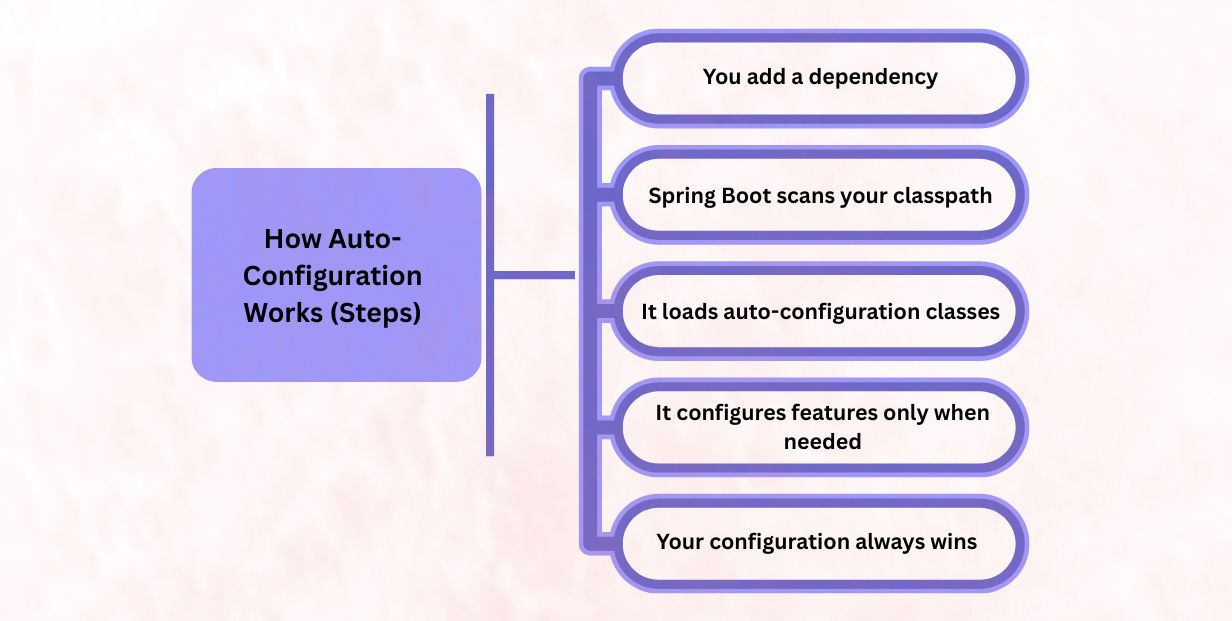
Example:
When you add a starter, Spring Boot instantly knows what kind of application you want to build (web, JPA, security, etc.).
spring-boot-starter-web
pring Boot checks which libraries are present in your project using smart conditions like:
@ConditionalOnClass → Configure only if a specific class is available@ConditionalOnMissingBean → Configure only if you didn’t create your own bean@ConditionalOnProperty → Configure only if a certain property is enabled@ConditionalOnWebApplication → Configure only if it’s a web appThis helps Spring Boot decide what to auto-configure and what to skip.
These configuration rules come from:
META-INF/spring.factories
(Newer Spring Boot versions use spring-autoconfigure-metadata for faster loading.)
These files contain a list of all auto-configuration classes that Spring Boot can apply.
Spring Boot applies configuration only for the features your project actually uses.
Examples:
Spring Boot never configures unnecessary things.
It gives you only what your app needs — nothing extra.
If you provide your own:
➡ Spring Boot stops its auto-configuration for those parts.
This means you always stay in control.
Auto-config just helps you until you override it.
Dependency:
spring-boot-starter-web
Spring Boot automatically configures everything needed for a web app:
DispatcherServlet➡ No XML, no manual configuration — web app is ready instantly!
Main Application
@SpringBootApplication
public class DemoApplication {
    public static void main(String[] args) {
        SpringApplication.run(DemoApplication.class, args);
    }
}
Controller
@RestController
class HelloController {
    @GetMapping("/hello")
    String hello() {
        return "Auto-Configuration Works!";
    }
}
When you run this application:
@RestController and @GetMapping are detectedResult: You get a working web application with zero manual configuration.
Dependency:
spring-boot-starter-data-jpa
Spring Boot auto-configures all database components:
DataSourceEntityManagerTransactionManagerIf you don’t specify a database, Spring Boot provides a default:
➡ Uses H2 in-memory database automatically.
Spring Boot chooses the server based on what is available in your classpath:
It then configures:
➡ Your app runs immediately — no external server installation needed.
Spring Boot sets up logging out of the box:
➡ Logging works automatically without writing any configuration.
Auto-Configuration is one of the biggest reasons developers prefer Spring Boot. It makes development faster, cleaner, and more efficient.
Yes — and Spring Boot makes it very simple. Even though it provides default settings, your configuration always has higher priority.
1. Create your own @Bean
If you define a custom bean in your configuration class:
@Bean
public DataSource customDataSource() { ... }
Spring Boot will skip its own auto-configured DataSource.
2. Update application.properties
Any value you specify here will override Spring Boot’s default settings.
Example:
server.port=9090
spring.jpa.hibernate.ddl-auto=update
3. Disable specific auto-configurations
You can turn off any unwanted auto-configuration class using:
@SpringBootApplication(exclude = { DataSourceAutoConfiguration.class })
Useful when your project doesn’t need certain features.
Auto-Configuration is one of the most powerful features of Spring Boot.
It automatically configures your application by detecting the libraries present on the classpath.
This means:
Enabled by @EnableAutoConfiguration, it provides smart defaults, follows best practices, and is fully customizable whenever you need.
? This makes Spring Boot the best choice for microservices, cloud apps, enterprise systems, and beginner-friendly development.
