
Author
HashSet is one of the most commonly used Set implementations in Java. It stores unique elements only, does not maintain order, and provides fast performance using hashing.
A HashSet is a collection in Java that:
Iterable
   └── Collection
          └── Set
                └── HashSet
HashSet Implements
HashSet stores data as keys inside a HashMap.
When you add an element:
hash = hashCode(element)
bucket = hash % array_length
store element in that bucket
Internal Structure Diagram
Hash Table (Buckets)
0 → [Apple]
1 → [null]
2 → [Banana → Grapes]
3 → [null]
4 → [Orange]
If two elements have the same hash bucket:
Each element becomes a key in HashMap:
K = element
V = dummy value (PRESENT)
Use HashSet when you need:
Avoid HashSet if:
HashSet provides multiple constructors to create a new set:
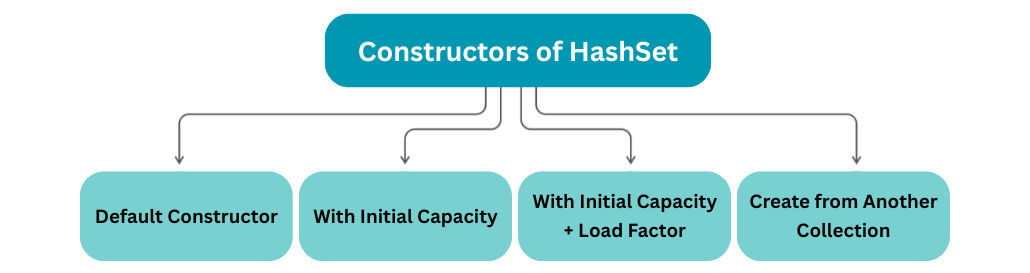
Default Constructor
Creates an empty HashSet with default capacity and load factor.
HashSet<String> set = new HashSet<>();
With Initial Capacity
Creates an empty HashSet with a specified initial capacity.
HashSet<Integer> set = new HashSet<>(50);
With Initial Capacity + Load Factor
Allows specifying both initial capacity and load factor for performance tuning.
HashSet<String> set = new HashSet<>(32, 0.75f);
Create from Another Collection
Initializes a HashSet with elements from an existing collection, automatically removing duplicates.
HashSet<String> set = new HashSet<>(list);
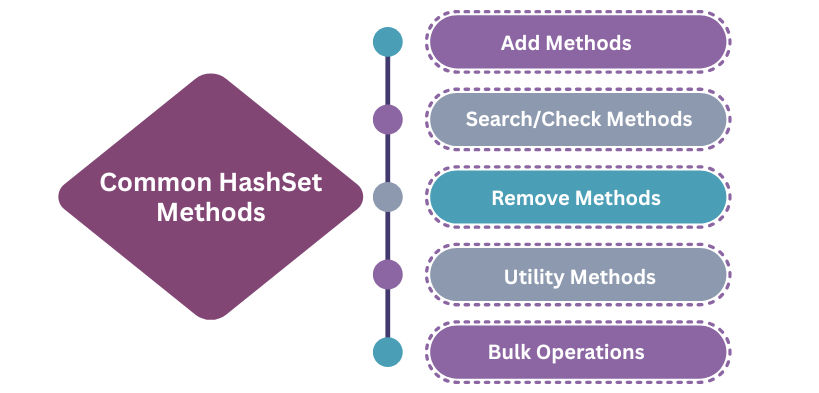
add(E e)
Adds the element to the set if it is not already present; duplicates are ignored.
set.add("HTML");
contains(Object o)
Checks if the specified element exists in the set; returns true or false.
set.contains("Java");
remove(Object o)
Removes the element from the set if it exists; returns true if removal was successful.
set.remove("Python");
clear()
Removes all elements from the HashSet, making it empty.
set.clear();
size()
Returns the total number of elements currently stored in the set.
set.size(); // total elements
isEmpty()
Checks whether the set contains no elements.
set.isEmpty();
iterator()
Returns an iterator to traverse all elements of the set one by one.
set.iterator();
addAll(Collection<? extends E> c)
Adds all elements from another collection into this set (duplicate elements ignored).
set1.addAll(set2); // union
removeAll(Collection<?> c)
Removes all elements from this set that are also present in the given collection.
set1.removeAll(set2); // difference
retainAll(Collection<?> c)
Keeps only the elements that are common between this set and the given collection.
set1.retainAll(set2); // intersection
| Operation | Time Complexity | Explanation |
|---|---|---|
| add() | O(1) average | Hashing-based |
| remove() | O(1) average | Direct bucket removal |
| contains() | O(1) average | Hash lookup |
| iterate() | O(n) | Visit all elements |
| worst-case | O(n) or O(log n with tree) | Collision-heavy buckets |
| Feature | HashSet | ArrayList | LinkedList |
|---|---|---|---|
| Duplicate Allowed | No | Yes | Yes |
| Order | No | Yes | Yes |
| Searching | Fast (O(1)) | Medium | Slow |
| Indexing | No | Yes | No |
| Structure | Hash Table | Dynamic Array | Doubly Linked List |
import java.util.HashSet;

public class Main {
    public static void main(String[] args) {
        HashSet<String> set = new HashSet<>();

        set.add("Java");
        set.add("Python");
        set.add("Java"); // duplicate → ignored

        System.out.println(set);
    }
}
for (String s : set) {
    System.out.println(s);
}
List<Integer> list = Arrays.asList(10, 20, 10, 30, 20);

HashSet<Integer> unique = new HashSet<>(list);

System.out.println(unique);
Default load factor = 0.75
When:
size > capacity × loadFactor
→ HashSet resizes (rehashing happens)
Rehashing is expensive (O(n)) but rare.
