
Author
Collections is a utility class in Java that provides static helper methods to work with Collection Framework classes like List, Set, and Map.
It belongs to:
java.util.Collections
Collections (constructor is private)Collections Utility Methods Are Divided Into 9 Categories
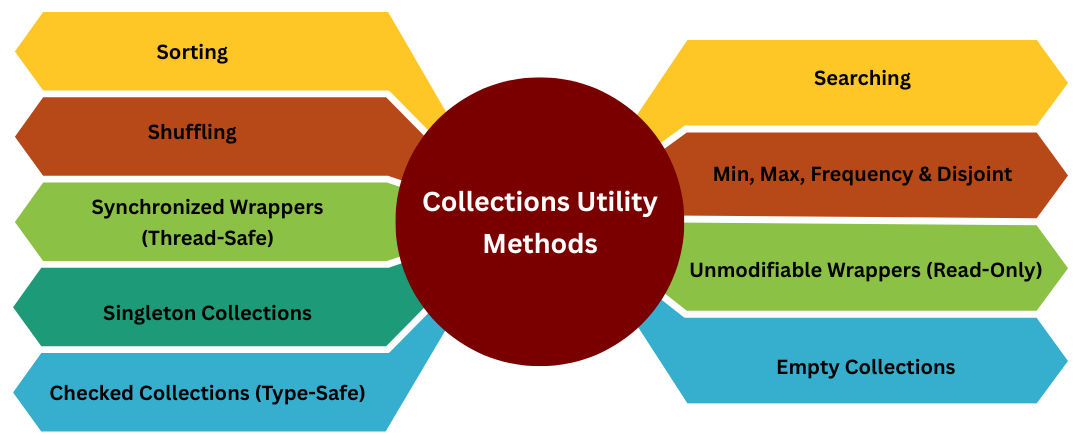
Sorting methods reorder elements in a list into a specific order, usually ascending natural order or based on a custom Comparator.

a) sort(List list)
Sorts the list into ascending order based on natural ordering (e.g., numbers, strings).
Collections.sort(list);
b) sort(List list, Comparator c)
Sorts the list using a custom Comparator (custom sorting).
Collections.sort(list, (a,b) -> b - a); // Descending
c) reverse(List list)
Reverses the order of elements in the list.
Collections.reverse(list);
d) swap(List list, int i, int j)
Swaps elements at the two given indexes.
Collections.swap(list, 0, 1);
e) rotate(List list, int distance)
Moves elements by the given distance (cyclic rotation).
Collections.rotate(list, 2);
Searching methods help you locate an element inside a sorted list using efficient algorithms like binary search.
—> Note: List must be sorted before searching.
a) binarySearch(List list, T key)
Searches for the key using binary search. Returns index or negative value if not found.
int index = Collections.binarySearch(list, 10);
b) binarySearch(List list, T key, Comparator c)
Same as above, but uses a custom Comparator.
Collections.binarySearch(list, "John", String.CASE_INSENSITIVE_ORDER);
These methods randomly reorder the elements of a list to produce a non-deterministic sequence, useful for games, lotteries, and simulations.
a) shuffle(List list)
Randomly rearranges the elements in the list using the default random source.
Collections.shuffle(list);
b) shuffle(List list, Random rnd)
Same as above but allows specifying a custom Random object, useful for reproducible results.
Collections.shuffle(list, new Random(5));
These methods analyze collection data:
These are used for lightweight data analysis.
a) min(Collection coll)
Returns the smallest element based on natural order. Requires elements to be Comparable.
int min = Collections.min(list);
b) min(Collection coll, Comparator c)
Returns minimum element using custom comparison.
Collections.min(list, (a,b) -> b - a);
c) max(Collection coll)
Returns the largest element in the collection.
int max = Collections.max(list);
d) max(Collection coll, Comparator c)
Finds the maximum using a custom comparator.
Collections.max(list, String.CASE_INSENSITIVE_ORDER);
e) frequency(Collection c, Object o)
Counts how many times the given element appears in the collection.
int count = Collections.frequency(list, 2);
f) disjoint(Collection c1, Collection c2)
Returns true if both collections have no common elements.
boolean result = Collections.disjoint(list1, list2);
These methods wrap normal collections with synchronized (thread-safe) versions so they can be safely used in multi-threaded environments.
a) synchronizedList(List list)
Returns a thread-safe list by internally synchronizing all operations.
List<Integer> list = Collections.synchronizedList(new ArrayList<>());
b) synchronizedSet(Set set)
Returns a synchronized version of a Set.
Set<String> safeSet = Collections.synchronizedSet(new HashSet<>());
c) synchronizedMap(Map map)
Makes a Map thread-safe for multi-threaded access.
Map<Integer, String> safeMap = Collections.synchronizedMap(new HashMap<>());
d) synchronizedCollection(Collection c)
Synchronizes any general collection. Use these when multiple threads modify the same collection.
Collection<String> col = Collections.synchronizedCollection(new ArrayList<>());
These methods create read-only versions of collections where no modifications (add/remove/update) are allowed.
a) unmodifiableList(List list)
Returns a list where no modifications (add, remove, set) are allowed.
List<String> list = Collections.unmodifiableList(Arrays.asList("A","B"));
b) unmodifiableSet(Set set)
Provides a read-only version of a Set.
Set<String> set = Collections.unmodifiableSet(new HashSet<>());
c) unmodifiableMap(Map map)
Returns an immutable Map. Used for secure data sharing, constants, and preventing accidental modifications.
Map<String, String> map = Collections.unmodifiableMap(new HashMap<>());
(Also available: unmodifiableCollection, unmodifiableSortedMap, etc.)
These methods create collections that contain only one element. Useful for APIs, defaults, or placeholder values.
a) singleton(T o)
Returns an immutable Set containing a single element.
Set<String> s = Collections.singleton("Hello");
b) singletonList(T o)
Creates a List with only one element.
List<Integer> list = Collections.singletonList(10);
c) singletonMap(K key, V value)
Creates a Map with exactly one key-value pair. Useful in APIs, testing, and when you want fixed-size collections.
Map<String, String> map = Collections.singletonMap("id", "101");
These methods return predefined, immutable empty collections, which are memory-efficient and safe to share globally.
a) emptyList()
Returns an immutable empty list.
List<String> lst = Collections.emptyList();
b) emptySet()
Returns a shared immutable empty set.
Set<String> set = Collections.emptySet();
c) emptyMap()
Returns a shared immutable empty map. These help avoid NullPointerException.
Map<String, String> map = Collections.emptyMap();
These wrappers enforce runtime type checking, preventing insertion of elements with the wrong type. Useful for debugging or when working with raw types.
a) checkedList(List list, Class type)
Returns a list that throws a runtime error if an incorrect type is added.
List<String> list = Collections.checkedList(new ArrayList<>(), String.class);
b) checkedSet(Set set, Class type)
Ensures type safety when adding elements to a Set.
Set<Integer> set = Collections.checkedSet(new HashSet<>(), Integer.class);
c) checkedMap(Map map, Class keyType, Class valueType)
Ensures the Map only accepts keys and values of the specified type. Useful for debugging, especially when working with raw types.
Map<String, Integer> map = Collections.checkedMap(new HashMap<>(), String.class, Integer.class);
| Category | Purpose |
|---|---|
| Sorting | Sort, reverse, rotate, swap |
| Searching | Binary search |
| Shuffling | Randomize order |
| Min/Max | Find extremes |
| Frequency/Disjoint | Count + check common elements |
| Synchronized | Thread-safe wrappers |
| Unmodifiable | Read-only wrappers |
| Singleton | One-element collections |
| Empty | Immutable empty objects |
| Checked | Runtime type-safety |
