
Author
In multithreaded Java applications, multiple threads often try to access shared resources at the same time. This can lead to race conditions, data inconsistency, and unpredictable behavior.
To handle this safely, Java provides Locks — powerful synchronization mechanisms that offer more control and flexibility than the traditional synchronized keyword.
Locks are part of the Java Concurrency API and are available in the java.util.concurrent.locks package.
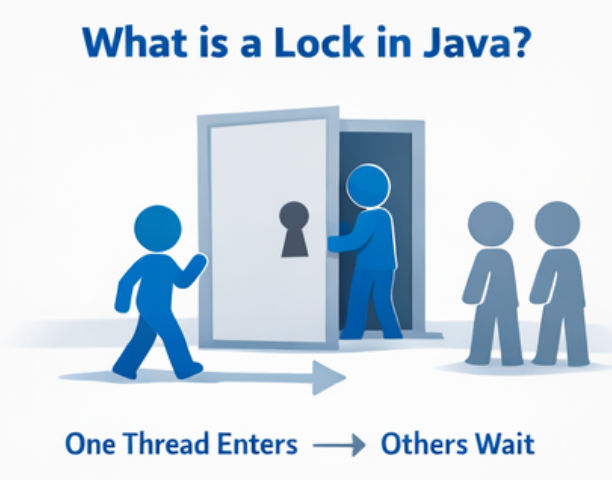
A Lock is a mechanism that allows only one thread at a time to access a critical section of code.
Think of a lock like a room key — only one person (thread) can enter at a time.
While synchronized works well, Locks are more powerful and flexible.
Problems with synchronized
Advantages of Locks
Java provides different types of Locks to handle various multithreading scenarios. Each lock type is designed to solve a specific concurrency problem efficiently.

Intrinsic locks are the default locks provided by Java.
Key Points
synchronized keywordExample
synchronized (this) {
// critical section
}
When to Use
ReentrantLock is the most commonly used explicit lock in Java.
Why Reentrant?
A thread holding the lock can acquire it again without causing a deadlock.
Features
Example
import java.util.concurrent.locks.Lock;
import java.util.concurrent.locks.ReentrantLock;

public class ReentrantLockExample {

    private final Lock lock = new ReentrantLock();
    private int count = 0;

    public void increment() {
        lock.lock();
        try {
            count++;
            System.out.println(Thread.currentThread().getName() +
                               " count = " + count);
        } finally {
            lock.unlock(); // always release lock
        }
    }
}
When to Use
ReadWriteLock separates read and write operations.
How It Works
Implementation
ReentrantReadWriteLock
Common Implementation
ReadWriteLocklock=newReentrantReadWriteLock();
ReadWriteLock Example
import java.util.concurrent.locks.ReadWriteLock;
import java.util.concurrent.locks.ReentrantReadWriteLock;

publicclassReadWriteLockExample {

privatefinalReadWriteLocklock=newReentrantReadWriteLock();
privateintdata=0;

publicvoidreadData() {
        lock.readLock().lock();
try {
            System.out.println("Reading data: " + data);
        }finally {
            lock.readLock().unlock();
        }
    }

publicvoidwriteData(int value) {
        lock.writeLock().lock();
try {
            data = value;
            System.out.println("Writing data: " + data);
        }finally {
            lock.writeLock().unlock();
        }
    }
}
When to Use
StampedLock is an advanced and high-performance lock.
Key Features
Important Note
StampedLock Example (Optimistic Read)
import java.util.concurrent.locks.StampedLock;

publicclassStampedLockExample {

privateintdata=10;
privatefinalStampedLocklock=newStampedLock();

publicintreadData() {
longstamp= lock.tryOptimisticRead();
intcurrentData= data;

if (!lock.validate(stamp)) {
            stamp = lock.readLock();
try {
                currentData = data;
            }finally {
                lock.unlockRead(stamp);
            }
        }
return currentData;
    }

publicvoidwriteData(int value) {
longstamp= lock.writeLock();
try {
            data = value;
        }finally {
            lock.unlockWrite(stamp);
        }
    }
}
When to Use
A fair lock ensures threads acquire the lock in the order they requested it.
How Fair Lock Works
Fair Lock Example
import java.util.concurrent.locks.Lock;
import java.util.concurrent.locks.ReentrantLock;

Locklock=newReentrantLock(true);// fair lock
Passing true to the ReentrantLock constructor enables fairness.
When to Use a Fair Lock
Use a fair lock when:
An Unfair Lock does not guarantee that threads will acquire the lock in the order they requested it. A thread can jump ahead of others if the lock becomes available.
How Unfair Lock Works
Unfair Lock Example
import java.util.concurrent.locks.Lock;
import java.util.concurrent.locks.ReentrantLock;

Locklock=newReentrantLock();// unfair lock (default)
When to Use an Unfair Lock
Use an unfair lock when:
A Spin Lock is a locking mechanism where a thread continuously checks (spins) to see if a lock is available instead of going into a blocked or sleeping state.
How a Spin Lock Works
This approach avoids thread suspension but consumes CPU cycles.
When to Use Spin Lock (Conceptually)
Use a spin lock approach when:
The Lock interface in Java provides advanced locking mechanisms beyond the basic synchronized keyword. These methods allow fine-grained control over thread synchronization.
1. lock()
Acquires the lock. If the lock is not available, the thread waits until it becomes free. Always use it inside a try-finally block to ensure the lock is released.
Locklock=newReentrantLock();

lock.lock();// acquire lock
try {
    System.out.println("Critical section executed by " + Thread.currentThread().getName());
}finally {
    lock.unlock();// release lock
}
2. unlock()
Releases the lock. It should always be called in the finally block to prevent deadlocks, ensuring other threads can acquire the lock safely.
3. tryLock()
Attempts to acquire the lock without waiting. Returns true if successful, otherwise false. This is useful when you don’t want threads to block indefinitely.
if (lock.tryLock()) {
try {
        System.out.println("Lock acquired, performing task");
    }finally {
        lock.unlock();
    }
}else {
    System.out.println("Could not acquire lock, skipping task");
}
4. tryLock(long time, TimeUnit unit)
Tries to acquire the lock within a specified timeout. Returns true if the lock is acquired in time, otherwise false. This helps avoid long waits and potential deadlocks.
if (lock.tryLock(2, TimeUnit.SECONDS)) {
try {
        System.out.println("Lock acquired within 2 seconds");
    }finally {
        lock.unlock();
    }
}else {
    System.out.println("Timeout: Could not acquire lock");
}
5. lockInterruptibly()
Acquires the lock unless the thread is interrupted while waiting. Throws InterruptedException if interrupted. This is useful for gracefully cancelling threads that are waiting for a lock.
try {
    lock.lockInterruptibly();
try {
        System.out.println("Lock acquired with interruptible waiting");
    }finally {
        lock.unlock();
    }
}catch (InterruptedException e) {
    System.out.println("Thread was interrupted while waiting for the lock");
}
6. newCondition()
Returns a Condition object associated with the lock. Conditions allow threads to wait and signal in a controlled way, similar to wait() and notify() in synchronized blocks, but more flexible.
Locklock=newReentrantLock();
Conditioncondition= lock.newCondition();

lock.lock();
try {
    System.out.println("Thread is waiting for condition");
    condition.await();// thread waits here
    System.out.println("Thread resumed after signal");
}catch (InterruptedException e) {
    e.printStackTrace();
}finally {
    lock.unlock();
}

// Another thread can signal
lock.lock();
try {
    condition.signal();
}finally {
    lock.unlock();
}
When using explicit locks like ReentrantLock, it’s critical to always release the lock. Failing to do so can cause deadlocks where other threads wait forever.
Example
lock.lock();// Acquire the lock
try {
// Critical section: only one thread executes here at a time
}finally {
    lock.unlock();// Always release the lock
}
Why this is important:
The tryLock() method lets a thread attempt to acquire a lock without waiting, preventing blocking and improving performance in high-concurrency situations.
if (lock.tryLock()) {  // Attempt to acquire lock
    try {
        System.out.println("Lock acquired");
        // Critical section code
    } finally {
        lock.unlock();  // Always release the lock
    }
} else {
    System.out.println("Could not acquire lock");  // Lock not available
}
Key Benefits of tryLock()
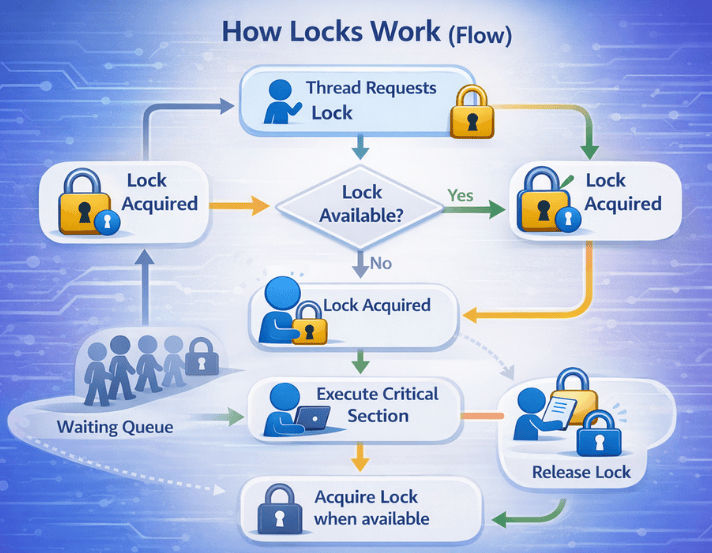
Locks control access to shared resources in multithreaded Java applications. Here’s how they work:
finally blockReadWriteLock for read-heavy systemstryLock() when waiting is dangeroussynchronized for simple casesBoth synchronized and Lock are used to control access to shared resources in multithreaded applications. However, Locks provide more flexibility and advanced control.
| Feature | synchronized |
Lock |
|---|---|---|
| Automatic unlock | Yes – released automatically when block/method exits | No – must call unlock() manually |
| Try lock | No – always waits | Yes – can attempt lock without blocking |
| Timeout | No – waits indefinitely | Yes – can specify maximum wait time |
| Interruptible | No – cannot interrupt waiting threads | Yes – supports lockInterruptibly() |
| Read/Write lock | No – only exclusive access | Yes – supports ReadWriteLock and StampedLock |
| Control | Simple – easy to use | Advanced – fine-grained control over concurrency |
| Feature | ReentrantLock | ReadWriteLock (ReentrantReadWriteLock) |
|---|---|---|
| Purpose | General-purpose mutual exclusion lock | Separates read and write access |
| Locking | Single lock for all operations | Two locks: read lock (shared) and write lock (exclusive) |
| Multiple Readers | Not allowed | Allowed – multiple threads can read simultaneously |
| Single Writer | Only one thread can write | Only one thread can write at a time |
| Performance | Good for general synchronization | Better for read-heavy applications |
| Use Case | General locking of shared resources | Caching, configuration stores, read-dominant systems |
| Complexity | Simple to use | Medium – requires careful handling of read/write locks |
| Reentrant | Yes – same thread can re-acquire | Yes – both read and write locks are reentrant separately |
Locks in Java provide fine-grained control over thread synchronization. They are more powerful than synchronized and are essential for building high-performance, thread-safe applications.
If your application has complex concurrency requirements, Locks are the right choice.
