
Author
TreeMap is a widely used Map implementation in Java that stores key-value pairs in sorted order.
It is part of the java.util package and implements the SortedMap interface.
A TreeMap is a Red-Black Tree based implementation of Map that:
Package:
import java.util.TreeMap;
Iterable (Not parent)
   └── Collection (Not parent)
Map
   └── SortedMap
         └── TreeMap
firstKey(), lastKey(), headMap(), tailMap(), etc.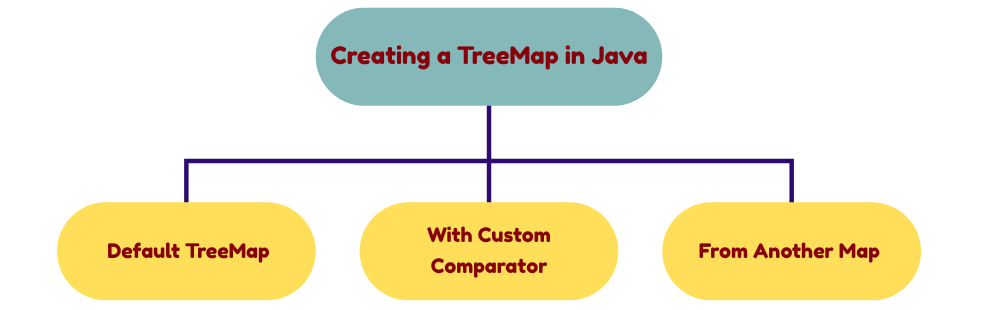
Creates an empty TreeMap with keys sorted in natural ascending order.
TreeMap<Integer, String> map = new TreeMap<>();
Creates a TreeMap with custom sorting order as per the comparator.
TreeMap<Integer, String> map = new TreeMap<>(Comparator.reverseOrder());
Creates a TreeMap by copying entries from an existing map, with keys sorted automatically.
Map<Integer, String> existingMap = new HashMap<>();
TreeMap<Integer, String> map = new TreeMap<>(existingMap);
put(K key, V value) – Adds or updates a key-value pair
map.put(1, "Java");
map.put(2, "Python");
putIfAbsent(K key, V value) – Adds only if key is not present
map.putIfAbsent(3, "C++");
putAll(Map m) – Copies all entries from another map
map.putAll(otherMap);
get(Object key) – Returns the value for a given key
map.get(1);
containsKey(Object key) – Checks if key exists
map.containsKey(2);
containsValue(Object value) – Checks if value exists
map.containsValue("Java");
firstKey() / lastKey() – Returns first/last key
map.firstKey();
map.lastKey();
size() / isEmpty() – Returns number of entries / checks if empty
map.size();
map.isEmpty();
remove(Object key) – Removes mapping for key
map.remove(2);
clear() – Removes all entries
map.clear();
headMap(K toKey) – Returns keys less than toKey
map.headMap(3);
tailMap(K fromKey) – Returns keys greater than or equal to fromKey
map.tailMap(2);
subMap(K fromKey, K toKey) – Returns keys in the range
map.subMap(1, 3);
ceilingKey(K key) / floorKey(K key) – Smallest key ≥ / largest key ≤ given key
map.ceilingKey(2);
map.floorKey(2);
higherKey(K key) / lowerKey(K key) – Next higher / lower key
map.higherKey(1);
map.lowerKey(2);
keySet() – Returns all keys
for (Integer key : map.keySet()) {
    System.out.println(key);
}
values() – Returns all values
for (String value : map.values()) {
    System.out.println(value);
}
entrySet() – Returns key-value pairs
for (Map.Entry<Integer, String> e : map.entrySet()) {
    System.out.println(e.getKey() + " = " + e.getValue());
}
| Operation | Time Complexity |
|---|---|
| put() | O(log n) |
| get() | O(log n) |
| remove() | O(log n) |
| containsKey() | O(log n) |
| iteration | O(n) |
| Feature | HashMap | LinkedHashMap | TreeMap |
|---|---|---|---|
| Order | No order | Insertion/Access | Sorted order |
| Null Key | 1 | 1 | Not allowed |
| Null Values | Allowed | Allowed | Allowed |
| Performance | O(1) avg | O(1) avg | O(log n) |
| Internal DS | Hashing | Hash + LinkedList | Red-Black Tree |
| Best Use | High performance | Cache / predictable order | Sorted data / range queries |
import java.util.TreeMap;
import java.util.Map;

public class Main {
    public static void main(String[] args) {

        TreeMap<Integer, String> map = new TreeMap<>();

        map.put(101, "Java");
        map.put(102, "Python");
        map.put(103, "C++");

        for (Map.Entry<Integer, String> e : map.entrySet()) {
            System.out.println(e.getKey() + " = " + e.getValue());
        }
    }
}
Output:
101 = Java
102 = Python
103 = C++
firstKey(), lastKey(), ceilingKey(), floorKey(), headMap(), tailMap(), subMap().