
Author
TreeSet is one of the most important classes in Java Collections Framework.
It is part of the java.util package and implements the NavigableSet and SortedSet interfaces.
TreeSet is used when you need:
A TreeSet is a collection that:
Iterable
   └── Collection
          └── Set
               └── SortedSet
                      └── NavigableSet
                             └── TreeSet
TreeSet uses a Red-Black Tree (self-balancing binary search tree).
Each element becomes a node in the tree.
The tree stays balanced after every insertion and deletion.
          (20)
        /      \\
     (10)      (30)
       \\       /   \\
       (15) (25)  (40)
Example:
TreeSet<Integer> set = new TreeSet<>();
TreeSet<Integer> set = new TreeSet<>((a, b) -> b - a);
Creates an empty TreeSet that sorts elements in natural order.
TreeSet<String> set = new TreeSet<>();
Creates a TreeSet with a custom sorting order.
TreeSet<Integer> set = new TreeSet<>(Comparator.reverseOrder());
Creates a TreeSet containing elements from another collection and sorts them.
TreeSet<String> set = new TreeSet<>(list);
TreeSet<String> set = new TreeSet<>(new TreeSet<>(list));
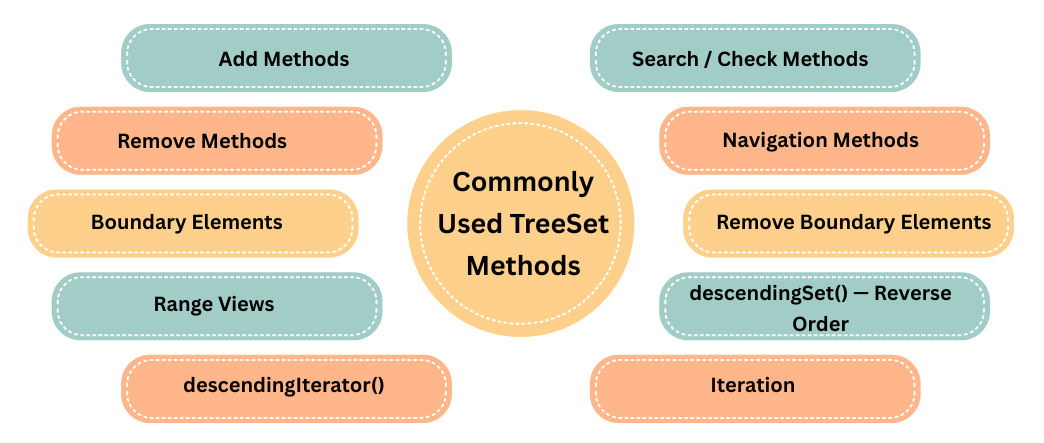
add(E e)
Adds an element. TreeSet automatically sorts elements and ignores duplicates.
TreeSet<Integer> set = new TreeSet<>();

set.add(50);
set.add(10);
set.add(30);

System.out.println(set);
Output:
[10, 30, 50]
addAll(Collection c)
Adds all elements from another collection and sorts them.
set.addAll(list);
contains(Object o)
Checks if an element exists.
set.contains("Java");
isEmpty()
Checks if TreeSet is empty.
set.isEmpty();
size()
Returns total elements.
set.size();
remove(Object o)
Removes a specific element.
set.remove("Python");
clear()
Removes all elements.
set.clear();
ceiling(E e)
Smallest element ≥ given value.
set.ceiling(40);
floor(E e)
Largest element ≤ given value.
set.floor(40);
higher(E e)
Next higher element (strictly > element).
set.higher(30);
lower(E e)
Next lower element (strictly < element).
set.lower(30);
first()
Returns smallest element.
set.first();
last()
Returns largest element.
set.last();
pollFirst()
Removes + returns smallest element.
set.pollFirst();
pollLast()
Removes + returns largest element.
set.pollLast();
subSet(a, b)
Elements from a (inclusive) to b (exclusive).
set.subSet(10, 40);
More precise variant:
set.subSet(10, true, 40, false);
headSet(x)
All elements less than x.
set.headSet(30);
tailSet(x)
All elements greater than or equal to x.
set.tailSet(30);
System.out.println(set.descendingSet());
Output:
[50, 30, 10]
Iterator<Integer> itr = set.descendingIterator();
while (itr.hasNext()) {
    System.out.println(itr.next());
}
Using Iterator
Iterator<String> itr = set.iterator();
while (itr.hasNext()) {
    System.out.println(itr.next());
}
Using Enhanced For Loop
for (String s : set) {
    System.out.println(s);
}
import java.util.TreeSet;

public class Main {
    public static void main(String[] args) {
        TreeSet<Integer> set = new TreeSet<>();

        set.add(40);
        set.add(10);
        set.add(30);
        set.add(20);

        System.out.println(set);
    }
}
Output:
[10, 20, 30, 40]
| Operation | Time Complexity | Explanation |
|---|---|---|
| add() | O(log n) | Red-Black Tree insertion |
| remove() | O(log n) | Tree rebalancing |
| contains() | O(log n) | Tree search |
| first() / last() | O(log n) | Root traversal |
| iteration | O(n) | In-order traversal |
| Feature | HashSet | LinkedHashSet | TreeSet |
|---|---|---|---|
| Order | No | Maintains insertion order | Sorted order |
| Speed | Fastest | Fast | Slowest |
| Null Allowed | Yes | Yes | No |
| Underlying DS | HashMap | HashMap + Linked List | TreeMap |
| Time Complexity | O(1) | O(1) | O(log n) |
| Use Case | Performance | Ordered set | Sorted set |
TreeSet is ideal when you need:
Examples:
Autocomplete Search
Search results need to be sorted.
TreeSet<String> dictionary = new TreeSet<>();

dictionary.add("car");
dictionary.add("carbon");
dictionary.add("cat");
dictionary.add("dog");

System.out.println(dictionary.tailSet("ca"));
Output:
[car, carbon, cat, dog]
