
Author
Multithreading is a core part of modern Java. ExecutorService is a high-level API that lets you run tasks concurrently, manage threads efficiently, and simplify multithreaded programming. Using ExecutorService makes your programs faster, cleaner, and more scalable without manually handling threads.
ExecutorService is a Java API from the java.util.concurrent package that manages threads and executes tasks for you.
Instead of manually creating Thread objects, ExecutorService handles:
In simple words:
ExecutorService = Thread Manager + Task Runner
It makes multithreaded programming simpler, safer, and more efficient, especially when running many tasks concurrently.
Example:
import java.util.concurrent.ExecutorService;
import java.util.concurrent.Executors;

publicclassExecutorServiceExample {
publicstaticvoidmain(String[] args) {
ExecutorServiceexecutor= Executors.newFixedThreadPool(2);// Thread pool with 2 threads

// Submit a task
        executor.submit(() -> System.out.println("Task is running in " + Thread.currentThread().getName()));

// Shutdown executor
        executor.shutdown();
    }
}
Output:
Task is running in pool-1-thread-1
ExecutorService is widely used because it simplifies multithreading and makes your programs faster and more efficient.
Here are the main benefits:
Runnable or Callable.Runnable tasks (no return value) and Callable tasks (returns a value), giving you control over asynchronous computations.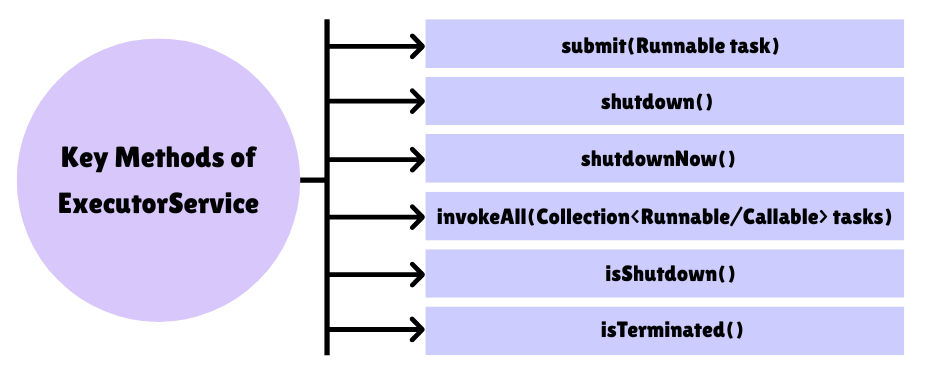
1. submit(Runnable task)
Runs a task asynchronously using a thread from the pool. Use this when you don’t need a result from the task.
Example:
import java.util.concurrent.ExecutorService;
import java.util.concurrent.Executors;

publicclassSubmitRunnableExample {
publicstaticvoidmain(String[] args) {
ExecutorServiceexecutor= Executors.newFixedThreadPool(2);

// Submit Runnable tasks
for (inti=1; i <=3; i++) {
inttaskId= i;
            executor.submit(() -> {
                System.out.println("Running task " + taskId +" by " + Thread.currentThread().getName());
            });
        }

        executor.shutdown();
    }
}
Sample Output:
Running task1 by pool-1-thread-1
Running task2 by pool-1-thread-2
Running task3 by pool-1-thread-1
—> Notice how threads are reused from the pool.
2. shutdown()
Stops accepting new tasks but finishes all already submitted tasks before shutting down.
Example:
ExecutorServiceexecutor= Executors.newFixedThreadPool(2);

executor.submit(() -> System.out.println("Task running..."));

// Stop accepting new tasks
executor.shutdown();

System.out.println("Executor shutdown called");
Sample Output:
Task running...
Executor shutdown called
—> The executor finishes submitted tasks but will not accept new ones.
3. shutdownNow()
Attempts to stop all running tasks immediately. Tasks that are already running may not stop instantly.
Example:
ExecutorServiceexecutor= Executors.newFixedThreadPool(2);

executor.submit(() -> {
try {
        Thread.sleep(2000);
        System.out.println("Long running task finished");
    }catch (InterruptedException e) {
        System.out.println("Task interrupted!");
    }
});

// Attempt to stop tasks immediately
executor.shutdownNow();
System.out.println("ShutdownNow called");
Sample Output (may vary):
Task interrupted!
ShutdownNow called
—> shutdownNow() tries to stop all tasks immediately but cannot guarantee that already running threads stop instantly.
4. invokeAll(Collection<Runnable/Callable> tasks)
Runs multiple tasks at the same time and waits for all of them to finish. Useful for batch processing tasks.
Example (Runnable version):
import java.util.concurrent.*;
import java.util.Arrays;
import java.util.List;

publicclassInvokeAllExample {
publicstaticvoidmain(String[] args)throws InterruptedException {
ExecutorServiceexecutor= Executors.newFixedThreadPool(2);

        List<Runnable> tasks = Arrays.asList(
            () -> System.out.println("Task 1 done by " + Thread.currentThread().getName()),
            () -> System.out.println("Task 2 done by " + Thread.currentThread().getName())
        );

// Convert Runnable to Callable<Void> for invokeAll
        List<Callable<Void>> callables = tasks.stream()
            .map(task -> Executors.callable(task))
            .toList();

        executor.invokeAll(callables);

        executor.shutdown();
    }
}
Sample Output:
Task1 done by pool-1-thread-1
Task2 done by pool-1-thread-2
—> invokeAll() waits until all tasks are completed.
5. isShutdown()
Checks if the executor has been shut down (i.e., no new tasks are accepted).
Example:
ExecutorServiceexecutor= Executors.newFixedThreadPool(2);
executor.shutdown();

System.out.println("Is executor shutdown? " + executor.isShutdown());
Output:
Is executor shutdown?true
6. isTerminated()
Checks if all tasks have completed after shutdown.
Example:
ExecutorServiceexecutor= Executors.newFixedThreadPool(2);

executor.submit(() -> System.out.println("Task running..."));
executor.shutdown();

while (!executor.isTerminated()) {
// Wait until all tasks finish
}

System.out.println("All tasks completed: " + executor.isTerminated());
Sample Output:
Task running...
All tasks completed:true
—> Useful to confirm all tasks are done before proceeding.
import java.util.concurrent.*;
import java.util.Arrays;
import java.util.List;

publicclassExecutorServiceMethodsExample {
publicstaticvoidmain(String[] args)throws Exception {
// Create a fixed thread pool with 2 threads
ExecutorServiceexecutor= Executors.newFixedThreadPool(2);

// 1. Using submit(Runnable)
        executor.submit(() -> System.out.println("Runnable Task running by " + Thread.currentThread().getName()));

// 2. Using submit(Callable)
        Callable<Integer> callableTask = () -> {
intsum=0;
for (inti=1; i <=5; i++) sum += i;
return sum;
        };
        Future<Integer> futureResult = executor.submit(callableTask);
        System.out.println("Callable Task Result: " + futureResult.get());

// 3. Using invokeAll()
        Callable<String> task1 = () ->"Task1 Done";
        Callable<String> task2 = () ->"Task2 Done";
        List<Future<String>> results = executor.invokeAll(Arrays.asList(task1, task2));
for (Future<String> r : results) {
            System.out.println(r.get());
        }

// 4. Check if executor is shutdown
        System.out.println("Is executor shutdown? " + executor.isShutdown());

// 5. Shutdown executor
        executor.shutdown();
        System.out.println("Executor shutdown called");

// 6. Check if all tasks are terminated
        System.out.println("Is executor terminated? " + executor.isTerminated());
    }
}
Sample Output:
RunnableTask running by pool-1-thread-1
CallableTask Result:15
Task1 Done
Task2 Done
Is executor shutdown?false
Executor shutdown called
Is executor terminated?true
—> This example shows how different ExecutorService methods work, including submitting tasks, returning results, running multiple tasks, and shutting down the executor safely.
Java provides several types of ExecutorService depending on how you want to manage threads and tasks:

Executors.newFixedThreadPool(n)Example:
ExecutorServiceexecutor= Executors.newFixedThreadPool(3);
for (inti=1; i <=5; i++) {
inttaskId= i;
    executor.submit(() -> System.out.println("Task " + taskId +" running by " + Thread.currentThread().getName()));
}
executor.shutdown();
Executors.newCachedThreadPool()Example:
ExecutorServiceexecutor= Executors.newCachedThreadPool();
for (inti=1; i <=5; i++) {
inttaskId= i;
    executor.submit(() -> System.out.println("Task " + taskId +" running by " + Thread.currentThread().getName()));
}
executor.shutdown();
Executors.newSingleThreadExecutor()Example:
ExecutorServiceexecutor= Executors.newSingleThreadExecutor();
for (inti=1; i <=3; i++) {
inttaskId= i;
    executor.submit(() -> System.out.println("Task " + taskId +" running by " + Thread.currentThread().getName()));
}
executor.shutdown();
Executors.newScheduledThreadPool(n)Example:
ScheduledExecutorServiceexecutor= Executors.newScheduledThreadPool(2);
executor.schedule(() -> System.out.println("Task executed after 2 seconds"),2, TimeUnit.SECONDS);
executor.shutdown();
ExecutorService is a powerful tool to manage threads efficiently and simplify multithreaded programming in Java.
By mastering ExecutorService, you can write fast, maintainable, and modern Java applications without manually managing threads.
