
Author
The Optional class in Java was introduced in Java 8 to handle one of the most common problems in programming — the NullPointerException.
If used properly, Optional helps you write safer, cleaner, and more readable code.
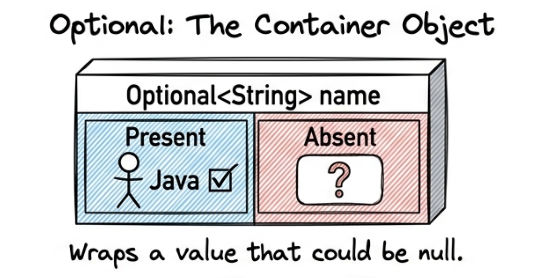
Optional is a container object that may or may not contain a value. It is used to represent the presence or absence of a value instead of using null directly.
With Optional, you can handle missing values in a safe, clear, and readable way without writing multiple null checks.
In simple words: It is a wrapper for a value that could be null.
Syntax of Optional
Optional<Type> objectName = Optional.of(value);
? This creates an Optional object that contains a value.
import java.util.Optional;

Optional<String> name = Optional.of("Java");

System.out.println(name.get());
? This example creates an Optional object with a value and prints it.
get() method is used to retrieve the value from Optional
Before Java 8, developers often wrote:
if (value != null) {
    System.out.println(value);
}
This approach leads to:
? Optional solves this problem by making null handling explicit, safe, and more readable.
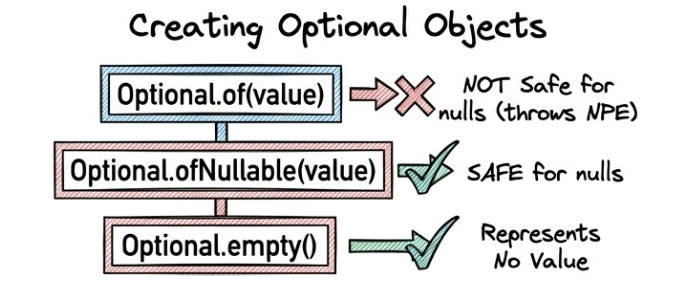
Optional provides different ways to create objects depending on whether the value is present or not.
Optional.of()This method is used when the value is always present (not null). It is not safe for null values.
Optional<String> name = Optional.of("Java");
? This example creates an Optional object with a non-null value "Java".
Optional.ofNullable()This method is used when the value may be null or non-null. It safely handles null values without throwing an exception.
Optional<String> name = Optional.ofNullable(null);
? This example creates an Optional object with a null value, and it will not throw any error.
Optional.empty()This method is used to create an empty Optional object when you want to represent that no value is present.
Optional<String> empty = Optional.empty();
? This example creates an Optional object that contains no value inside it.
These methods are used to check and handle values safely inside Optional.
isPresent()This method is used to check whether a value is present inside the Optional or not.
if (name.isPresent()) {
    System.out.println(name.get());
}
? This example first checks if the value exists, and then prints it using get().
if conditionifPresent()This method is used to directly perform an action if value is present, without explicit checking.
name.ifPresent(n -> System.out.println(n));
? This example prints the value only if it is present inside Optional.
isPresent()if conditionThese methods are used to retrieve values safely from Optional.
get()This method is used to directly get the value from Optional.
String value = name.get();
? This example retrieves the value stored inside the Optional.
orElse()This method returns the value if present, otherwise returns a default value.
String value = name.orElse("Default");
? This example returns the value if present, otherwise it returns "Default".
orElseGet()This method returns the value if present, otherwise it generates a value using a Supplier.
String value = name.orElseGet(() -> "Generated Value");
? This example returns the value if present, otherwise it returns "Generated Value".
orElseThrow()This method returns the value if present, otherwise it throws an exception.
String value = name.orElseThrow(() -> new RuntimeException("No value"));
? This example returns the value if present, otherwise it throws a RuntimeException with a custom message.
The map() method is used to transform the value inside Optional without changing its structure.
map()
Optional<String> name = Optional.of("java");

Optional<String> upper = name.map(n -> n.toUpperCase());

System.out.println(upper.get());
? This example converts the string "java" into uppercase "JAVA" using map().
This method is used when you are working with nested Optional values. It helps to avoid Optional<Optional<T>> structure.
Optional<String> result = name.flatMap(n -> Optional.of(n.toUpperCase()));
? This example converts the value inside Optional to uppercase and returns a single flattened Optional.
Optional<Optional<T>> problem.The filter() method is used to apply a condition on Optional values. If the condition is true, the value is returned; otherwise, it becomes empty.
Optional<Integer> num = Optional.of(10);

num.filter(n -> n > 5)
   .ifPresent(System.out::println);
? This example checks if the number is greater than 5, and then prints it if the condition is true.
This example shows how Optional is used in real applications like validating email addresses.
Optional<String> email = Optional.ofNullable(getEmail());

String result = email
    .filter(e -> e.contains("@"))
    .orElse("Invalid Email");

System.out.println(result);
? This example checks if the email contains "@". If valid, it returns the email; otherwise, it returns "Invalid Email".
Optional.ofNullable() for safe handling of null values.ifPresent() instead of isPresent() for cleaner code.get() directly because it may throw exceptions.orElse() or orElseGet() to provide default values safely.Use Optional when:
Avoid using Optional when:
| Feature | Optional | Null |
|---|---|---|
| Safety | High (prevents NullPointerException) | Low (can cause NullPointerException) |
| Readability | Good and expressive | Poor and unclear |
| Error Handling | Better with built-in methods | Risky and manual checks needed |
The Optional class in Java is a powerful feature to handle null values in a safe, clean, and modern way.
It helps you:
? Mastering Optional will make your Java code more robust, professional, and production-ready.
