
Author
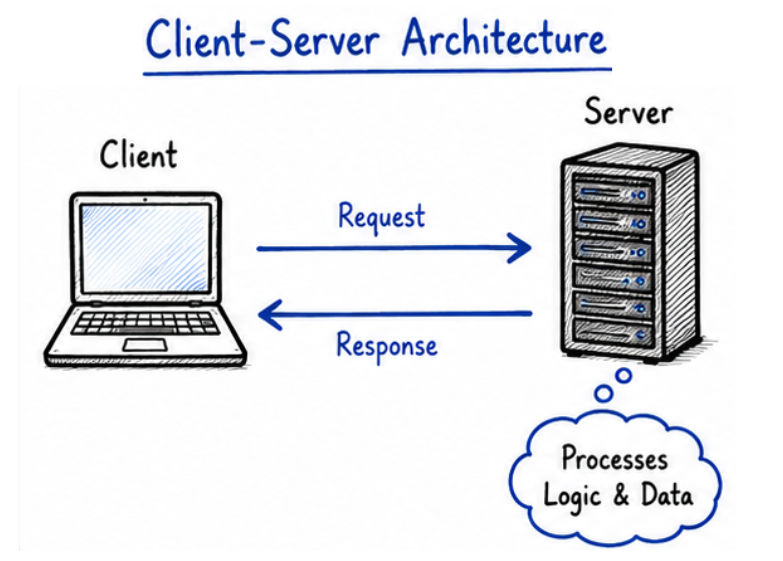
Client-server architecture is the foundation of modern applications like web apps, APIs, chat systems, and enterprise software. In Java, you can build powerful client-server systems using sockets and networking APIs.
This guide will help you understand how to design, implement, and handle real-world client-server communication step by step.
A client-server application is a system where:
In simple words: Client asks for data → Server provides data
Example: A web browser (client) requests a webpage, and the web server responds with HTML content.
Before writing code, it’s important to design how your system will work.
Client  →  Server
Request → Processing → Response
Example
Understanding the flow is very important.
Step-by-Step Flow
Flow Chart
[Start]
   ↓
[Server Starts]
   ↓
[Server Listening on Port]
   ↓
[Client Sends Connection Request]
   ↓
[Connection Established]
   ↓
[Client Sends Request]
   ↓
[Server Receives Request]
   ↓
[Server Processes Request]
   ↓
[Server Sends Response]
   ↓
[Client Receives Response]
   ↓
[Connection Closed]
   ↓
[End]
import java.net.*;
import java.io.*;

public class Server {
    public static void main(String[] args) throws Exception {

        ServerSocket server = new ServerSocket(5000);
        System.out.println("Server started...");

        Socket socket = server.accept();
        System.out.println("Client connected");

        BufferedReader in = new BufferedReader(
                new InputStreamReader(socket.getInputStream())
        );

        PrintWriter out = new PrintWriter(socket.getOutputStream(), true);

        String request = in.readLine();
        System.out.println("Client: " + request);

        // Business logic
        String response = "Hello Client, request received";

        out.println(response);

        socket.close();
        server.close();
    }
}
Explanation
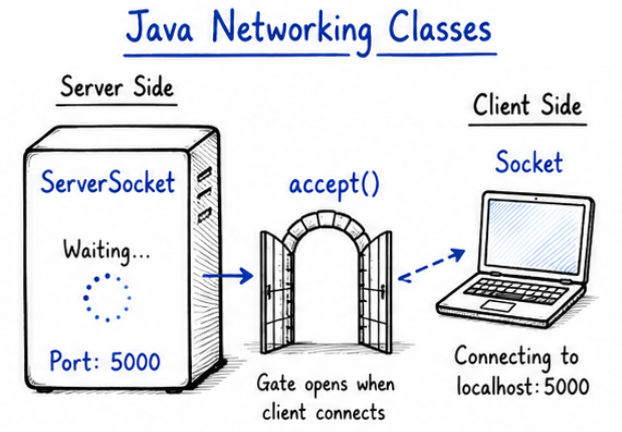
ServerSocket(5000) → Starts server on port 5000 and listens for connectionsaccept() → Waits for client connection (blocking call)BufferedReader → Reads data sent by clientPrintWriter → Sends response back to clientimport java.net.*;
import java.io.*;
public class Client {
public static void main(String[] args) throws Exception {
Socket socket = new Socket("localhost", 5000);
BufferedReader in = new BufferedReader(
new InputStreamReader(socket.getInputStream())
);
PrintWriter out = new PrintWriter(socket.getOutputStream(), true);
// Send request
out.println("Hello Server");
// Receive response
String response = in.readLine();
System.out.println("Server: " + response);
socket.close();
}
}
Explanation
Socket("localhost", 5000) → Connects to server on given host and portout.println() → Sends request data to serverin.readLine() → Reads response sent by serverOutput
Client: Hello Server
Server: Hello Client, request received
Scenario: Simple Calculator Server
Client sends:
ADD 10 20
Server responds:
Result: 30
? Client sends a request containing an operation (ADD) and two numbers. Server reads the request, identifies the operation, performs the calculation, and sends back the final result to the client.
import java.net.*;
import java.io.*;

public class CalcServer {
    public static void main(String[] args) throws Exception {

        ServerSocket server = new ServerSocket(6000);
        Socket socket = server.accept();

        BufferedReader in = new BufferedReader(
                new InputStreamReader(socket.getInputStream())
        );

        PrintWriter out = new PrintWriter(socket.getOutputStream(), true);

        String input = in.readLine();

        String[] parts = input.split(" ");
        String op = parts[0];
        int a = Integer.parseInt(parts[1]);
        int b = Integer.parseInt(parts[2]);

        int result = 0;

        if (op.equals("ADD")) result = a + b;

        out.println("Result: " + result);

        socket.close();
        server.close();
    }
}
import java.net.*;
import java.io.*;

public class CalcClient {
    public static void main(String[] args) throws Exception {

        Socket socket = new Socket("localhost", 6000);

        BufferedReader in = new BufferedReader(
                new InputStreamReader(socket.getInputStream())
        );

        PrintWriter out = new PrintWriter(socket.getOutputStream(), true);

        out.println("ADD 10 20");

        String response = in.readLine();
        System.out.println(response);

        socket.close();
    }
}
Output
Result: 30
Common Issues
Example with Exception Handling
try {
    Socket socket = new Socket("localhost", 5000);
} catch (IOException e) {
    System.out.println("Connection failed: " + e.getMessage());
}
? This handles cases where the client is unable to connect to the server and prevents the program from crashing unexpectedly.
Important Points
try-catch blocksIOException properly in both client and server1. Multithreading
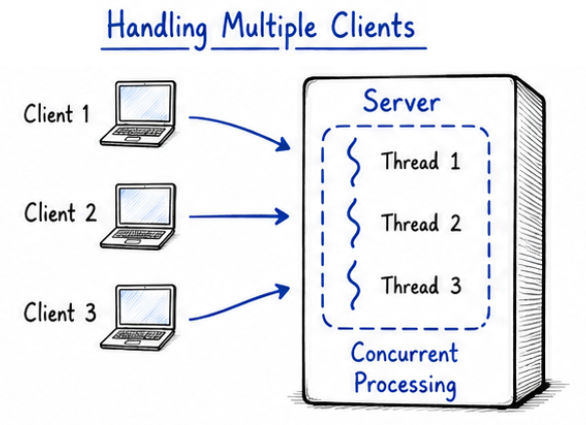
To handle multiple clients at the same time:
new Thread(() -> handleClient(socket)).start();
This allows the server to serve multiple clients simultaneously instead of processing one by one.
2. Use Protocol Design
Define a proper message format for communication between client and server:
LOGIN username password
GET_DATA userId
This makes communication structured, readable, and easier to process on the server side.
3. Security Improvements

Client-server architecture is used in almost every modern application where communication between two systems is required.
Building client-server applications in Java is a core skill for backend development.
? Client-server architecture is the foundation of how modern network-based applications work.
