
Author
HTTP communication is a core part of modern Java applications. It allows your program to interact with web servers, APIs, and external services using standard web protocols.
In this guide, you will learn how HTTP works in Java and how to send GET and POST requests step by step.
HTTP (HyperText Transfer Protocol) is a communication protocol used to transfer data between a client and a server over the internet.
In simple words: HTTP is the way a browser or application communicates with a web server.
Example: When you open a website, your browser sends an HTTP request and the server returns a response (web page data).
Basic flow:
Client (Java App / Browser) → Sends Request → Server
Server → Processes Request → Sends Response → Client

Common HTTP Methods
? These methods define the type of operation a client wants to perform on the server.
The URL class is used to represent a web address.
Example
import java.net.URL;

public class URLExample {
    public static void main(String[] args) throws Exception {

        URL url = new URL("<https://jsonplaceholder.typicode.com/posts>");

        System.out.println("Protocol: " + url.getProtocol());
        System.out.println("Host: " + url.getHost());
        System.out.println("Path: " + url.getPath());
    }
}
Explanation
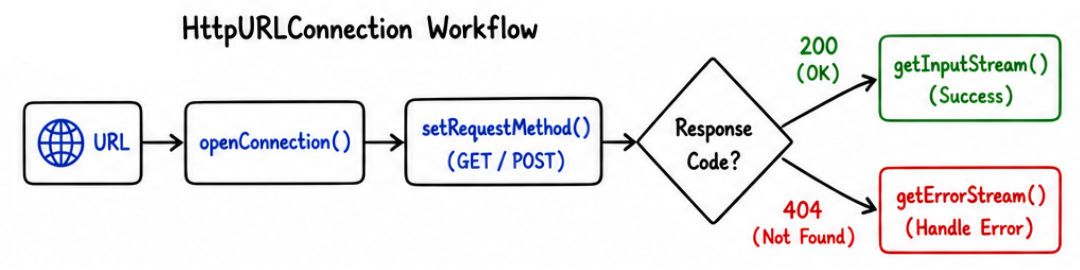
getProtocol() → Returns protocol (e.g., https)getHost() → Returns domain name (e.g., jsonplaceholder.typicode.com)getPath() → Returns endpoint path (e.g., /posts)HttpURLConnection is used to send HTTP requests and receive responses in Java. It supports GET, POST, and other HTTP methods.
In simple words: It acts as a bridge between your Java application and a web server, allowing you to send requests and get responses.
java.net packageURL to establish connection? Commonly used for calling APIs and communicating with web services
Example
import java.net.*;
import java.io.*;

public class GetRequestExample {
    public static void main(String[] args) throws Exception {

        URL url = new URL("<https://jsonplaceholder.typicode.com/posts/1>");

        HttpURLConnection con = (HttpURLConnection) url.openConnection();
        con.setRequestMethod("GET");

        BufferedReader br = new BufferedReader(
                new InputStreamReader(con.getInputStream())
        );

        String line;
        StringBuilder response = new StringBuilder();

        while ((line = br.readLine()) != null) {
            response.append(line);
        }

        br.close();

        System.out.println(response.toString());
    }
}
Explanation
openConnection() → Opens HTTP connection to the URLsetRequestMethod("GET") → Sets request type as GETgetInputStream() → Reads response from serverBufferedReader → Reads response line by lineStringBuilder → Stores complete responseExample
import java.net.*;
import java.io.*;

public class PostRequestExample {
    public static void main(String[] args) throws Exception {

        URL url = new URL("<https://jsonplaceholder.typicode.com/posts>");

        HttpURLConnection con = (HttpURLConnection) url.openConnection();

        con.setRequestMethod("POST");
        con.setDoOutput(true);

        String jsonInput = "{\\"title\\":\\"Java\\",\\"body\\":\\"HTTP Post\\",\\"userId\\":1}";

        OutputStream os = con.getOutputStream();
        os.write(jsonInput.getBytes());
        os.flush();
        os.close();

        BufferedReader br = new BufferedReader(
                new InputStreamReader(con.getInputStream())
        );

        String line;
        StringBuilder response = new StringBuilder();

        while ((line = br.readLine()) != null) {
            response.append(line);
        }

        br.close();

        System.out.println(response.toString());
    }
}
Explanation
setDoOutput(true) → Enables sending data in request bodygetOutputStream() → Sends data to serverImportant Methods
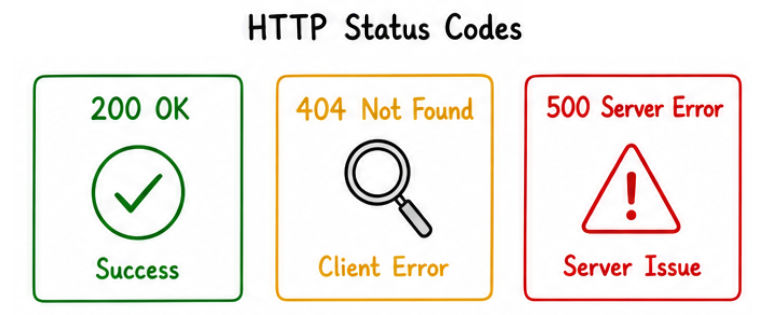
getResponseCode() → Returns HTTP status code (200, 404, etc.)getInputStream() → Used for successful responsegetErrorStream() → Used for error responseExample
int status = con.getResponseCode();

if (status == 200) {
    System.out.println("Success");
} else {
    System.out.println("Error: " + status);
}
HTTP communication is used in:
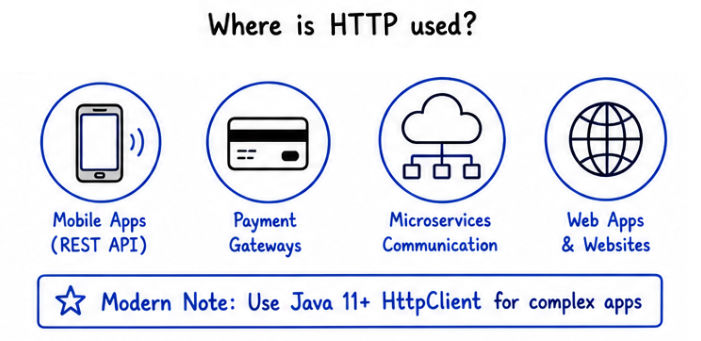
HTTP is the backbone of web communication between applications and servers.
HttpURLConnection is low-level and verbose (requires more code)Modern alternatives:
HttpClient (Java 11+)setDoOutput(true) while making POST requestsHTTP communication is essential for building modern Java applications.
URL and HttpURLConnection for communication? HTTP allows Java applications to communicate with web servers and exchange data over the internet.
