
Author
Modern database applications require data consistency, reliability, and high performance. JDBC provides powerful features like transaction management and batch processing to handle these requirements efficiently.
? These features ensure that database operations are safe, consistent, and optimized for performance, especially in real-world applications.
A transaction is a group of SQL operations executed as a single unit.
In simple words: Either all operations succeed, or none of them are applied.
? This means if any step fails, all previous changes are rolled back to maintain consistency.
Example (JDBC Transaction Code)
import java.sql.*;

public class TransactionExample {
    public static void main(String[] args) throws Exception {

        Connection con = DriverManager.getConnection(
                "jdbc:mysql://localhost:3306/testdb", "root", "password");

        // Step 1: Disable auto-commit
        con.setAutoCommit(false);

        try {
            // Step 2: First operation
            PreparedStatement ps1 = con.prepareStatement(
                "UPDATE accounts SET balance = balance - 1000 WHERE id = 1"
            );
            ps1.executeUpdate();

            // Step 3: Second operation
            PreparedStatement ps2 = con.prepareStatement(
                "UPDATE accounts SET balance = balance + 1000 WHERE id = 2"
            );
            ps2.executeUpdate();

            // Step 4: Commit transaction
            con.commit();
            System.out.println("Transaction Successful!");

        } catch (Exception e) {

            // Step 5: Rollback if error occurs
            con.rollback();
            System.out.println("Transaction Failed! Rolled back.");

        }

        con.close();
    }
}
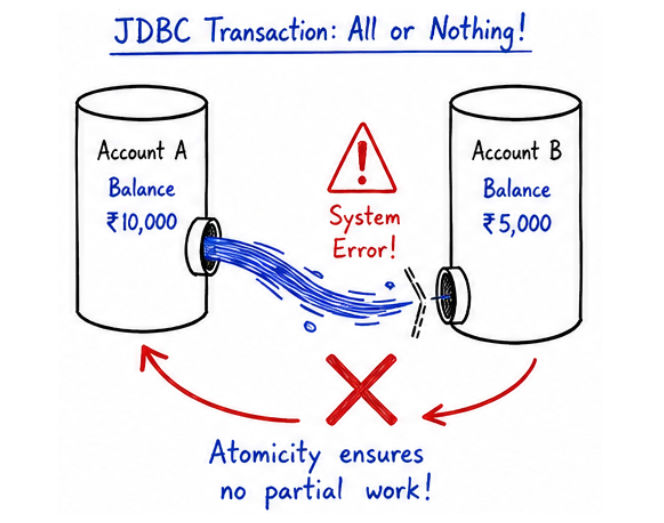
How it Works
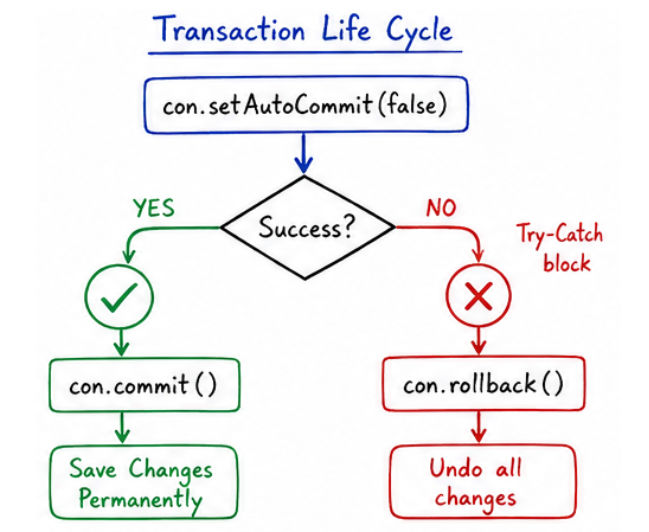
setAutoCommit(false) → Starts transaction modecommit() → Saves all changes permanentlyrollback() → Cancels all operations if error occursWithout transactions:
JDBC provides methods to control transactions manually, allowing you to decide when changes should be saved or cancelled.
commit() is used to save changes permanently in the database.
All SQL operations executed after disabling auto-commit are stored temporarily and only saved when commit() is called.
Example
Connection con = DriverManager.getConnection(url, user, pass);

// Disable auto-commit mode
con.setAutoCommit(false);

Statement stmt = con.createStatement();

// First operation
stmt.executeUpdate(
    "UPDATE accounts SET balance = balance - 100 WHERE id = 1"
);

// Second operation
stmt.executeUpdate(
    "UPDATE accounts SET balance = balance + 100 WHERE id = 2"
);

// Save all changes
con.commit();
Explanation
setAutoCommit(false) → Starts manual transaction modecommit() → Saves all changes permanently to the database? Without calling commit(), changes will not be saved, and may be lost if the connection is closed.
rollback() is used to undo changes if something goes wrong during a transaction.
It cancels all operations performed after setAutoCommit(false) and restores the database to its previous state.
Example
try {
    con.setAutoCommit(false);

    stmt.executeUpdate(
        "UPDATE accounts SET balance = balance - 100 WHERE id = 1"
    );

    stmt.executeUpdate(
        "UPDATE accounts SET balance = balance + 100 WHERE id = 2"
    );

    con.commit();

} catch (Exception e) {

    // Undo all changes if error occurs
    con.rollback();
}
Explanation
setAutoCommit(false) → Starts transaction modecommit() saves changesrollback() cancels all operations? rollback() ensures data safety and consistency, especially in critical operations like banking and transactions.
A Savepoint allows you to create a checkpoint within a transaction.
It helps you rollback only a specific part of the transaction, instead of undoing everything.
Example
con.setAutoCommit(false);

stmt.executeUpdate("INSERT INTO users VALUES (1, 'Amit')");

// Create savepoint
Savepoint sp = con.setSavepoint();

stmt.executeUpdate("INSERT INTO users VALUES (2, 'Rahul')");

// Rollback only second insert
con.rollback(sp);

// Commit remaining changes
con.commit();
Explanation
setSavepoint() → Creates a checkpointrollback(sp) → Undoes only the operations after savepointcommit() → Saves remaining changes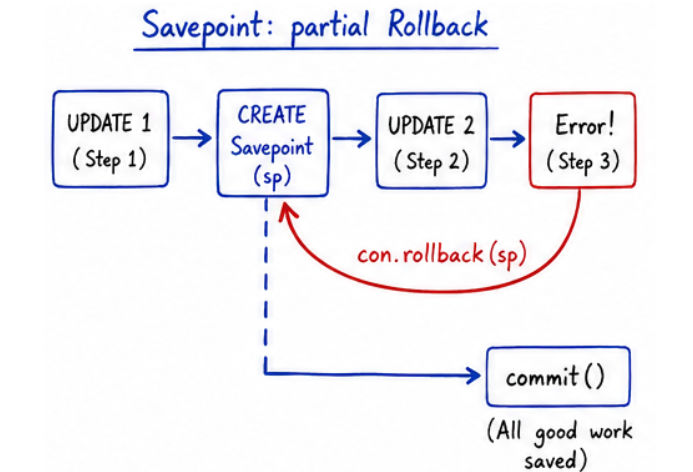
? Only changes after the savepoint are undone, earlier changes remain safe.
By default, JDBC runs in auto-commit mode.
This means every SQL statement is automatically saved in the database.
Default Behavior
commit() manuallyDisable Auto-Commit
con.setAutoCommit(false);
Explanation
commit() and rollback()? Auto-commit must be disabled when you want to implement proper transaction management in JDBC.
Transactions follow ACID properties to ensure reliability, consistency, and safety of database operations.
In simple words: ACID rules make sure that data is always correct and safe, even if errors occur.
? If any step fails, the entire transaction is rolled back
Example:
Money deducted but not added → Not allowed → Entire transaction cancelled
? Before and after the transaction, the database must follow all rules (constraints, relations)
Example:
Account balance should never go negative (if rule exists)
? Multiple transactions can run simultaneously without affecting each other
Example:
User A and User B transactions run at the same time without conflict
? Even if system crashes, committed data will not be lost
Example:
After commit(), data is stored safely in the database
Batch processing allows executing multiple SQL queries together instead of one by one.
? This significantly improves performance, especially when dealing with large amounts of data.
Without Batch
With Batch
Example: Batch Processing
Connection con = DriverManager.getConnection(url, user, pass);

Statement stmt = con.createStatement();

stmt.addBatch("INSERT INTO users VALUES (1, 'Amit')");
stmt.addBatch("INSERT INTO users VALUES (2, 'Rahul')");
stmt.addBatch("INSERT INTO users VALUES (3, 'Neha')");

int[] result = stmt.executeBatch();
Explanation
addBatch() → Adds multiple SQL queries to the batchexecuteBatch() → Executes all queries at onceint[] result → Returns update count for each queryPreparedStatement ps = con.prepareStatement(
"INSERT INTO users (id, name) VALUES (?, ?)"
);
ps.setInt(1, 1);
ps.setString(2, "Amit");
ps.addBatch();
ps.setInt(1, 2);
ps.setString(2, "Rahul");
ps.addBatch();
int[] result = ps.executeBatch();
Explanation
prepareStatement() → Precompiles the SQL querysetInt() / setString() → Sets parameter valuesaddBatch() → Adds each set of values to the batchexecuteBatch() → Executes all queries togetherint[] result → Returns number of rows affected for each query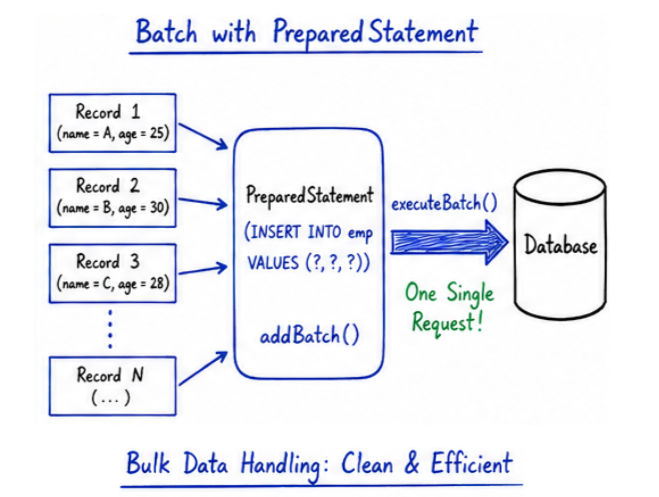
Batch processing improves performance by:
? Instead of executing queries one by one, batch processing executes them in a single go, which saves time and resources.
? Ideal for bulk operations (1000+ records or more)
Batch processing is widely used in real-world applications such as:
commit() after disabling auto-commit (changes won’t be saved)rollback() in case of failure (can lead to inconsistent data)clearBatch() when reusing statementsTransactions and batch processing are essential for building robust, reliable, and high-performance applications.
