
Author
Java 11 introduced a modern HTTP Client API that makes HTTP communication much simpler, cleaner, and more powerful compared to the old HttpURLConnection.
In this guide, you will learn how to use HttpClient, HttpRequest, and HttpResponse to send synchronous and asynchronous requests and work with JSON APIs.
The Java 11 HTTP Client is a modern API available in the java.net.http package used to send HTTP requests and handle responses.
In simple words: It is a new and improved way to call APIs in Java with less code and better performance.
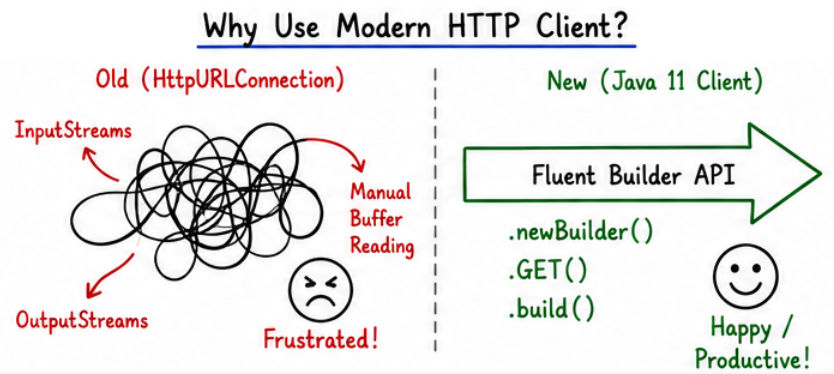
HttpURLConnection .? It simplifies HTTP communication and is widely used in modern Java applications.
Problems with old HttpURLConnection:
? Solution:
1. HttpClient
2. HttpRequest
3. HttpResponse
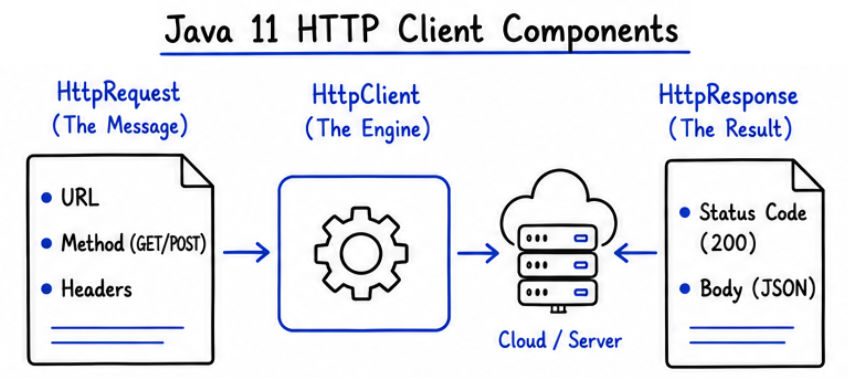
import java.net.http.HttpClient;

HttpClient client = HttpClient.newHttpClient();
? Creates a default HTTP client instance used to send requests.
Example: GET Request
import java.net.URI;
import java.net.http.*;

public class SyncExample {
    public static void main(String[] args) throws Exception {

        HttpClient client = HttpClient.newHttpClient();

        HttpRequest request = HttpRequest.newBuilder()
                .uri(new URI("<https://jsonplaceholder.typicode.com/posts/1>"))
                .GET()
                .build();

        HttpResponse<String> response = client.send(
                request,
                HttpResponse.BodyHandlers.ofString()
        );

        System.out.println("Status: " + response.statusCode());
        System.out.println("Body: " + response.body());
    }
}
Explanation
newHttpClient() → Creates HTTP client.HttpRequest.newBuilder() → Builds the request..GET() → Sets request method as GET.send() → Sends request and waits for response.BodyHandlers.ofString() → Converts response body into string.? This is called synchronous because the program waits until the response is received before moving to the next step.
Example: Async GET
import java.net.URI;
import java.net.http.*;
import java.util.concurrent.CompletableFuture;

public class AsyncExample {
    public static void main(String[] args) throws Exception {

        HttpClient client = HttpClient.newHttpClient();

        HttpRequest request = HttpRequest.newBuilder()
                .uri(new URI("<https://jsonplaceholder.typicode.com/posts/1>"))
                .GET()
                .build();

        CompletableFuture<HttpResponse<String>> future =
                client.sendAsync(request, HttpResponse.BodyHandlers.ofString());

        future.thenApply(HttpResponse::body)
              .thenAccept(System.out::println)
              .join();
    }
}
Explanation
sendAsync() → Sends request without blocking the main thread.CompletableFuture → Represents future result.thenApply() → Processes the response (extracts body).thenAccept() → Consumes and prints the result.join() → Waits for completion (optional, for demo).? Useful for high-performance and concurrent applications where multiple requests run in parallel without waiting.

import java.net.URI;
import java.net.http.*;

public class PostExample {
    public static void main(String[] args) throws Exception {

        HttpClient client = HttpClient.newHttpClient();

        String json = "{\\"title\\":\\"Java\\",\\"body\\":\\"HTTP Client\\",\\"userId\\":1}";

        HttpRequest request = HttpRequest.newBuilder()
                .uri(new URI("<https://jsonplaceholder.typicode.com/posts>"))
                .header("Content-Type", "application/json")
                .POST(HttpRequest.BodyPublishers.ofString(json))
                .build();

        HttpResponse<String> response = client.send(
                request,
                HttpResponse.BodyHandlers.ofString()
        );

        System.out.println(response.body());
    }
}
Explanation
newHttpClient() → Creates HTTP client.HttpRequest.newBuilder() → Builds the request..header("Content-Type", "application/json") → Sets request content type..POST(BodyPublishers.ofString(json)) → Sends JSON data in request body.send() → Sends request and waits for response.BodyHandlers.ofString() → Converts response to string.? Used to send data to server (API) in JSON format.
Most modern APIs return data in JSON format, which is easy to read and widely used in web services.
Example Response
{
  "id": 1,
  "title": "Java",
  "body": "HTTP Client"
}
? This response represents structured data returned by a server.
To work with JSON in Java, you need to convert it into Java objects. This process is called parsing.
You can use libraries like:
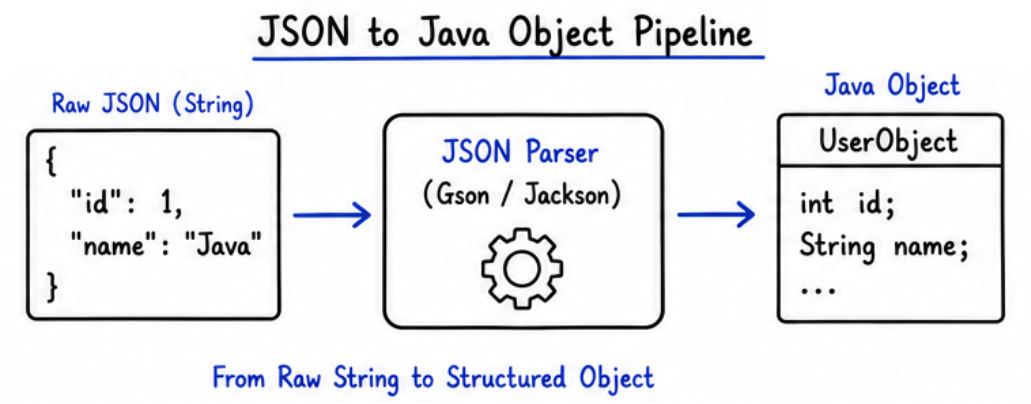
Example (concept):
// Using Gson
Gson gson = new Gson();
MyObject obj = gson.fromJson(response.body(), MyObject.class);
Explanation
Gson → Library used to handle JSON data.fromJson() → Converts JSON string into Java object.response.body() → Contains JSON response from API.MyObject.class → Target Java class for mapping JSON fields.? JSON data from API is converted into a Java object so you can easily access its fields like id, title, etc.
? These methods define how a client interacts with server resources.
? HTTP methods are widely used for communication between client and server in modern applications.
sendAsync).Content-Type)..join() unnecessarily).Modern HTTP Client in Java makes API communication simple, clean, and powerful.
HttpClient, HttpRequest, and HttpResponse.? It is the recommended approach for handling HTTP communication in modern Java applications.
