
Author
Socket programming is the foundation of network communication in Java. It allows applications to communicate over a network using the client-server model.
It is widely used in real-world applications like chat systems, file transfer, and web communication.
In this guide, you will learn how TCP sockets work, how to build a client-server application, and how data is exchanged between systems.
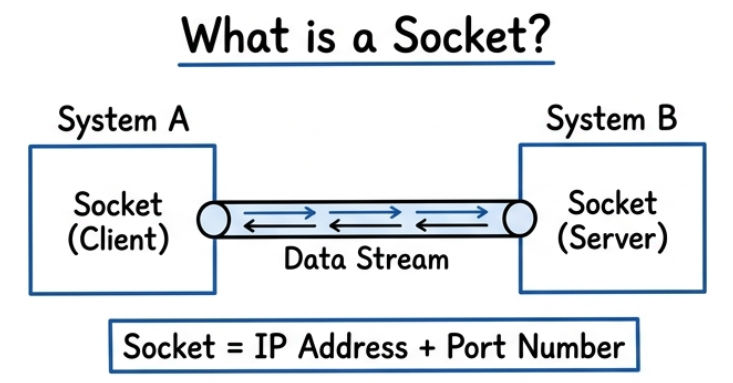
A socket is an endpoint of communication between two systems over a network.
In simple words: It is like a connection between two computers through which data is sent and received.
Conceptual Example
? Example: Chat application (real-time messaging)
Code Example (Basic Connection)
import java.net.Socket;

public class SocketExample {
    public static void main(String[] args) throws Exception {

        Socket socket = new Socket("localhost", 5000);

        System.out.println("Connection established");

        socket.close();
    }
}
? Shows how a client connects to a server
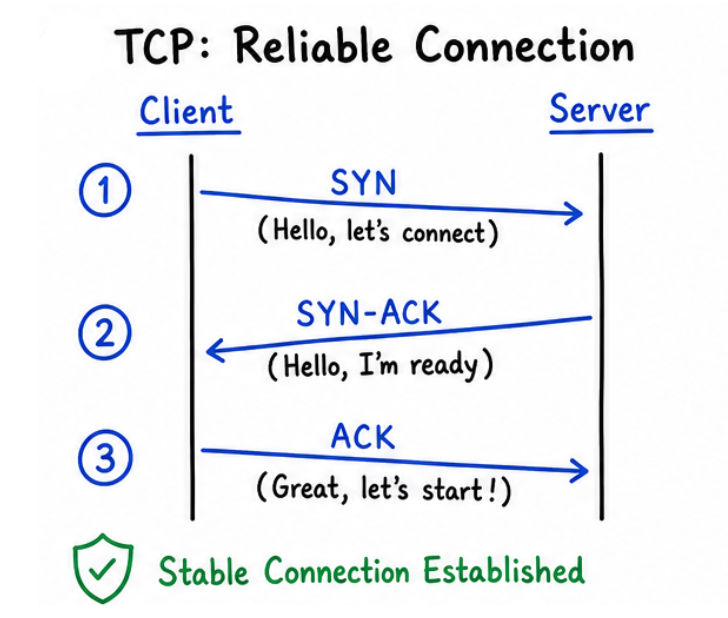
TCP (Transmission Control Protocol) is a reliable, connection-oriented protocol used for communication between client and server over a network.
In simple words: TCP ensures that data is sent safely, in order, and without loss between two systems.
Flow
Client → Request Connection → Server Accepts
Client → Send Data → Server
Server → Process → Respond
Connection Closed
Key Features
? Used in web apps, APIs, file transfer, email
| Feature | ServerSocket | Socket |
|---|---|---|
| Usage Side | Used on server side | Used on client side |
| Role | Waits for and accepts client connections | Connects to server and communicates |
| Main Purpose | Listens for incoming connection requests | Sends and receives data |
| Key Method | accept() |
connect(), getInputStream(), getOutputStream() |
| Connection Start | Passively waits for client | Actively initiates connection |
| Data Transfer | Does not transfer data directly | Handles data transmission |
Steps
ServerSocketServer Code
import java.net.*;
import java.io.*;

public class Server {
    public static void main(String[] args) {

        try {
            ServerSocket server = new ServerSocket(5000);
            System.out.println("Server started...");

            Socket socket = server.accept();
            System.out.println("Client connected");

            BufferedReader br = new BufferedReader(
                    new InputStreamReader(socket.getInputStream())
            );

            PrintWriter pw = new PrintWriter(socket.getOutputStream(), true);

            String msg = br.readLine();
            System.out.println("Client: " + msg);

            pw.println("Hello from Server");

            socket.close();
            server.close();

        } catch (Exception e) {
            e.printStackTrace();
        }
    }
}
Explanation
ServerSocket(5000) → Server starts and listens on port 5000accept() → Waits until a client connects (blocking call)getInputStream() → Receives data from clientgetOutputStream() → Sends data to clientreadLine() → Reads message sent by clientprintln() → Sends response back to clientsocket.close() → Closes client connectionserver.close() → Stops the server? The server waits for a client, reads a message, sends a response, and then closes the connection
Steps
SocketClient Code
import java.net.*;
import java.io.*;

public class Client {
    public static void main(String[] args) {

        try {
            Socket socket = new Socket("localhost", 5000);

            BufferedReader br = new BufferedReader(
                    new InputStreamReader(socket.getInputStream())
            );

            PrintWriter pw = new PrintWriter(socket.getOutputStream(), true);

            pw.println("Hello Server");

            String response = br.readLine();
            System.out.println("Server: " + response);

            socket.close();

        } catch (Exception e) {
            e.printStackTrace();
        }
    }
}
Explanation
Socket("localhost", 5000) → Connects to server running on port 5000getOutputStream() → Used to send data to serverprintln() → Sends message to servergetInputStream() → Receives data from serverreadLine() → Reads response sent by serversocket.close() → Closes the connection? The client connects to the server, sends a message, receives a response, and then closes the connection
Sockets use streams to exchange data between client and server.
getInputStream()In simple words: It receives data sent by the other side.
getOutputStream()In simple words: It sends data to the other side.
BufferedReader → Reads text efficiently (line by line)PrintWriter → Sends text easilyDataInputStream → Reads binary data (like int, float, etc.)? These wrappers make socket communication simple and readable
Example
BufferedReader br = new BufferedReader(
    new InputStreamReader(socket.getInputStream())
);

PrintWriter pw = new PrintWriter(socket.getOutputStream(), true);
This example enables continuous two-way communication.
import java.net.*;
import java.io.*;

public class ChatServer {
    public static void main(String[] args) throws Exception {

        ServerSocket server = new ServerSocket(5000);
        Socket socket = server.accept();

        BufferedReader in = new BufferedReader(
                new InputStreamReader(socket.getInputStream())
        );

        PrintWriter out = new PrintWriter(socket.getOutputStream(), true);

        BufferedReader userInput = new BufferedReader(
                new InputStreamReader(System.in)
        );

        String msg;

        while ((msg = in.readLine()) != null) {
            System.out.println("Client: " + msg);

            String reply = userInput.readLine();
            out.println(reply);
        }

        socket.close();
        server.close();
    }
}
Explanation (Server)
ServerSocket(5000) → Server starts on port 5000accept() → Waits for client connectionin.readLine() → Reads message from clientuserInput.readLine() → Takes input from server consoleout.println() → Sends response to clientimport java.net.*;
import java.io.*;
public class ChatClient {
public static void main(String[] args) throws Exception {
Socket socket = new Socket("localhost", 5000);
BufferedReader in = new BufferedReader(
new InputStreamReader(socket.getInputStream())
);
PrintWriter out = new PrintWriter(socket.getOutputStream(), true);
BufferedReader userInput = new BufferedReader(
new InputStreamReader(System.in)
);
while (true) {
String msg = userInput.readLine();
out.println(msg);
String response = in.readLine();
System.out.println("Server: " + response);
}
}
}
Explanation (Client)
Socket("localhost", 5000)out.println()in.readLine()
? TCP sockets are used wherever reliable and structured communication is required between systems.
Socket programming is a core concept in Java networking.
? Socket programming enables two systems to communicate over a network by sending and receiving data in a structured way.
