
Author
Database performance is one of the most critical parts of backend development. Creating a new database connection for every request is slow and resource-heavy.
To solve this, Java provides connection pooling and performance optimization techniques that make applications fast, scalable, and efficient.
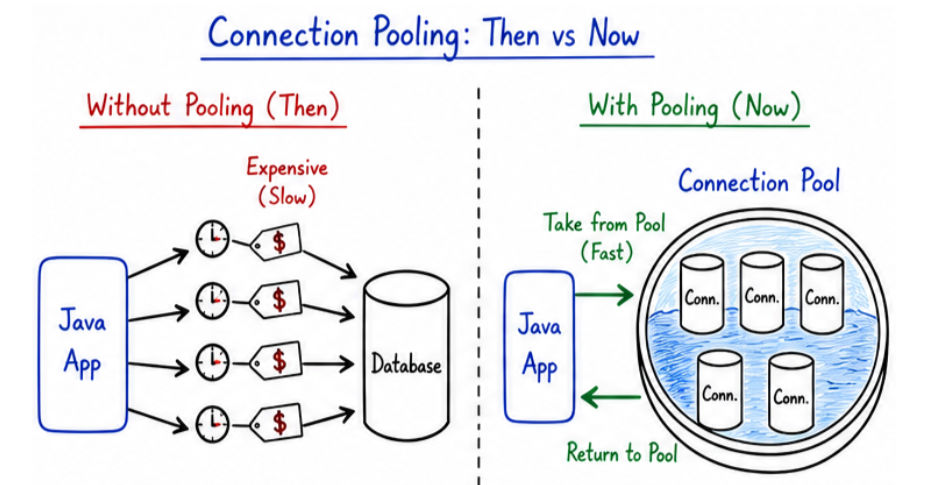
Connection Pooling is a technique where a pool (group) of database connections is created in advance and reused whenever needed.
In simple words: Instead of creating a new connection every time, we reuse existing connections.
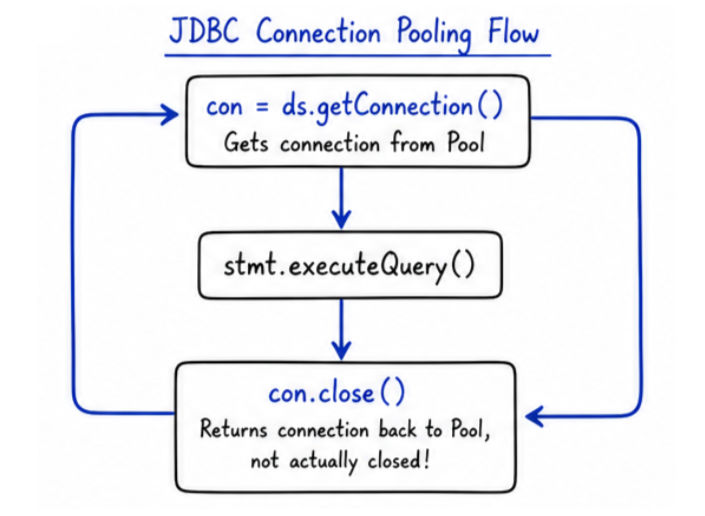
? A connection is taken from the pool, used, and then returned back to the pool for reuse.
Example (Using DataSource with Pooling)
import org.apache.commons.dbcp2.BasicDataSource;
import java.sql.Connection;

public class PoolExample {
    public static void main(String[] args) throws Exception {

        BasicDataSource ds = new BasicDataSource();

        ds.setUrl("jdbc:mysql://localhost:3306/testdb");
        ds.setUsername("root");
        ds.setPassword("password");

        // Get connection from pool
        Connection con = ds.getConnection();

        System.out.println("Using pooled connection");

        // Return connection to pool
        con.close();
    }
}
Explanation
BasicDataSource → Creates and manages connection poolgetConnection() → Gets connection from pool (not new every time)close() → Returns connection back to pool (not actually closed)Without pooling:
With pooling:
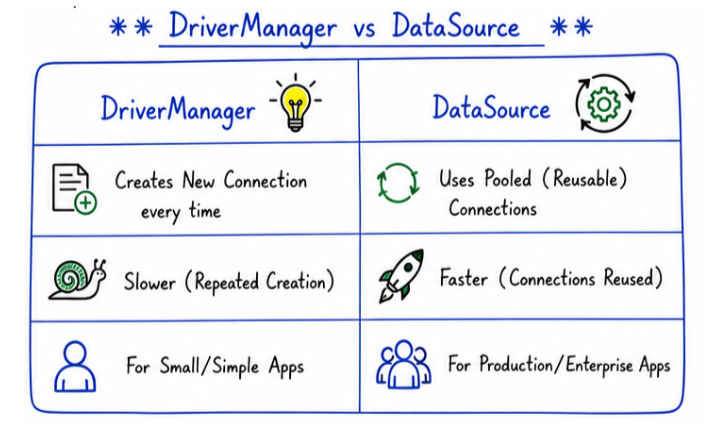
DataSource is an interface used to manage database connections more efficiently than DriverManager.
? It is mainly used in real-world and enterprise applications because it supports connection pooling and better configuration.
| Feature | DriverManager | DataSource |
|---|---|---|
| Connection Creation | Creates a new connection every time a request is made | Uses pooled (reusable) connections from a connection pool |
| Performance | Slower due to repeated connection creation | Faster because connections are reused |
| Configuration | Mostly hardcoded inside application code | Can be configured externally (properties files, servers) |
| Scalability | Not suitable for high-load applications | Designed for scalable and enterprise-level applications |
| Usage | Used in small or simple applications | Used in production and enterprise applications |
BasicDataSource ds = new BasicDataSource();

ds.setUrl("jdbc:mysql://localhost:3306/testdb");
ds.setUsername("root");
ds.setPassword("password");

Connection con = ds.getConnection();
con.close(); // Returns connection to pool
How It Works
? This reuse mechanism saves time and system resources.
Example (Simple Flow Understanding)
Client Request
      ↓
Connection Pool
      ↓
Get Connection
      ↓
Execute Query
      ↓
Return Connection to Pool
HikariCP is the most popular and fastest connection pool used in modern Java applications.
? It is widely adopted because of its high performance and low overhead, and it is used by default in Spring Boot.
Why HikariCP?
Example: HikariCP Configuration
import com.zaxxer.hikari.HikariConfig;
import com.zaxxer.hikari.HikariDataSource;
import java.sql.Connection;

public class HikariExample {
    public static void main(String[] args) throws Exception {

        HikariConfig config = new HikariConfig();

        config.setJdbcUrl("jdbc:mysql://localhost:3306/testdb");
        config.setUsername("root");
        config.setPassword("password");

        config.setMaximumPoolSize(10);

        HikariDataSource ds = new HikariDataSource(config);

        // Get connection from pool
        Connection con = ds.getConnection();

        System.out.println("Connection from HikariCP");

        // Return connection to pool
        con.close();
    }
}
Explanation
HikariConfig → Used to configure connection pool settingssetJdbcUrl(), setUsername(), setPassword() → Database configurationsetMaximumPoolSize() → Maximum number of connections in poolHikariDataSource → Creates and manages the poolgetConnection() → Retrieves connection from poolclose() → Returns connection back to poolmaximumPoolSize → Maximum number of connections allowedminimumIdle → Minimum idle (ready-to-use) connectionsconnectionTimeout → Maximum wait time to get a connectionidleTimeout → Time after which idle connections are removedApache DBCP (Database Connection Pooling) is another popular library used for managing database connection pools in Java applications.
? It is widely used in older and some enterprise systems, though newer projects often prefer HikariCP for better performance.
Features
Example: Apache DBCP
import org.apache.commons.dbcp2.BasicDataSource;
import java.sql.Connection;

public class DBCPExample {
    public static void main(String[] args) throws Exception {

        BasicDataSource ds = new BasicDataSource();

        ds.setUrl("jdbc:mysql://localhost:3306/testdb");
        ds.setUsername("root");
        ds.setPassword("password");

        ds.setMaxTotal(10); // Maximum connections

        // Get connection from pool
        Connection con = ds.getConnection();

        System.out.println("Connection from DBCP");

        // Return connection to pool
        con.close();
    }
}
Explanation
BasicDataSource → Provides connection pooling implementationsetUrl(), setUsername(), setPassword() → Configure database connectionsetMaxTotal() → Maximum number of connections in poolgetConnection() → Retrieves connection from poolclose() → Returns connection back to pool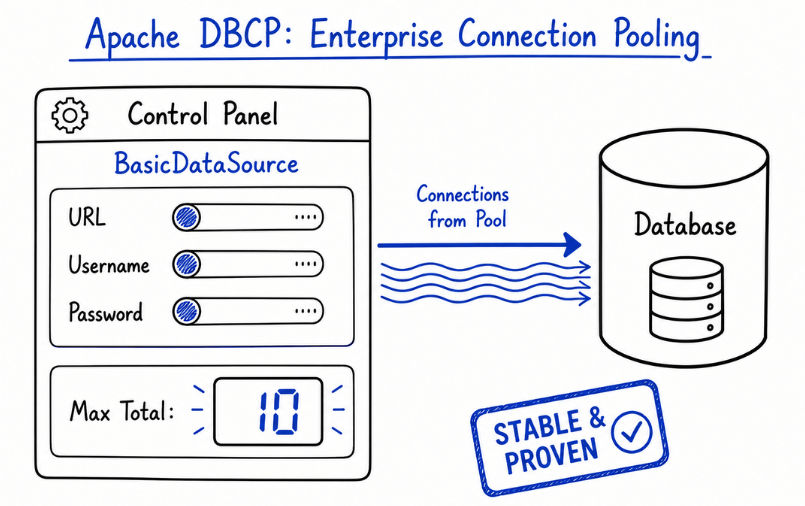
| Feature | HikariCP | Apache DBCP |
|---|---|---|
| Performance | Very fast due to optimized connection handling | Moderate performance compared to HikariCP |
| Resource Usage | Low memory and CPU usage | Higher resource consumption |
| Modern Usage | Preferred in modern applications | Less preferred in new applications |
| Default in Spring Boot | Yes (used by default) | No |
Improving database performance is critical for building scalable and efficient applications.
1. Use Connection Pooling
? Reduces connection creation overhead and improves performance
2. Use PreparedStatement
PreparedStatement ps = con.prepareStatement(
    "SELECT * FROM users WHERE id = ?"
);
3. Use Batch Processing
? Best for large data inserts/updates
4. Optimize SQL Queries
SELECT *)? Efficient queries = faster execution
5. Use Connection Pool Settings Properly
? Proper configuration improves stability and performance
6. Close Resources Properly
Use try-with-resources:
try (Connection con = ds.getConnection()) {
    // use connection
}
? Automatically closes resources and prevents memory leaks
7. Use Caching
? Useful in high-read applications
8. Avoid Long Transactions
? Long transactions can block other operations and slow down the system
DriverManager in production instead of connection pooling.Connection pooling and performance optimization are essential for building fast, scalable, and efficient Java applications.
DataSource improves connection management and supports pooling.