
Author
When working with databases, writing correct code is not enough—you must also ensure security, proper error handling, and clean coding practices.
In this guide, you will learn how to prevent SQL injection, handle exceptions properly, manage resources safely, and follow best practices used in real-world Java applications.
Without proper practices:
? These practices ensure your application is secure, stable, and production-ready, especially in real-world backend systems.
SQL Injection is a security attack where malicious SQL code is inserted into input fields to manipulate the database.
In simple words: User input is treated as SQL code instead of data.
Vulnerable Example (Bad Practice)
Statement stmt = con.createStatement();

String query = "SELECT * FROM users WHERE username = '" + username + "'";
ResultSet rs = stmt.executeQuery(query);
Problem:
Example attack input:
' OR '1'='1
? This can bypass authentication because the condition becomes always true, making the application insecure.
PreparedStatement prevents SQL Injection by separating SQL logic from data.
Safe Example
PreparedStatement ps = con.prepareStatement(
    "SELECT * FROM users WHERE username = ?"
);

ps.setString(1, username);

ResultSet rs = ps.executeQuery();
?) instead of directly inserting values.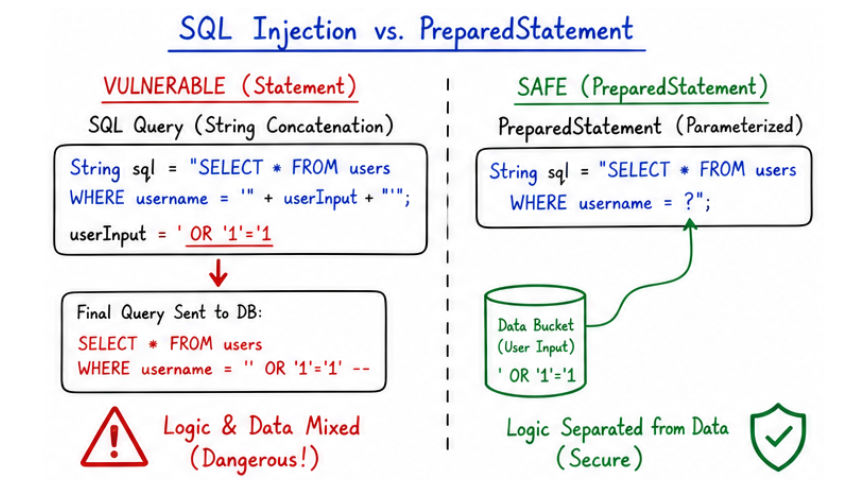
? This makes it secure, reliable, and the preferred choice in real-world applications.
Managing database resources properly is very important because database connections and related objects are limited and expensive.
If resources are not handled correctly, it can affect both performance and stability of the application.
Problem Without Closing Resources
Solution: try-with-resources
try-with-resources is a feature introduced in Java that automatically closes resources after use.
It ensures that resources are closed even if an exception occurs.
Automatically closes resources like:
? These resources implement AutoCloseable, so Java can close them automatically.
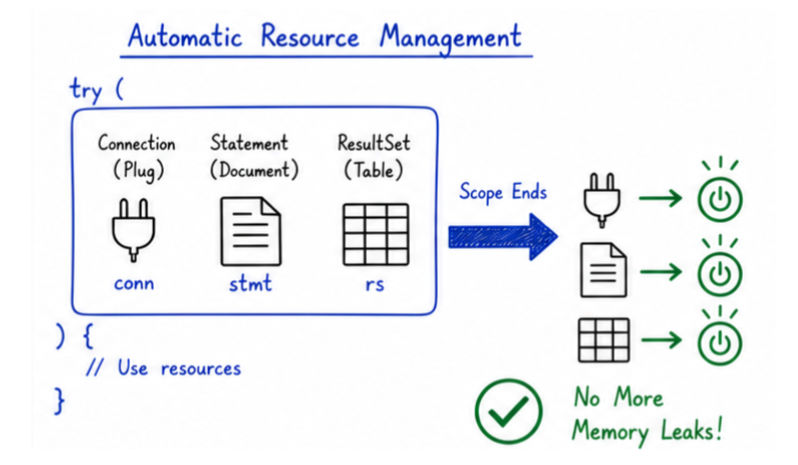
Example
try (
    Connection con = DriverManager.getConnection(url, user, pass);
    PreparedStatement ps = con.prepareStatement("SELECT * FROM users");
    ResultSet rs = ps.executeQuery()
) {

    while (rs.next()) {
        System.out.println(rs.getString("name"));
    }

} catch (SQLException e) {
    e.printStackTrace();
}
? No need to manually close resources
Database operations can fail due to many reasons:
Handling SQLException :
try {
    Connection con = DriverManager.getConnection(url, user, pass);

} catch (SQLException e) {
    System.out.println("Error Code: " + e.getErrorCode());
    System.out.println("Message: " + e.getMessage());
}
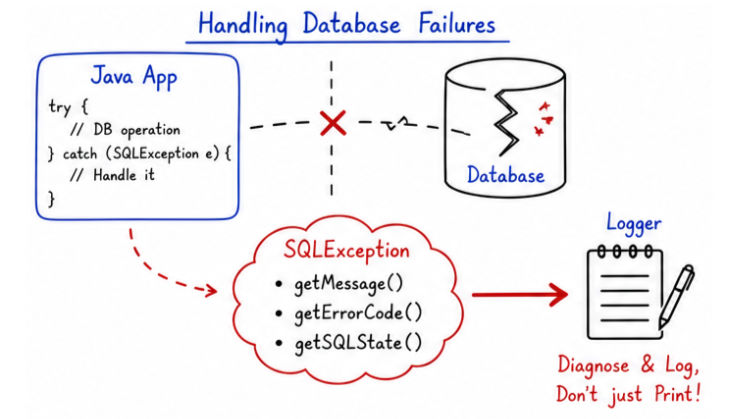
getMessage() → Returns detailed error message.getErrorCode() → Returns database/vendor-specific error code.getSQLState() → Returns standard SQL error code (useful for portability).? Helps in debugging and logging
Using proper logging is essential in production systems, as it helps in tracking application behavior and diagnosing issues without directly accessing the system.
Bad Practice
e.printStackTrace();
Not suitable for production because it:
Good Practice (Using Logger)
import java.util.logging.Logger;

Logger logger = Logger.getLogger("AppLogger");

try {
    // DB code
} catch (SQLException e) {
    logger.severe("Database error: " + e.getMessage());
}
Logging Tips
INFO, WARNING, SEVERE appropriately.Writing clean code improves readability, maintainability, and makes applications easier to scale and debug.
1. Use PreparedStatement
? Always prefer PreparedStatement over Statement in real-world applications
2. Avoid Hardcoding Credentials
Bad:
String user = "root";
String pass = "password";
Good:
application.properties).? This improves security and makes the application easier to manage across environments (dev, test, production).
3. Separate Database Logic
? This keeps your application modular, clean, and scalable
4. Use Meaningful Names
PreparedStatement getUserById;
ps, stmt, etc. in larger codebases? Improves readability and helps other developers understand the code quickly
5. Close Resources Properly
Connection, Statement, and ResultSet properly.? Proper resource management keeps the application stable and efficient.
6. Handle Exceptions Properly
? Good exception handling improves reliability and makes debugging easier.
7. Use Connection Pooling
? Essential for building scalable and production-ready applications.
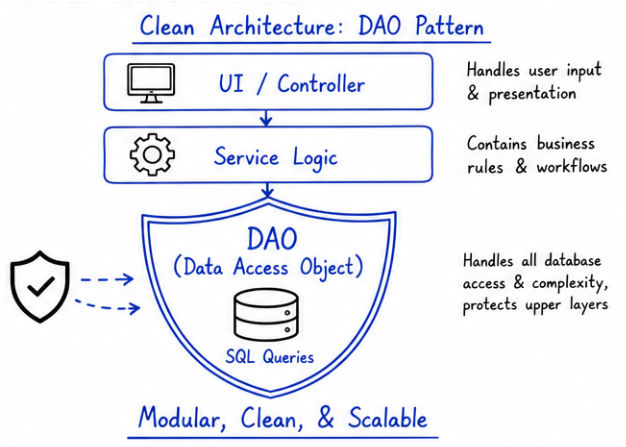
These best practices are widely used in real-world production systems where security, performance, and reliability are critical.
Statement instead of PreparedStatement (leads to SQL injection risks).Security, exception handling, and best practices are essential for building robust, secure, and production-ready JDBC applications.
PreparedStatement .SQLException and logging.? Applying these concepts ensures your Java database applications are secure, stable, and scalable in real-world environments.
