
Author
When you execute a query in JDBC, the result is returned in the form of a ResultSet. JDBC also provides metadata APIs to get information about the database and query results.
ResultSet is an interface used to store and process data returned from a SQL query.
In simple words: It is like a table of data returned by the database.
Example: Basic ResultSet Usage
import java.sql.*;

public class Test {
    public static void main(String[] args) throws Exception {

        Connection con = DriverManager.getConnection(
                "jdbc:mysql://localhost:3306/testdb", "root", "password");

        Statement stmt = con.createStatement();

        ResultSet rs = stmt.executeQuery("SELECT id, name FROM users");

        while (rs.next()) {
            System.out.println(rs.getInt("id") + " " + rs.getString("name"));
        }

        con.close();
    }
}
Output Example
1 Amit
2 Rahul
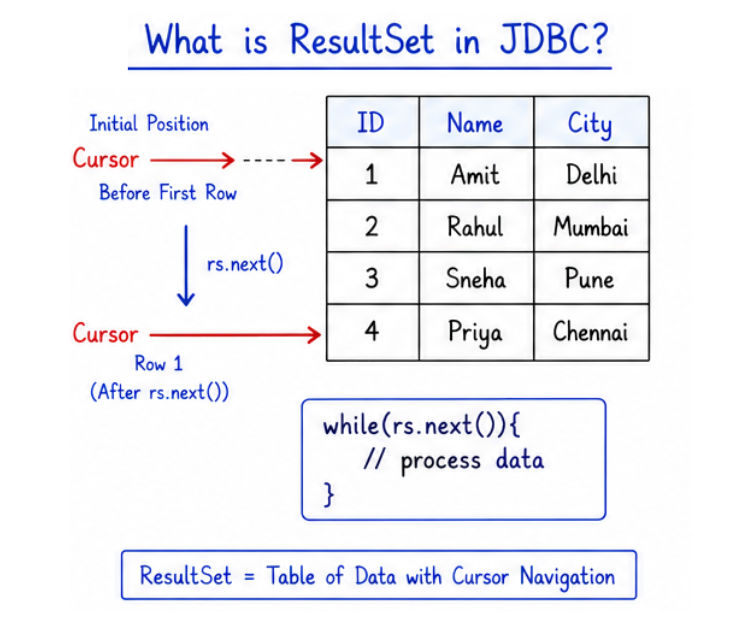
ResultSet objectrs.next() moves the cursor one row forward each time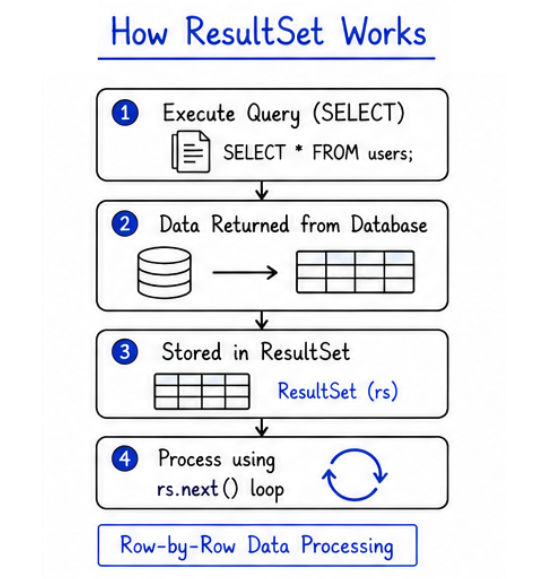
The ResultSet interface provides methods to:
? It acts as a container that holds data returned from the database and allows you to access it row by row.
Example
Statement stmt = con.createStatement();

ResultSet rs = stmt.executeQuery("SELECT * FROM users");

while (rs.next()) {
    System.out.println(rs.getString("name"));
}
Explanation
createStatement() → Creates a Statement objectexecuteQuery() → Executes SELECT query and returns ResultSetrs.next() → Moves cursor to the next rowgetString("name") → Retrieves value from the name column? The loop continues until all rows are processed.
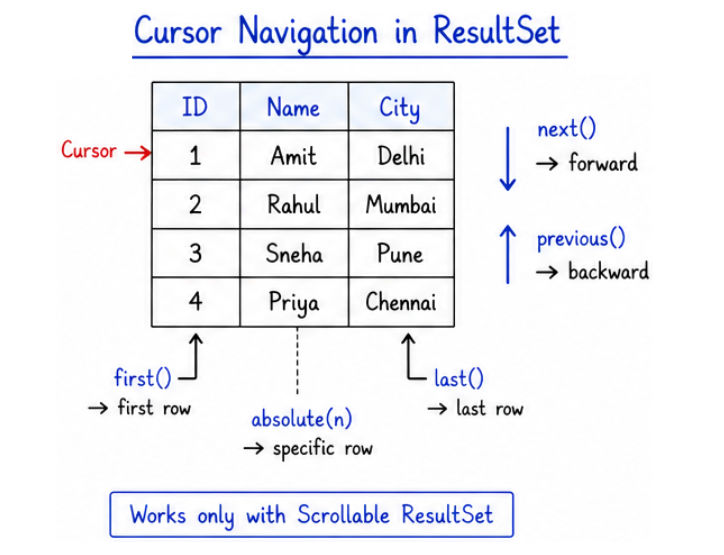
ResultSet uses a cursor (pointer) to navigate through rows in the data.
? The cursor controls which row you are currently accessing in the ResultSet.
next() to move to the first row.next() moves the cursor forward by one row.next() → Move to next row.previous() → Move to previous row.first() → Move to first row.last() → Move to last row.absolute(int row) → Move to a specific row number.Example
rs.next();     // moves to first row
rs.next();     // moves to second row
rs.previous(); // moves back to first row
Important Note
Methods like previous(), first(), and last() work only with scrollable ResultSet (not default).
Example to create scrollable ResultSet:
Statement stmt = con.createStatement(
    ResultSet.TYPE_SCROLL_INSENSITIVE,
    ResultSet.CONCUR_READ_ONLY
);
? Cursor navigation allows you to move forward and backward in data, making data processing more flexible in JDBC.
You can retrieve data from a ResultSet using column name or column index.
? It is recommended to use column names because they are more readable and less error-prone.
Example
while (rs.next()) {
    int id = rs.getInt("id");
    String name = rs.getString("name");

    System.out.println(id + " " + name);
}
Explanation
rs.next() → Moves cursor to the next rowgetInt("id") → Retrieves integer value from id columngetString("name") → Retrieves string value from name column? You can also use index:
int id = rs.getInt(1);
String name = rs.getString(2);
getInt() → For integer valuesgetString() → For text valuesgetDouble() → For decimal valuesgetDate() → For date values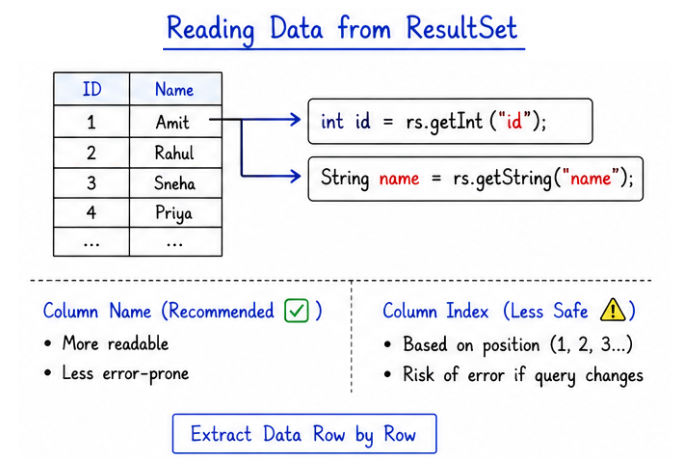
? Always match the getter method with the column data type, otherwise it may cause errors or incorrect data retrieval.
By default, ResultSet is forward-only, which means you can only move in one direction using next().
? To move backward or jump between rows, we use a scrollable ResultSet.
Statement stmt = con.createStatement(
    ResultSet.TYPE_SCROLL_INSENSITIVE,
    ResultSet.CONCUR_READ_ONLY
);

ResultSet rs = stmt.executeQuery("SELECT * FROM users");
Explanation
TYPE_SCROLL_INSENSITIVE → Allows moving forward and backward (data does not change during processing)CONCUR_READ_ONLY → ResultSet is read-only (cannot update data)next() and previous()absolute()first() and last()rs.last();
System.out.println("Last Row: " + rs.getString("name"));
rs.first();
System.out.println("First Row: " + rs.getString("name"));
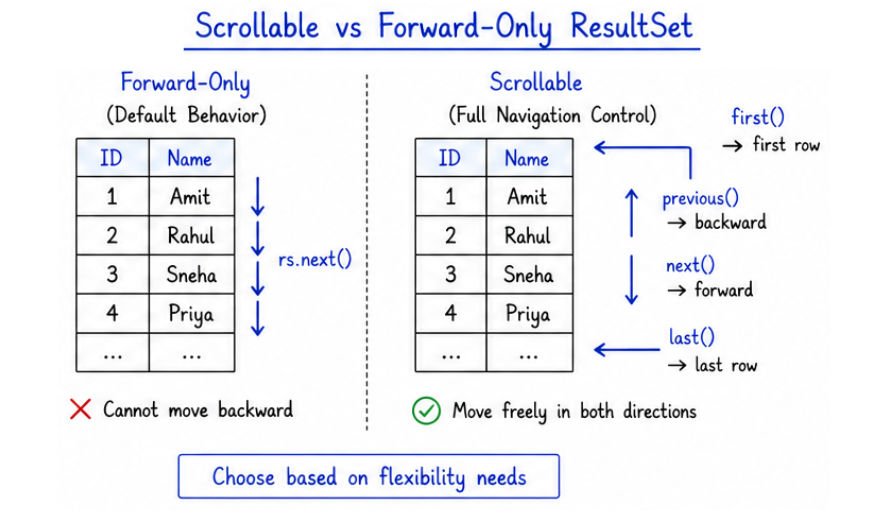
? Scrollable ResultSet gives you more control over data navigation, especially useful in complex data processing scenarios.
JDBC allows updating database records directly using a ResultSet.
? This means you can modify data without writing separate SQL UPDATE queries.
Statement stmt = con.createStatement(
    ResultSet.TYPE_SCROLL_SENSITIVE,
    ResultSet.CONCUR_UPDATABLE
);
Explanation
TYPE_SCROLL_SENSITIVE → Reflects changes made to the database while navigatingCONCUR_UPDATABLE → Allows updating data through the ResultSetExample
ResultSet rs = stmt.executeQuery("SELECT * FROM users");

rs.next();

rs.updateString("name", "Rahul Updated");
rs.updateRow();
rs.next() → Moves to the row you want to updateupdateString() → Updates the column value in memoryupdateRow() → Applies the changes to the database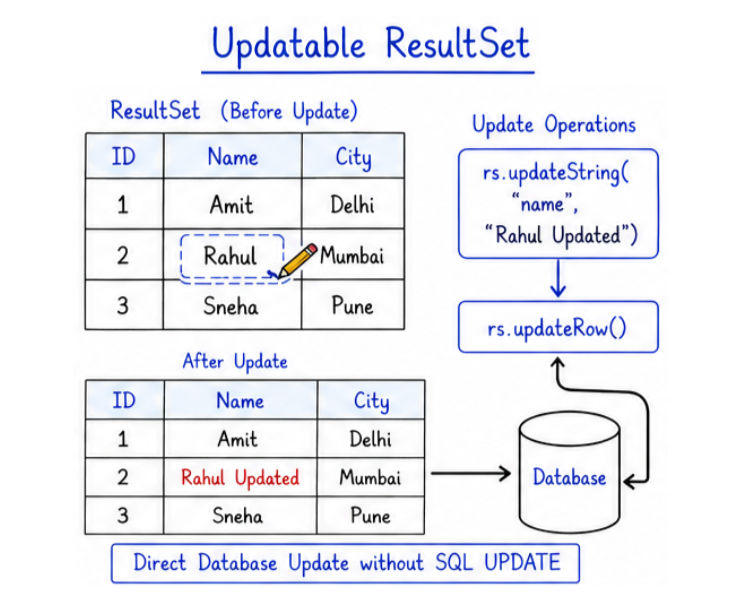
DatabaseMetaData provides information about the database itself.
? It helps you understand database details like version, driver, and supported features programmatically.
What it can provide
Example
DatabaseMetaData dbmd = con.getMetaData();

System.out.println(dbmd.getDatabaseProductName());
System.out.println(dbmd.getDatabaseProductVersion());
System.out.println(dbmd.getDriverName());
Explanation
getMetaData() → Returns DatabaseMetaData objectgetDatabaseProductName() → Returns database name (e.g., MySQL)getDatabaseProductVersion() → Returns version of databasegetDriverName() → Returns JDBC driver details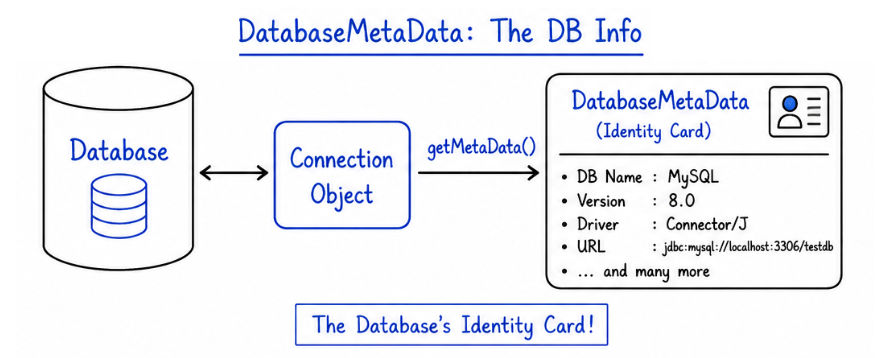
ResultSetMetaData provides information about the columns of the query result.
? It helps you understand the structure of the data returned by a query.
What it can provide
Example
ResultSetMetaData rsmd = rs.getMetaData();

int count = rsmd.getColumnCount();

for (int i = 1; i <= count; i++) {
    System.out.println(rsmd.getColumnName(i));
}
Explanation
getMetaData() → Returns ResultSetMetaData objectgetColumnCount() → Returns total number of columnsgetColumnName(i) → Returns name of each column? You can also get column types:
System.out.println(rsmd.getColumnTypeName(i));
ResultSet and metadata APIs are widely used in real-world applications where dynamic data handling is required.
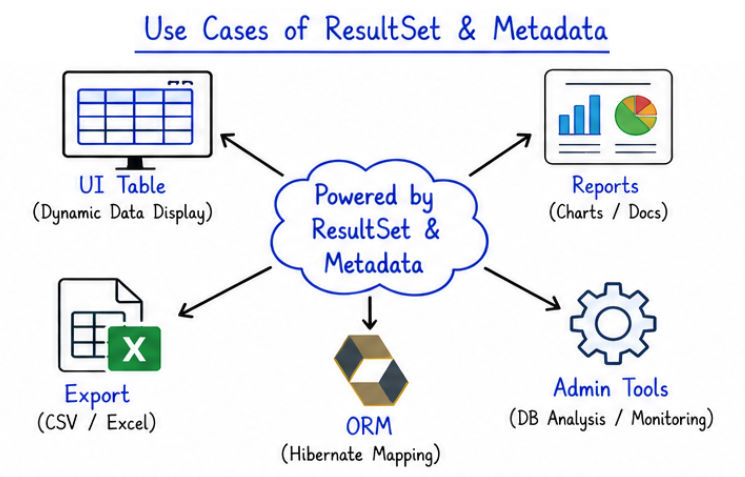
next() before reading data (cursor must move to first row).getInt() for a String column).ResultSet (can cause memory/resource leaks).ResultSet and Metadata APIs are essential for handling and understanding database data in JDBC.
ResultSet helps in reading and processing query results.