
Durgesh Tiwari
Author
Modern Java applications are complex, so organizing code properly is very important. To solve this, Java introduced the Java Module System (JPMS) in Java 9.
A module in Java is a way to group related packages, classes, and resources into a single unit. It helps in building clean, secure, and scalable applications.
Modules make Java development more structured, especially for large enterprise applications, by improving code organization and maintainability.
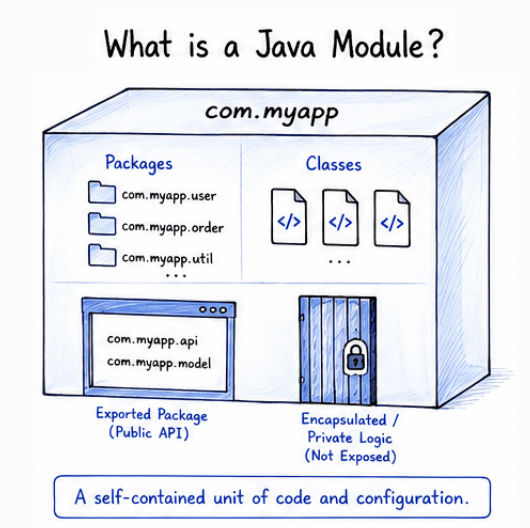
A Java module is a self-contained unit that groups related components together in a structured way.
It typically includes:
Packages
Classes
Resources
A special configuration file called module-info.java
A module clearly defines:
What parts of the code are accessible outside the module
What remains private and hidden inside the module (encapsulation)
Example
module com.myapp {
    exports com.myapp.service;
}
In this example, only the com.myapp.service package is accessible outside the module, while all other packages remain hidden by default.
Creating a custom module is the first step in modular programming. It helps you organize your project into a clean and maintainable structure.
project/
 └── src/
      └── com.app.demo/
           ├── module-info.java
           └── com/app/demo/Main.java
This structure separates module configuration and source code properly.
module com.app.demo {
    exports com.app.demo;
}
Here,
We created a module named com.app.demo
We are allowing other modules to access the com.app.demo package
All other packages (if any) remain hidden by default
package com.app.demo;

public class Main {
    public static void main(String[] args) {
        System.out.println("Custom Java Module Created!");
    }
}In real-world Java applications, we don’t use a single module. Instead, we use multi-module projects to separate different features and keep the code organized.
Each module is responsible for a specific part of the application.
Example Structure:
project/
 ├── user-module/
 │     ├── module-info.java
 │     └── User.java
 │
 ├── payment-module/
 │     ├── module-info.java
 │     └── Payment.java
 │
 └── app-module/
       ├── module-info.java
       └── Main.java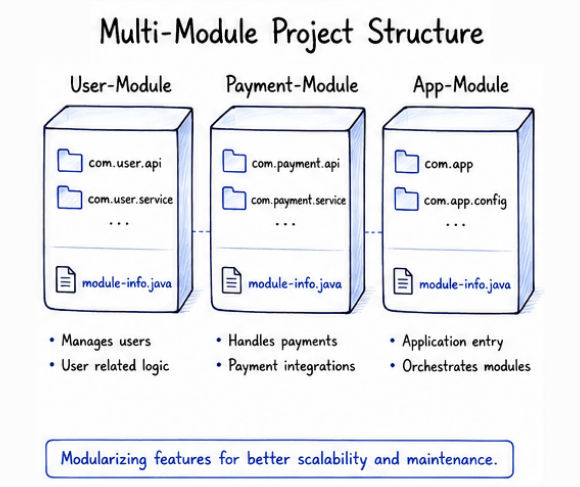
Better project organization and clean code structure
Easier debugging and issue tracking
Independent development of different modules
Faster builds and improved performance
Highly scalable architecture for large applications
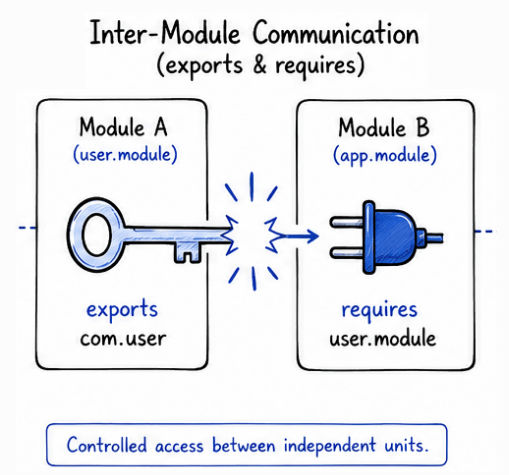
In Java, modules can interact with each other using exports and requires. This helps one module use the code of another module in a controlled way.
User Module
module user.module {
    exports com.user;
}
Payment Module
module payment.module {
    requires user.module;
}
Here,
user.module is sharing its package (com.user) with other modules
payment.module depends on user.module
So, Payment module can use the classes provided by User module
To compile modules, you use --module-source-path.
Command:
javac -d out --module-source-path src $(find src -name "*.java")What this command does
-module-source-path src → tells Java where your module source code is located
d out → sets the output folder for compiled files
find src -name "*.java" → collects all Java files inside the project
After compiling a modular project, you can run it using the module path instead of the normal classpath.
Command to Run
java --module-path out --module app.module/com.app.demo.MainExplanation:
module-path out → tells Java where compiled modules are stored
app.module → name of the module you want to run
com.app.demo.Main → main class inside the module
This is one of the most important concepts in Java modules.
Feature | Classpath (Old System) | Module Path (New System) |
|---|---|---|
Introduction | Used before Java 9 | Introduced in Java 9 |
Structure | Loads all classes together | Loads modules separately |
Encapsulation | No strong encapsulation | Strong encapsulation |
Security | Less secure | More secure |
Performance | Less optimized | More optimized |
Usage | Legacy Java applications | Modern Java applications |
Improves code organization and structure
Provides strong encapsulation and better security
Makes maintenance easier in large projects
Supports scalable and modular architecture
Helps in faster application startup
Ensures clean and controlled dependency management
Java modules are widely used in large-scale applications where code needs to be well-structured and maintainable.
They are commonly used in:
Banking applications
E-commerce systems
Enterprise backend systems
Large microservices-based applications
Example:
Order Module
Payment Module
Customer Module
Inventory Module
Each module works independently but communicates when needed.
Java Modules (JPMS) is a powerful feature that helps developers build modern, secure, and scalable applications in a more structured way.
To work effectively with Java modules, it’s important to understand:
How to create modules
Multi-module project structure
Inter-module communication
Difference between module path and classpath
How to compile and run modular applications
These concepts are not only useful for real-world projects but are also very important for Java interviews and enterprise development.
