
Durgesh Tiwari
Author
The Java Platform Module System (JPMS), introduced in Java 9, is a modular programming feature that helps developers organize applications into independent and reusable modules.
A module is a group of related packages, classes, resources, and configuration files that work together as a single unit.
JPMS improves application structure by providing:
Better dependency management
Strong encapsulation
Improved maintainability
Better scalability for large applications
In simple words: Java Modules help divide large applications into smaller, organized, and manageable parts.
JPMS (Java Platform Module System) is a modular architecture introduced in Java 9 that allows developers to build modular Java applications.
A Java module can contain:
Java packages
Classes and interfaces
Resources
Module configuration file (module-info.java)
Each module explicitly defines:
Which packages are accessible to other modules
Which external modules it depends on
This makes applications more secure, modular, and easier to maintain.
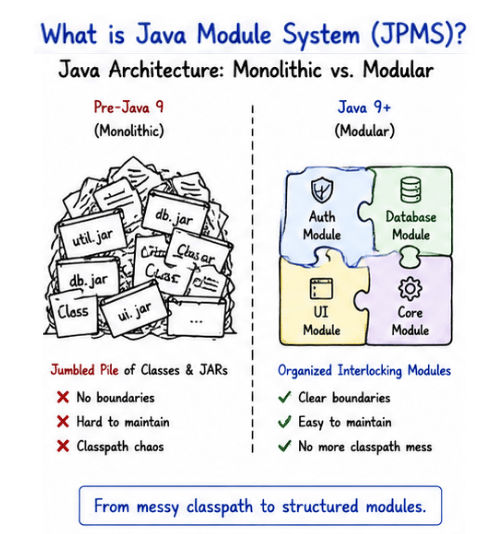
👉 JPMS helps reduce tight coupling between different parts of an application.
Before Java 9, Java applications were mostly built using large JAR files without proper dependency boundaries. As applications became larger, managing code and dependencies became increasingly difficult.
Problems in Non-Modular Applications
Classpath dependency conflicts
Weak encapsulation between packages
Difficult dependency management
Large monolithic application structure
Harder maintenance in enterprise systems
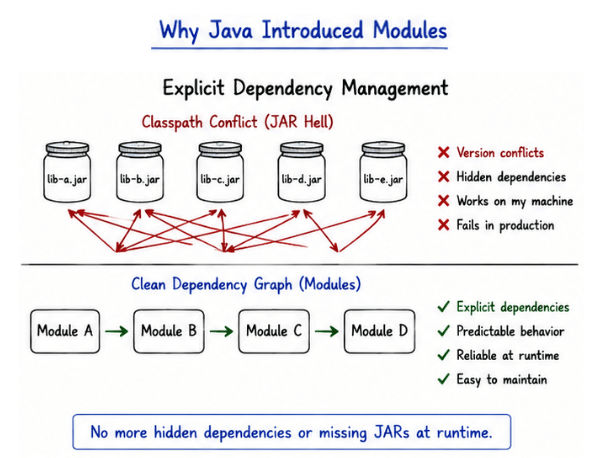
These issues made large-scale Java applications more complex and difficult to manage.
JPMS was introduced to solve these problems by providing a proper modular architecture with clear dependency management and strong encapsulation.
Modular architecture provides several advantages for building modern Java applications, especially large-scale enterprise systems.
Benefits of JPMS
Better dependency management
Strong encapsulation of internal implementation
Improved application maintainability
Easier testing and debugging
Better scalability for large applications
Reduced dependency conflicts
Faster startup and optimized runtime in some cases
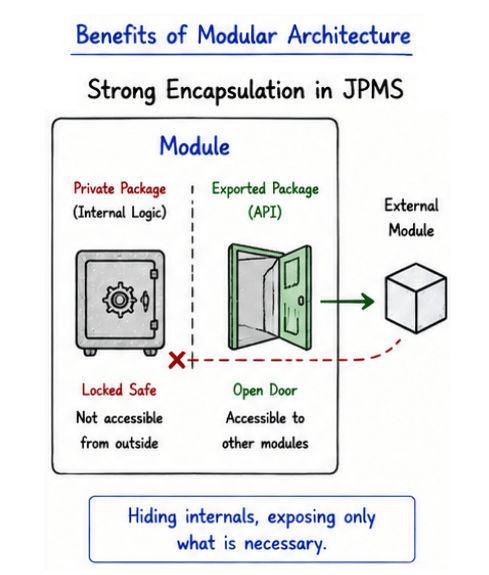
Practical Usage
Modular architecture is commonly used in:
Enterprise applications
Large backend systems
Microservices architecture
Large Java platforms and frameworks
👉 JPMS helps developers build cleaner, more organized, and maintainable Java applications.
Feature | Modular Application | Non-Modular Application |
|---|---|---|
Structure | Divided into independent modules | Large monolithic structure |
Dependency Management | Explicit and controlled | Classpath-based dependency handling |
Encapsulation | Strong encapsulation | Weak encapsulation |
Maintainability | Easier to maintain | Difficult in large projects |
Scalability | Better scalability | Limited scalability |
Code Organization | Well-structured and organized | Often tightly coupled |
Security | Better control over package access | Less controlled access |
In JPMS, every Java module is defined using a special configuration file called:
module-info.javaThis file describes the module’s dependencies and which packages are accessible to other modules.
Example
module com.example.app {

    requires java.sql;

    exports com.example.service;
}
Explanation
module com.example.app → Declares the module name
requires java.sql → Adds dependency on another module
exports com.example.service → Makes the package accessible to other modules
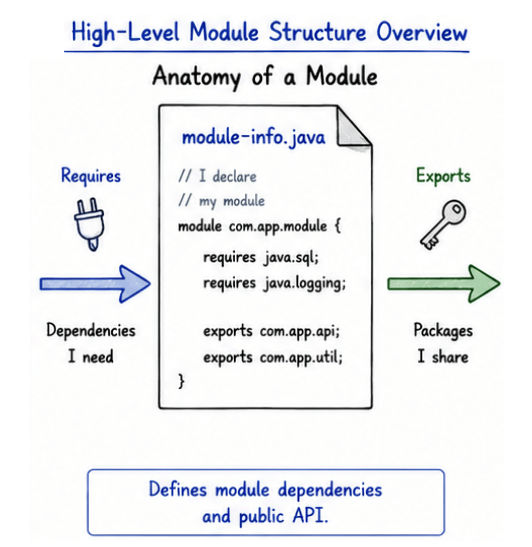
Keyword | Purpose |
|---|---|
| Declares a module |
| Specifies module dependencies |
| Makes packages accessible to other modules |
👉 module-info.java acts as the central configuration file of the Java Module System (JPMS).
project/
 ├── src/
 │    ├── com.example.app/
 │    │      ├── module-info.java
 │    │      └── Main.java
here,
com.example.app/ → Module directory
module-info.java → Module configuration file
Main.java → Application source code
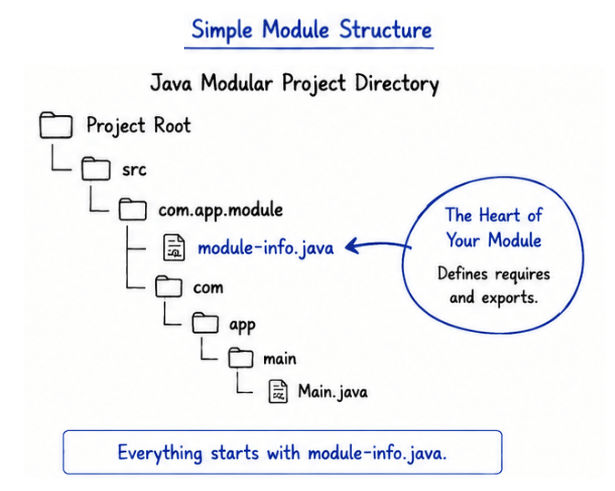
👉 Each module has its own source code and module configuration.
Java Modules (JPMS) are widely used in large and complex applications where maintainability, scalability, and dependency management are important.
Enterprise Java applications
Banking and financial systems
Large backend platforms
Microservices-based systems
Java desktop applications
Secure modular APIs
Large distributed systems
Use Java Modules when:
Building large-scale applications
Managing multiple dependencies
Creating reusable Java libraries
Developing enterprise-level systems
Improving application security and encapsulation
Organizing large codebases into independent modules
👉 Small applications may not always require modular architecture.
Adds additional complexity for beginners
Migrating older Java applications can be difficult
Some legacy libraries may not fully support modules
Small applications may not gain significant benefits from modularization
Managing module dependencies can become complex in large systems
The Java Platform Module System (JPMS), introduced in Java 9, is an important feature that supports modular programming and improves overall application architecture.
It helps developers:
Build modular and scalable applications
Improve dependency management
Increase code maintainability and security
Organize large applications more effectively
Create clean enterprise-level systems
👉 JPMS is an important concept for modern Java backend and enterprise application development
