
Durgesh Tiwari
Author
ResourceBundle in Java is a class used for internationalization (i18n) and localization (l10n). It helps applications display messages and text in different languages without changing the source code.
In simple words:
ResourceBundleallows Java applications to support multiple languages using separate property files.
ResourceBundle is part of the java.util package and is mainly used to store locale-specific resources such as:
Text messages
Labels
Error messages
UI content
Instead of hardcoding messages inside Java code, developers store them in separate files for different languages.
This makes applications easier to maintain and localize.
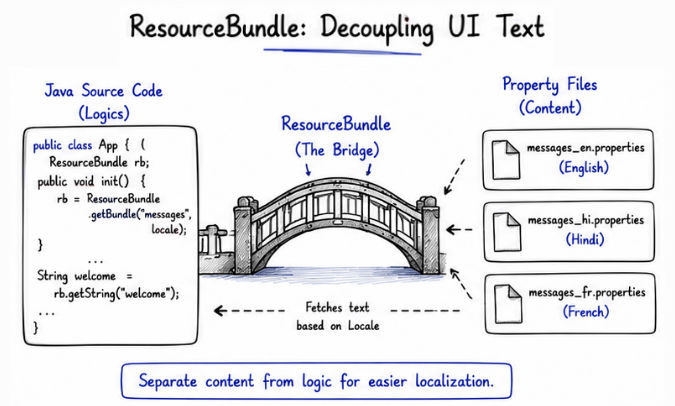
Modern applications are used by users from different countries and languages. ResourceBundle helps applications display language-specific content dynamically.
With ResourceBundle, applications can:
Support multiple languages
Separate content from source code
Simplify localization
Improve maintainability
Provide better user experience
ResourceBundle is widely used in enterprise applications, multilingual websites, banking systems, and global software platforms.
ResourceBundle commonly uses .properties files to store language-specific messages and content.
Each language and region has its own separate property file, which helps applications display messages according to the selected locale.
welcome=Welcome User
login=Login Successfulwelcome=स्वागत है
login=लॉगिन सफलEach property file contains messages and text for a specific language and regional setting.
Java automatically loads the appropriate file based on the selected Locale.
ResourceBundle follows a standard naming convention for property files.
baseName_language_country.propertiesHere:
baseName → Common file name
language → Language code
country → Country code
File Name | Locale |
|---|---|
| English (United States) |
| Hindi (India) |
| French (France) |
messages_en_US.properties
messages_hi_IN.properties
messages_fr_FR.properties
Java automatically loads the correct resource file based on the selected Locale.
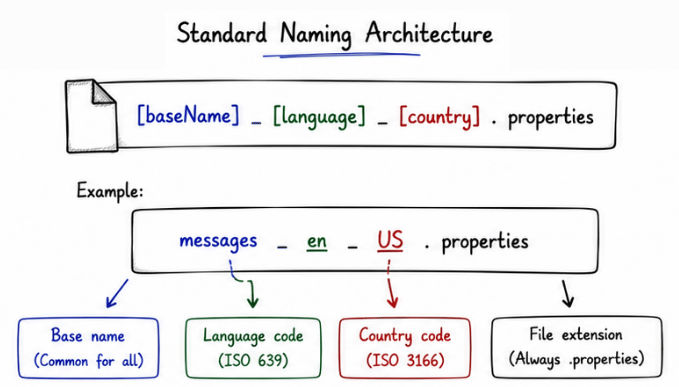
Java uses ResourceBundle to load language-specific messages dynamically based on the selected locale.
This helps applications display content in different languages without changing the source code.
Example
import java.util.Locale;
import java.util.ResourceBundle;

public class Test {

    public static void main(String[] args) {

        Locale locale =
                new Locale("en", "US");

        ResourceBundle rb =
                ResourceBundle.getBundle(
                        "messages",
                        locale);

        System.out.println(
                rb.getString("welcome"));
    }
}
Output
Welcome User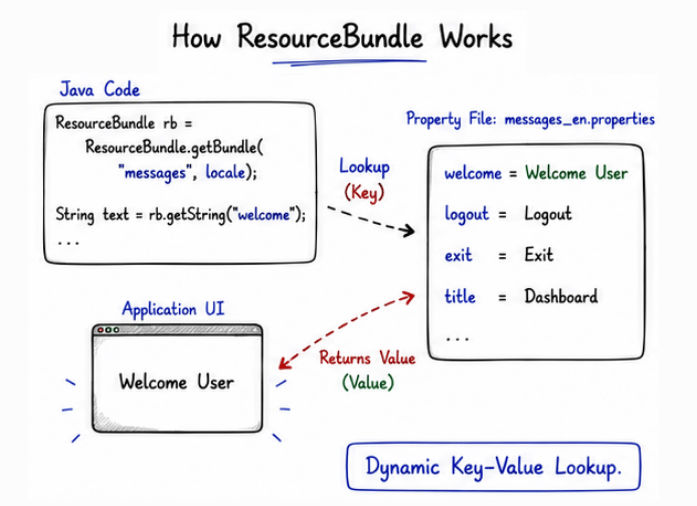
Java automatically loads the messages_en_US.properties file based on the selected locale.
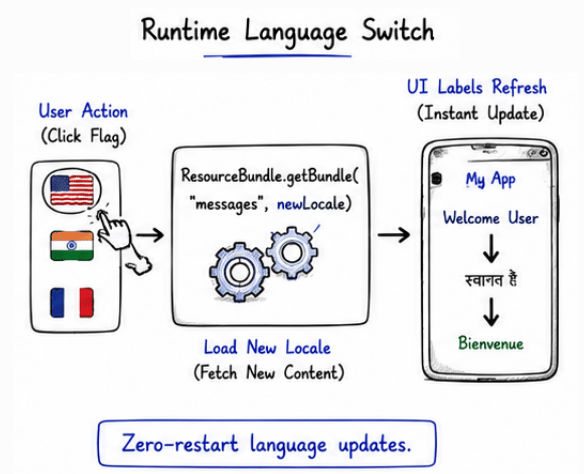
Java applications can dynamically switch languages at runtime using different Locale objects and ResourceBundle files.
This allows applications to display content in the user’s preferred language without restarting the application.
Example
import java.util.Locale;
import java.util.ResourceBundle;

public class Test {

    public static void main(String[] args) {

        Locale hindi =
                new Locale("hi", "IN");

        ResourceBundle rb =
                ResourceBundle.getBundle(
                        "messages",
                        hindi);

        System.out.println(
                rb.getString("welcome"));
    }
}
Output
स्वागत हैJava automatically loads the messages_hi_IN.properties file based on the selected locale.
Applications like Amazon, Netflix, and Facebook dynamically switch languages according to user preferences and regional settings.
If Java cannot find an exact locale-specific property file, it automatically uses a fallback mechanism to locate the most suitable resource file.
This ensures the application continues working even when some locale files are missing.
Example
Suppose the following resource files are available:
messages.properties
messages_en.properties
messages_en_US.properties
If locale is:
Locale("en", "US")Java searches for resource files in the following order:
messages_en_US.properties
        ↓
messages_en.properties
        ↓
messages.properties
First, Java searches for the exact locale match.
If not found, it searches for the language-specific file.
Finally, it loads the default property file.
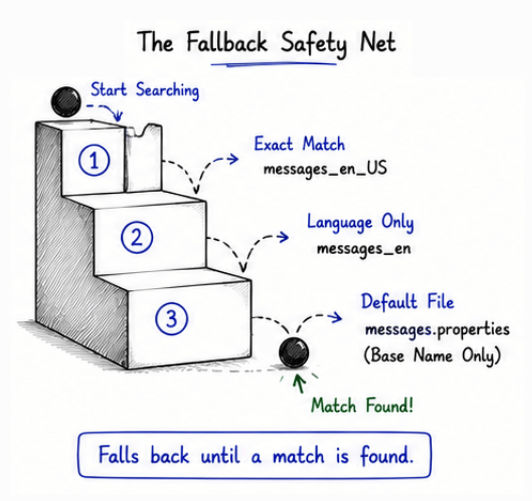
This fallback mechanism improves reliability and prevents application failures caused by missing locale files.
Method | Purpose |
|---|---|
| Loads the resource bundle |
| Returns the value associated with a key |
| Checks whether a specific key exists |
| Returns the locale of the loaded bundle |
These methods help applications load and manage locale-specific messages dynamically
Some common real-world use cases include:
Multi-language Applications → Display content in different languages based on user locale.
Banking Systems → Show region-specific messages, currency formats, and notifications.
E-Commerce Websites → Support multiple languages, currencies, and country-specific content.
Enterprise Software → Manage localized UI messages and error handling for global users.
Spring Boot Applications → Implement internationalization and message localization.
JavaFX Desktop Applications → Build multilingual desktop applications with localized interfaces.
Managing a large number of property files can become difficult in big applications.
Translation and localization maintenance require additional time and effort.
Large multilingual systems can become complex to manage.
Updating messages across multiple languages may increase maintenance overhead.
ResourceBundle in Java is an important feature used for building multilingual and international applications. It allows applications to load locale-specific messages dynamically using separate property files.
Using ResourceBundle, developers can:
Support multiple languages and regions
Separate content from source code
Simplify localization and maintenance
Build scalable international applications
Improve user experience for global users
Understanding ResourceBundle is essential for modern Java internationalization (i18n) and localization (l10n) development.
